CHAPTER 46 OF 54 · MIDI AND HOSTS
INK in a host
INK Synth runs as an AUv3 instrument in any AUv3 host, such as AUM or Drambo. It is the same instrument as the app, with the same three engines, sounds and projects. The host supplies MIDI, tempo and transport, mixes INK's audio and saves INK's state with the song. INK MIDI, a MIDI processor with the same engines and no sound, ships in the same app (INK MIDI).
#Ports
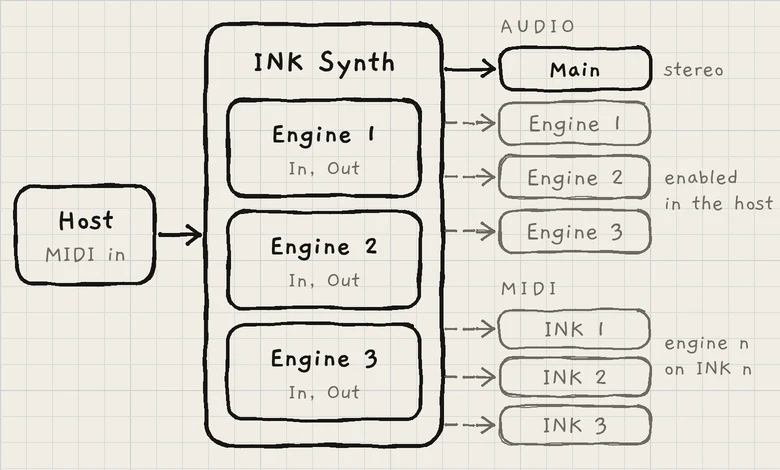 1234
1234- 1MIDI from the host
- 2Main bus
- 3Engine buses
- 4MIDI outputs
| Port | Name in the host | In a new instance |
|---|---|---|
| MIDI in | — | Every engine's In is Off. |
| Audio out, stereo | Main | Enabled. Every engine plays here. |
| Audio out, stereo | Engine 1, Engine 2, Engine 3 | Disabled until the host enables them. |
| MIDI out | INK 1, INK 2, INK 3 | Every engine's Out is Off. |
Each engine plays the MIDI on its own In channel. The engine tab on screen sets only what you edit, not which engine the host's MIDI reaches.
#MIDI in
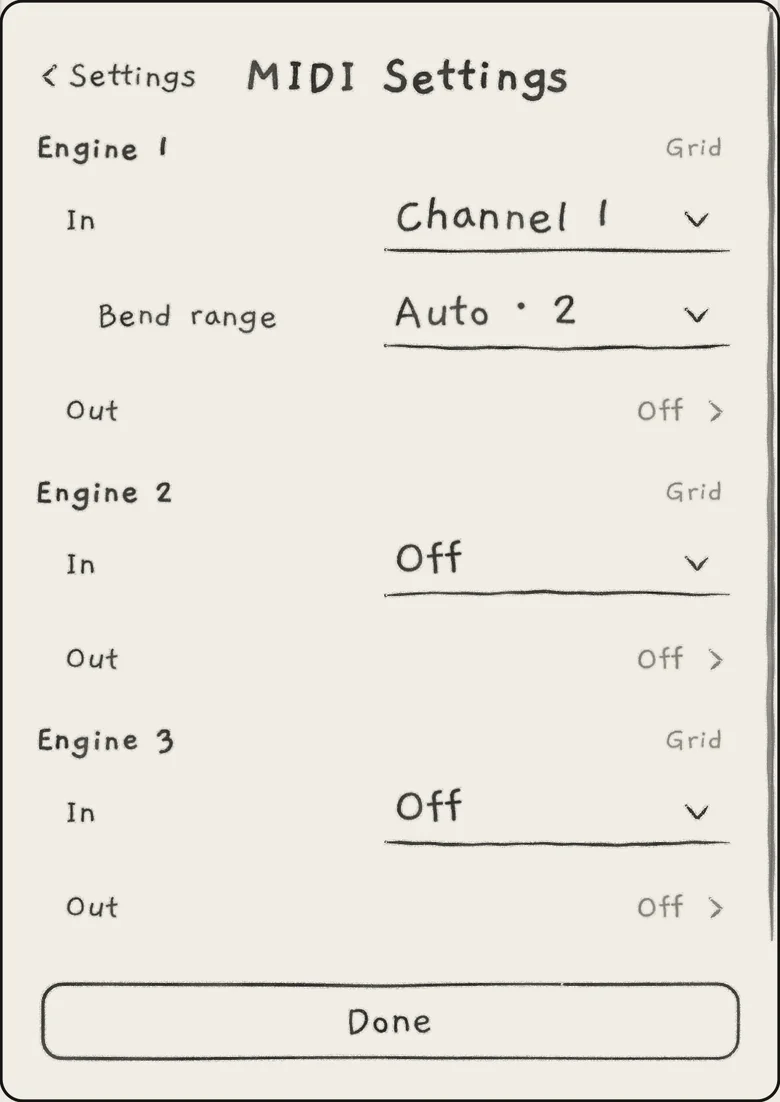
To play an engine from the host, open Settings › MIDI Settings and set the engine's In to a channel, Any channel or an MPE zone. Every engine's In starts Off, in a host as in the app. Bend range appears under In once In is on (MIDI in). The plug-in tells the host it accepts MPE.
 1234
1234- 1Engine 1's In
- 2Bend range, shown while In is on
- 3Out
- 4In Off
The host connects MIDI sources to the plug-in: choose the controller or app that plays INK in the host's MIDI routing. In a plug-in, the MIDI section of Settings has two pages, MIDI Settings and Clock (Settings and background audio).
In and Out are saved with the project and in the host session. Program Change messages from the host are ignored (MIDI implementation).
On iPhone and iPad, while an INK Synth plug-in with an engine's In on is running, the standalone app in the background leaves incoming notes to it, so one controller does not play both. The app's INK in another app setting chooses this: Plug-in only (default) or Both play (MIDI in).
#Audio out
Audio out, the last row of the engine sheet, chooses whether an engine plays through the Main bus or through its own stereo bus.

- Main: the engine plays through the Main bus with the other engines. The default for every engine of a new project.
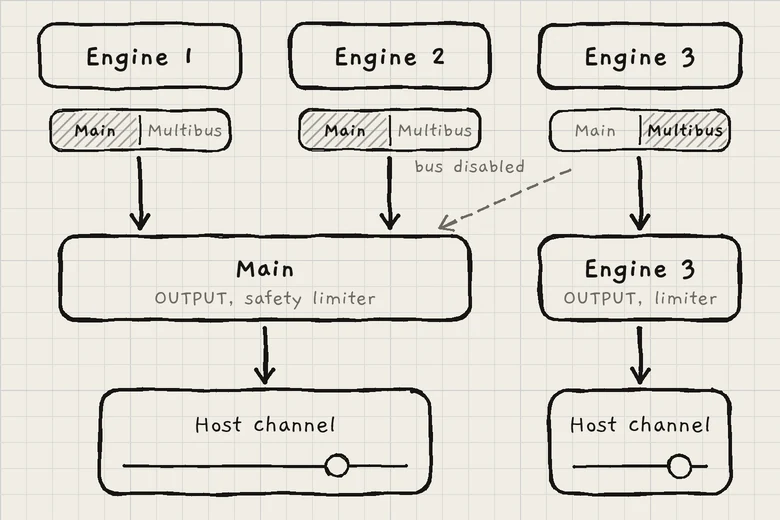
- Multibus: Multibus takes the engine out of Main and sends it to its own bus, Engine 1, Engine 2 or Engine 3. The bus carries the finished engine: after its effects, Multiband, Level, Mute and Solo.
 1234
1234- 1Engine 3 set to Multibus
- 2Main bus
- 3Engine 3 bus
- 4Bus disabled in the host
To give an engine its own host channel, set its Audio out to Multibus, then enable its bus in the host and connect it. Until the host enables the bus, a Multibus engine plays through Main.
OUTPUT sets the gain of Main and of every own bus, and each bus has its own safety limiter. In the standalone app the AUDIO OUT row is greyed and every engine plays through Main.
Audio out is saved with the project and in the host session, so a project set up in the app keeps it for the plug-in.
#Host parameters
Each engine has three automation parameters in the host: its two macros and its level. To automate a sound parameter, give it a cell in the Matrix's A or B column and automate that macro; one macro can move any number of Matrix rows (Macros and dice).
| Parameter | Controls | Host range | Same by MIDI |
|---|---|---|---|
| 1: Macro A, 2: Macro A, 3: Macro A | The engine's Macro A | 0 to 100% | CC 1 |
| 1: Macro B, 2: Macro B, 3: Macro B | The engine's Macro B | 0 to 100% | CC 30 |
| 1: Volume, 2: Volume, 3: Volume | The engine's Level, as linear gain | 0 to 100%; 100% is 0.0 dB | CC 7 |
The host's 0 to 100% spans the macro's whole range: 0% is −100%, 50% is 0%, 100% is +100%. The CCs work on the engine's In channel (MIDI implementation).
Moves made in INK reach the host, so it can record them as automation: a drag on A or B on the Sound tab, on the XY pad of the All page, or on an engine's Level.
#MIDI out
Each engine sends its MIDI to the host on the output of its own number: Engine 1 on INK 1, Engine 2 on INK 2, Engine 3 on INK 3. Connect an output to the instrument it should play. A MIDI route may also name any of the three outputs. Every engine's Out starts Off; set it in Settings › MIDI Settings › Out (MIDI out).
#Tempo and transport
- With Sync on, an engine follows the host's tempo. Its Tempo knob shows the host's tempo followed by host and is greyed (Arp rhythm and tempo).
- The host's start starts every engine, each synced engine on the step the song position implies. The host's stop stops every engine (Clock and sync).
- On the Seq tab, a label beside Play reads DAW plays or DAW stopped, the state of the host's transport.
- On the Clock page, Receive is Off or Any: with Any, INK follows a MIDI clock the host passes to it. While the host gives a tempo, the host's tempo wins.
- The host sends the clock: to clock other gear, use the host's own MIDI clock output.
#Latency
INK reports its latency to the host, which compensates for it. The latency is about 2.5 ms, the same at every Multiband setting. MIDI out leaves with the same delay, so it lines up with the audio after compensation.
#Differences from the app
- Record samples and import audio in the app. Kits made there play in the plug-in.
- On iPhone and iPad, Import and Export of sounds, projects and wavetables work in the plug-in, with the system's Files picker and share sheet.
- What's new opens from Settings › ABOUT INK; in a plug-in it never opens by itself.
- The host session restores INK's state when the song opens; the app's checkpoint applies only to the standalone app (Projects).
- Notices show as a small card inside INK's window. Tap Close to close one.
#What the host session keeps
| Where | What | Shared with the app |
|---|---|---|
| Host session | INK's whole state as it plays, a copy of every pattern, and the project it is on. Each instance's own keyboard per engine (Grid, Keys, Chords or Strings), bend ranges, member channels and Keys play. | No. A new instance starts from the app's keyboards and MIDI settings; after that each changes on its own. |
| Project | Sounds, keys, mixer, Audio out, MIDI In and Out, MIDI routes and the pattern banks. | Yes, the same Projects list. |
| App | The Library, kits, user wavetables, the colour theme, Touch and Slide control. | Yes, one store for the app and every instance. |
The full table is in Projects.
- Load INK Synth on an instrument channel and send it MIDI. In Settings › MIDI Settings, set Engine 1's In to the host's channel, for example Channel 1.
- On the Sound tab, set Cutoff to about the middle of its range. Init has the filter fully open.
- On the Matrix tab, set the A cell of the Cutoff row to +50.
- In the host, draw automation for 1: Macro A and hold a note: Cutoff follows the lane.