CHAPTER 27 OF 54 · MAKE IT MOVE
Envelope 2 and Random
Envelope 2 is INK's modulation envelope: an ADSR that makes no sound of its own and moves whatever you route it to from the Env column of the Matrix. Route it to Cutoff for a filter envelope, or to an oscillator row for a timbre envelope.
It is the ENVELOPE 2 section of the Sound tab and the ENV 2 group of the Matrix. Every voice runs its own Envelope 2, so the notes of a chord each follow their own timeline.
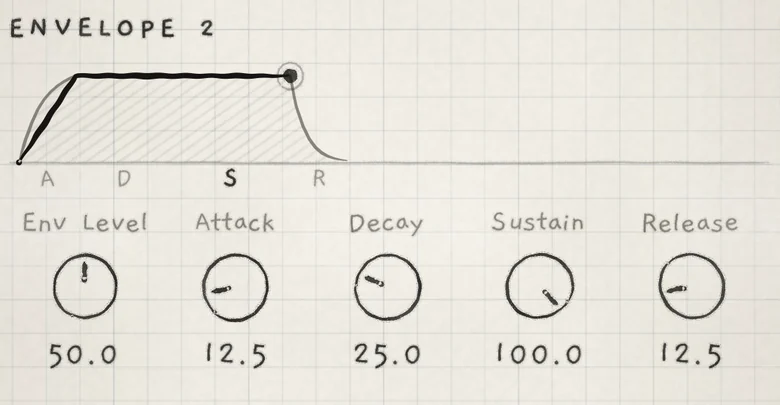 12
12- 1Envelope drawing
- 2Level of the last note played
#Controls
- Env LevelOutput level; scales every Env cell of the sound. 0 to 100.0; at 50.0 the peak is full output. Init: 50.0. Matrix: Level. CC 19.
- AttackTime to rise from zero to the peak. 0 to 100.0: 2 ms to 5.7 s. Init: 12.5 (0.09 s). CC 20.
- DecayTime to fall from the peak to the Sustain level. 0 to 100.0: 2 ms to 16.3 s. Init: 25.0 (1.0 s). CC 21.
- SustainLevel held while the note is down, as a share of the peak. 0 to 100.0, linear. Init: 100.0. CC 22.
- ReleaseTime to fall to zero after the note ends. 0 to 100.0: 2 ms to 16.3 s. Init: 12.5 (0.26 s). CC 23.
Every stage is an exponential curve. Attack times run to the peak; Decay and Release times run to −60 dB, the same as the amp envelope's (Amp envelope).
| Value | Attack | Decay or Release |
|---|---|---|
| 0.0 | 2 ms | 2 ms |
| 12.5 | 0.09 s | 0.26 s |
| 25.0 | 0.35 s | 1.0 s |
| 50.0 | 1.4 s | 4.1 s |
| 75.0 | 3.2 s | 9.2 s |
| 100.0 | 5.7 s | 16.3 s |
The controls are saved with the sound. Each is a row of the ENV 2 group in the Matrix (Env Level is the row Level), read for each voice while it plays: Prs → Decay gives harder-played notes a longer envelope.
On an INK MIDI engine, Envelope 2 reaches the PARAM knobs through the Env column (INK MIDI).
#Differences from the amp envelope
- Same shape at any pressure. Envelope 2 runs the same shape however hard you play. To make it follow pressure, put Prs cells on its rows.
- Restart from zero. Each new note on a voice starts Attack from zero. The amp envelope starts from its current level scaled by its Sustain.
- Linear Sustain. Sustain 50.0 holds at 50% of the peak. The amp envelope squares its Sustain.
- Retriggers. A press, each arp step and each strummed note at its turn restart it (Strum). A slide along a Grid column does not, nor a slide on Keys with Slide control on In tune or Free; on Piano each key crossed is a new note (Set up your playing). With Hold on, a latched note stays at the Sustain level.
The drawing above the controls shows Envelope 2's shape and the level of the voice played last, read as in the amp envelope (The envelope drawing). It always draws the shape at full height, whatever Env Level is.
#Env Level
Env Level scales the envelope's output, and with it every Env cell. At 50.0 the peak is full output: a cell of +60 moves its destination by up to 60% of its range. At 25.0 the same cell moves it by up to 30%.
Above 50.0 the output still stops at full, so the top of the shape is cut flat. At 100.0 the output is full while the shape is above half its peak, and any Sustain of 50.0 or higher holds at full.
Rows that the whole engine shares, such as the effects and the LFOs, follow the highest Envelope 2 output among the voices.
If an Env cell has no audible effect, see Modulation does nothing.
#Filter envelope
Env → Cutoff is the filter envelope. Each voice's filter follows its own Envelope 2.
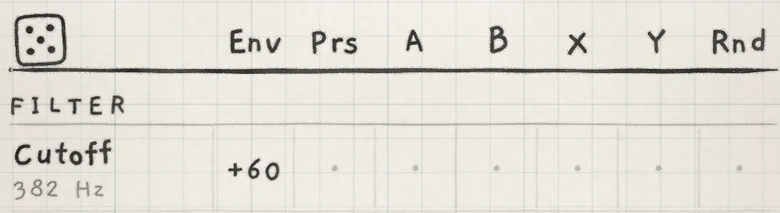 12
12- 1Base value
- 2Env cell
Envelope 2's output is never negative. A positive cell opens the filter above the Cutoff base value; a negative cell closes it below. Set the base value low enough for a positive cell to have room.
With Sustain at 0.0 this gives a filter pluck. Raise Decay to lengthen the pluck; raise Sustain to keep it bright while held.
#Timbre envelope
The first OSC row in the Matrix is the generator's tone control, named after it (Oscillators): Detune on Supersaw, Width on Pulse, Position on Wavetable, Wave on Phase. Env → Position with a long Attack sweeps the wavetable position over the Attack.
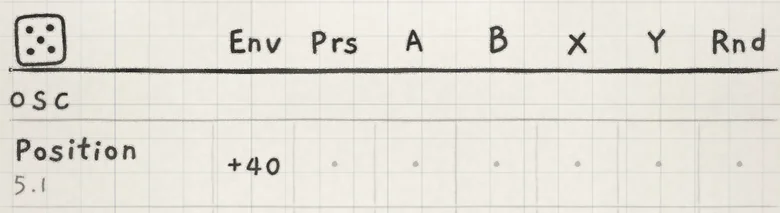 12
12- 1Base value
- 2Env cell
On a Granular sampler sound the first OSC row reads Shape and leaves the grains unchanged. To shape the grains over a note, route Env to a SAMPLER row such as Grain size or Scrub (Granular basics).
#Random
Rnd is the last column of the Matrix: a random value drawn when a note starts and held for the note. Every note start draws again: a press, an arp step, a strummed note at its turn.
- Per voice. Each voice draws its own value, so the notes of a chord differ from each other.
- Per destination. Each destination draws its own value. Rnd → Cutoff and Rnd → Decay on the same note move independently.
- Engine-wide rows (effects, LFOs) share one draw per destination for the engine, renewed whenever any note in the engine starts.
The sign of the cell sets how the values spread (Modulation matrix). Rnd on the first OSC row gives each note a different timbre; on Pitch or Microtone, a different tuning.
- Load Init. On the Sound tab lower Cutoff to about 400 Hz.
- In ENVELOPE 2 set Attack to 0.0, Decay to 30.0 and Sustain to 0.0.
- On the Matrix tab, in FILTER, set the Env cell of Cutoff to +60.
- Play and hold notes. Each opens the filter and closes it to 400 Hz over about 1.5 s.