CHAPTER 45 OF 54 · MIDI AND HOSTS
MIDI out
Each engine sends what it plays as MIDI notes with velocity, pressure and pitch bend, on a plain channel or as MPE, to up to 4 destinations at once. Out is Off on every engine in a new project.
INK Synth sends notes and their expression. To send parameter moves as CCs, use INK MIDI.
#What INK sends
INK sends the notes it plays, after the arp, Strum, patterns and the key have done their work.
| Source | What goes out |
|---|---|
| Grid, Keys, Chords, Strings | Every played note, and notes latched with Hold. |
| Arp | The arp's notes only, never the notes held under it, including notes held on a MIDI controller. |
| Strum | Each note at its turn. |
| Patterns | One note per strike. Rests and steps Probability skips send nothing; a tied step stays one note. |
| Lean, Fill, Follow | Their notes, as the engine plays them. |
| MIDI in | Not passed through. What INK makes from it goes out: a Chords engine's chords, the arp's and Strum's notes. |
INK never hears its own output.
The note sent is the note INK shows and plays, with the key, Root, Octave and Follow applied. The sound's Pitch, detune, sample tuning and Glide stay inside INK.
Velocity and pressure share one scale: 127 is INK's hardest tap at the default Touch settings; a normal press is about 112. Velocity is the strike. The note's pressure afterwards goes out as pressure, and on an MPE zone also as Slide (CC 74). A generated note's velocity is its pressure at the strike: a pattern step's recorded pressure, or the held finger's for the arp.
#Out
Each engine's Out sets the format it sends in. A destination with its Out and bend range is a MIDI route.
- OffSends nothing. The default in a new project.
- Channel 1toChannel 16Every note on one channel.
- MPE lowerManager channel 1, up to 7 member channels from 2 upwards.
- MPE upperManager channel 16, up to 7 member channels from 15 downwards.
Two routes cannot share a channel at one destination. A zone cannot be chosen where its manager channel is taken, or where no member channel is left.
Out and the routes are saved with the project; in a host, the host session keeps them. Changing a route ends its notes at once on the old channels, and the route plays from the next strike. Other routes and INK's own sound play on.
#iPhone and iPad: SEND INK TO
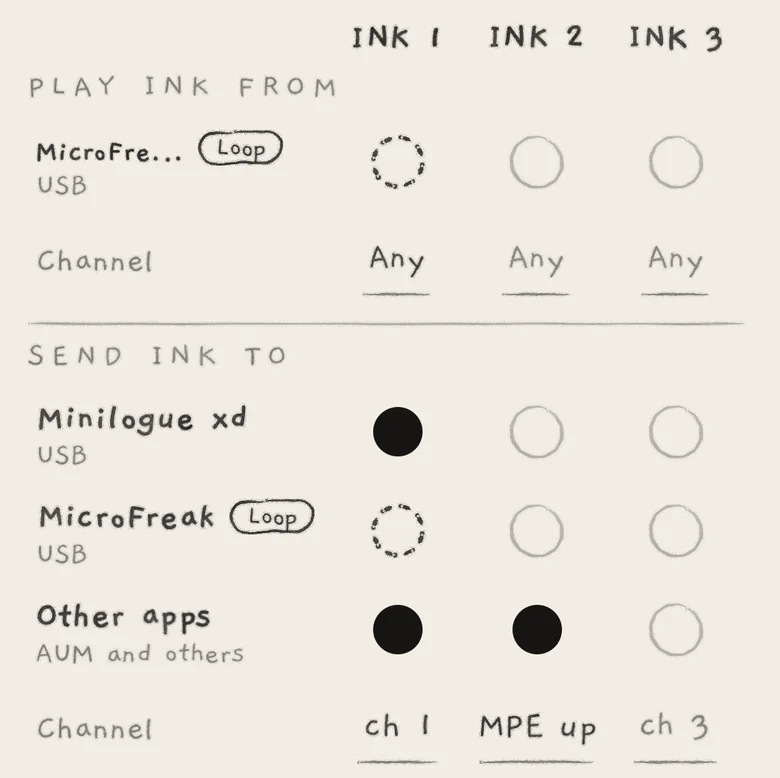
On iPhone and iPad, Out is the lower half of Settings › MIDI, under the devices INK plays from (MIDI in).
 123456
- 1SEND INK TO
- 2Device and connection
- 3Other apps
- 4Lit dot
- 5Channel row
- 6Loop
SEND INK TO lists every device INK can send to, with its connection under the name. The last row, Other apps ("AUM and others"), is INK's own virtual MIDI source, named INK, which other apps connect to.
Each row has a dot under each engine's column, INK 1 to INK 3. A lit dot is a route from that engine to that destination; tap the dot to switch it. Switching it off ends the engine's notes there. A device a route names stays listed as Not connected while it is away, and its routes play again when it returns.
The Channel row under SEND INK TO shows each engine's Out, one for all its destinations: ch 1 to ch 16, MPE (lower zone) or MPE up (upper zone). While no dot in the column is lit, it is in pencil and shows the channel the engine will use: its own number until you choose another.
Tap the Channel to choose MPE lower, MPE upper or Channel 1 to Channel 16. While Out is a zone, the list also holds Bend range: 2, 12, 24 or 48 st, 48 by default. A channel or zone another engine sends on is in pencil and cannot be chosen.
A device an engine both plays from and sends to shows Loop, with dashed dots.
#On a Mac and in plug-ins: routes
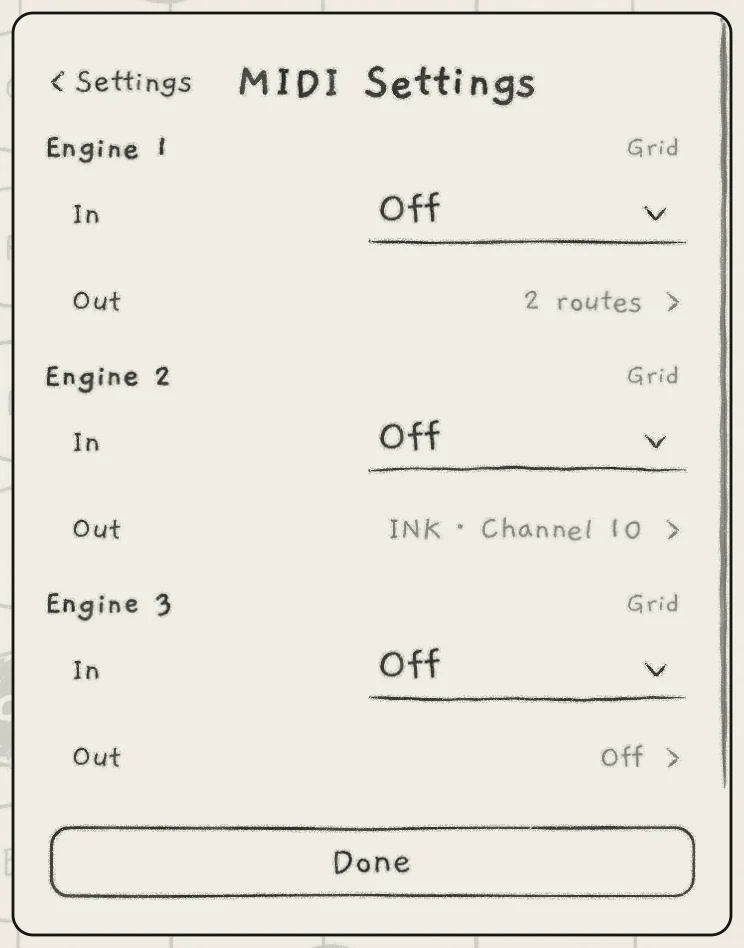
The Mac app and the plug-ins have one Out row per engine in Settings › MIDI Settings.
 123
123- 1Two routes
- 2Destination · Out
- 3Off
Out reads Off, the single route's destination and Out ("INK · Channel 10", "INK · MPE lower · 7"), or the number of routes ("2 routes"). Tap it to open the engine's routes, titled Engine 1 (2, 3).
 1234
1234- 1Destination
- 2Out
- 3Bend range out
- 4Add a route
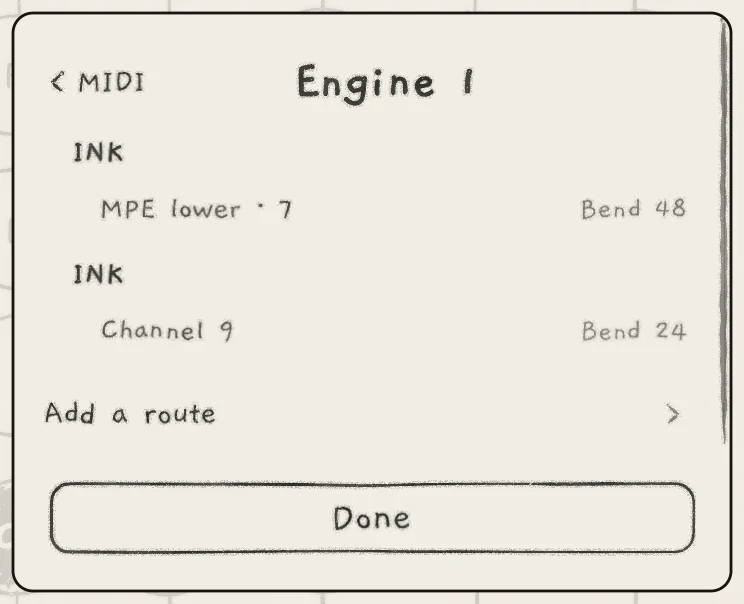
Each route shows its destination in bold with its connection at the right, then its Out and bend range ("Bend 48"). Add a route adds one while the engine has fewer than 4. All routes play at once from the same playing, each in its own format.
| Where | Destinations |
|---|---|
| Mac app | INK, the app's virtual MIDI source. |
| Plug-in (AUv3) | INK's three MIDI outputs, INK 1, INK 2 and INK 3, connected by the host. Engine n starts on INK n; a route may name any of them. |
A route that clashes when it arrives, from a loaded project for example, is struck through with the reason ("Channel 1 on INK is engine 2's"). It sends nothing until you change it; the route that was there first plays on.
#Route page
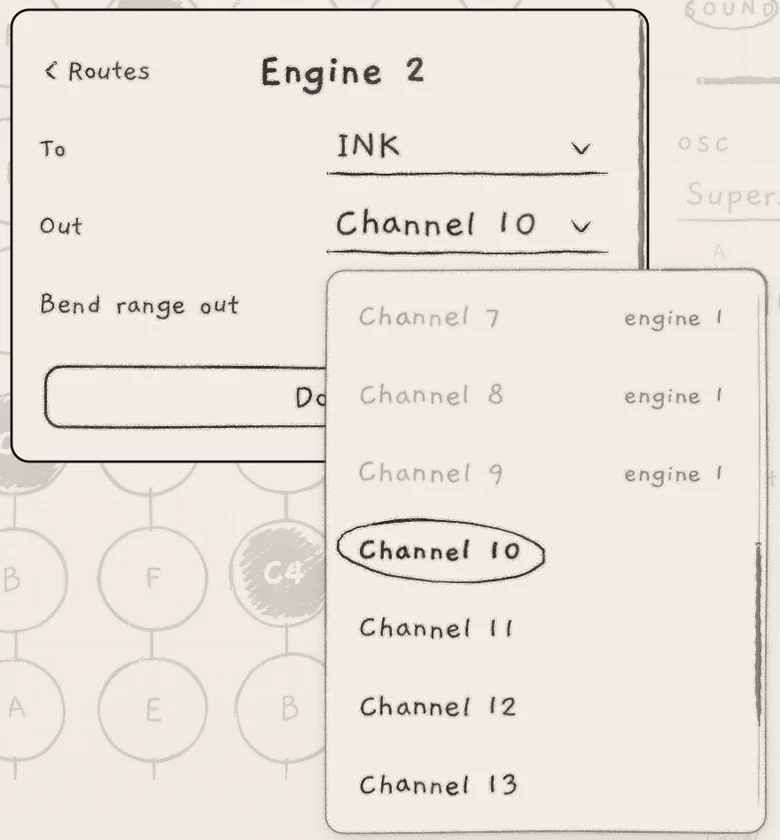
Tap a route to open its page.
 12345
12345- 1To
- 2Out
- 3Bend range out
- 4Used by another route
- 5Current Out
- ToThe destination, with its connection at the right.
- OutThe format sent: Off, MPE lower · n, MPE upper · n (channels at the right: "1–8", "16–9"), Channel 1 to Channel 16. Init: Off.
- Bend range outPitch bend range, sent to the receiver as RPN 0. 2, 12, 24 or 48 st. Init: 24 on a channel, 48 on an MPE zone. Hidden while Out is Off.
- DeleteRemoves the route. Not shown on an engine's only route.
An Out that another route at the destination uses is in pencil, marked with its engine ("engine 1"). Choosing a destination where the route's Out is taken sets Out to Off. A plain route and an MPE route may share a destination on channels outside the zone.
#MPE out
MPE out gives every note its own member channel, so each note bends and changes pressure on its own.
- Size: at most 7 member channels, lower 2 to 8, upper 15 to 9. The zone stops at the first channel another route at the destination sends on.
- Setup: INK configures the receiver. It sends the MPE Configuration Message and the bend range when the route starts, after a panic and after audio restarts. A zone that goes away is switched off (MIDI implementation).
- Channels: a new note takes the member channel that has been silent longest, so release tails ring on untouched. A released note's channel keeps its last values until another note takes it.
- Expression: each note's bend, Slide (CC 74) and pressure go out before its Note On, then follow that note alone. Arp, Strum and pattern notes carry their own too. A note bends up to Bend range out; past it, it is struck again at its new note.
- More notes than channels: the new note shares the channel of the oldest sounding note. No note is cut.
#Plain channel
One channel carries every note, so one pitch bend moves them all.
- While one note sounds, its pitch moves go out as pitch bend, up to Bend range out; past it, the note is struck again.
- While two or more sound, generated notes included, the bend stays centred. A note whose pitch reaches another note is struck again there, so every note stays within half a semitone of what INK plays.
- Channel pressure is the highest pressure of the sounding notes.
- Before the first bend, INK sends Bend range out as RPN 0, so a receiver that reads it bends by the same amount.
- When a route's notes are ended for it (a route change, a panic), its bend returns to centre and its pressure to 0.
#Notes and the keyboards
Grid. A finger slid onto another pad ends its note and strikes the new pad's note with the same velocity. Pitch moves within a pad bend.
Keys and Chords. The MIDI note is the key under the finger. Sliding onto another key strikes again; only movement inside a key bends. A chord change that moves a sounding voice to another note (a slide onto another tile, voice leading) ends that note and strikes the new one with the same velocity.
Strings. A pluck goes out at once, its velocity set by its strike: about 56 for the slowest strum, 127 for a flick. Its brightness goes out as CC 74 immediately before the Note On; on an MPE zone it is the note's Slide. Nothing streams while the string rings, so the receiver's own envelope shapes the decay. The note ends where INK's string is heard to end, so a harder pluck sends a longer note. A string bends only when its note moves (Degree, Stride, Follow); a new pluck is a new note.
Generated notes. Each strike sends a note, the same pitch twice included. A sounding note can move to another note: a pattern slide, Follow, a key change, the arp's octave. The new note then starts before the old one ends, so a mono receiver plays legato. Smaller moves, such as vibrato, start no note.
#Timing
- On iPhone and iPad, a tapped note goes out once INK has read the strength of the tap, so its velocity is the peak of the press. A Mac sends at once. Strings, the arp, Strum, patterns and held fingers never wait.
- A note struck again sounds on through the new strike's wait and ends immediately before the new note.
- All MIDI out, the clock included, is delayed by INK's own latency so it lines up with INK's audio; a host compensates it. The standalone app also allows for the audio device's output latency, so an external synth sounds together with INK.
- Notes, note-offs and MPE setups go out at once. Bend, pressure and Slide are thinned to what a 5-pin DIN cable carries, so a fast move reaches the receiver in fewer, larger steps.
#Mute, Stop and endings
- Mute silences INK's sound only; MIDI out plays on (Mixer and All page).
- A transport Stop, INK's or the host's, ends generated notes. Played notes sound until released.
- Out set to Off, a route change or a dot switched off ends the engine's notes on that route.
- All Sound Off (CC 120) on the engine's In channel, a change of keyboard and a host bypass end the engine's notes out.
#In the background
In the iPhone and iPad app, a note out still on, or one sent in the last 5 s, keeps the hidden app awake. A muted engine can drive another synth from the background. Before INK sleeps, every note out ends (Settings and background audio). In a host, the host decides.
#Clock out
The standalone app sends MIDI clock and transport with Send on the Clock page (Clock and sync).