CHAPTER 43 OF 54 · LIBRARY AND PROJECTS
Projects
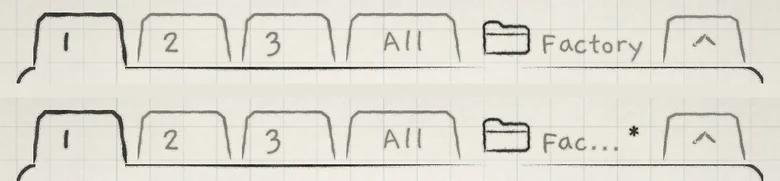
A project stores the whole instrument as it plays: the three engines, their keys and mixer settings, their MIDI settings and four banks of patterns of its own. The project's name sits after All in the tab row; tap it to open the Projects list.
 12
12- 1Folder and project name
- 2Asterisk: changed since the last Save
#What lives where
Sounds, patterns and projects each have their own Save. Settings that belong to the app are written at once, and a host keeps INK's state in its song.
| Kind | What it stores | Saved by |
|---|---|---|
| Sound | One engine's generator, Sound tab sections, Matrix amounts, macro positions, Hold on or off, and its arp or strum settings. | The sound's Save (Save and share sounds) |
| Pattern | Up to 64 steps of notes; the pattern's sequencer settings (Tempo, Sync, Division, the loop and the rest); the key playing when it was saved (Root, Scale, Stride and Degree), when it has notes; the chord rails and Spice; Lean and Fill when latched; the saved library sound on its engine. | The pattern's Save (What a pattern stores) |
| Project | Per engine: the sound as it plays, unsaved edits and asterisk included; Root, Scale, Lock and Follow; Level, Mute and Solo; Audio out (Main or Multibus); the keyboard's octave (the Octave arrows); Hold and its notes; the arp settings as they play; the pattern it plays. For the whole project: OUTPUT, Quantize, each engine's MIDI In and Out and the MIDI routes, four pattern banks with their unsaved pattern edits, the tab on screen and the focused engine. | The project's Save |
| App settings | The colour theme, Touch and Slide control, each engine's keyboard (Grid, Keys, Chords or Strings), bend ranges, member channels, Keys play, clock and device settings, Audition with, and the last name used in an Export card's By field. | Written at once (Settings and background audio) |
| Host session | INK's whole state as it plays, a copy of every pattern, and the project it is on. An AUv3 instance also keeps its own keyboards, bend ranges, member channels and Keys play, starting from the app's. | The host's song (INK in a host) |
The asterisk compares the project with its last Save. Pattern edits, the choice of pattern, the tab on screen and the focused engine never mark it changed: patterns have their own Save.
A project that opens with Hold on plays its held notes again. The standalone app also keeps a checkpoint: it reopens on the same project with its unsaved changes and held notes. When iOS starts INK in the background, INK stays silent until you first bring it to the front (Settings and background audio). In a host, the host session restores the state instead.
#The Projects list
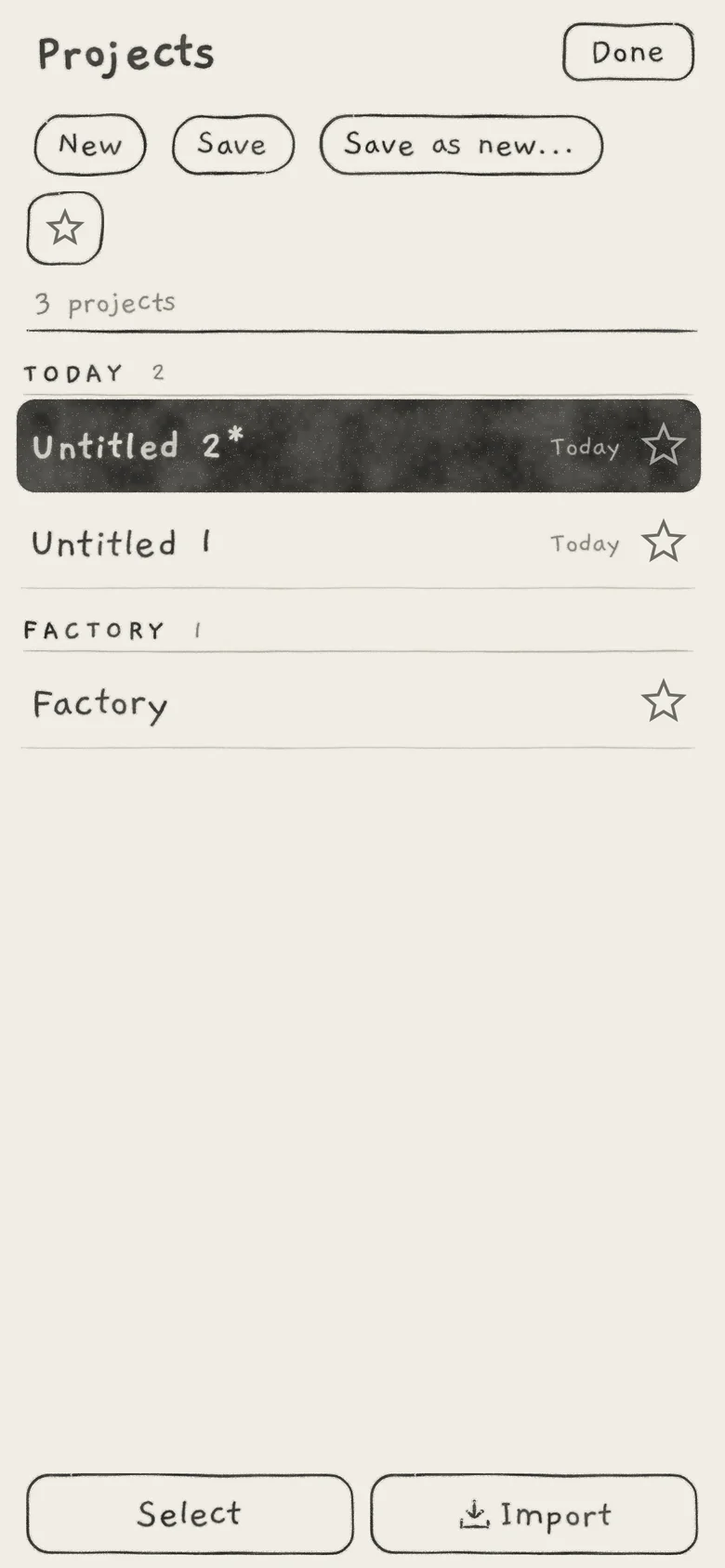
The list holds every project on the device, yours, imported ones and Factory, and is where you open, save, export and delete them.
 12345678
- 1Star filter
- 2New, Save, Save as new...
- 3Count
- 4Day group
- 5Open project, changed
- 6Saved day
- 7FACTORY group, always last
- 8Select and Import
- NewCreates an empty project and opens it.
- Save,Save as new...Save the open project, or a copy of it under a new name.
- SelectTicks projects to star, export or delete them.
- ImportBrings in the projects of an .inkproject file.
- DoneCloses the list.
The star filter (star icon) under New shows only starred projects. The status line counts the projects ("3 projects", or "1 of 3 projects" with the filter on); Clear turns the filter off. With no match the list reads "No projects".
Rows run newest saved first, grouped TODAY, YESTERDAY, THIS WEEK, THIS MONTH and EARLIER; Factory is last, under FACTORY. A row shows the name, the day it was saved (none on Factory) and a star; tap the star to star or unstar the project. A project that came in a file shows "by" and its author under the name. The open project is highlighted, with an asterisk while it has unsaved changes.
Tap another project to open it. If the open project has unsaved changes or unsaved patterns, the leave card comes first. Opening a project, or New, starts a fresh undo history (Undo and redo).
#New
New creates a project named Untitled 1, Untitled 2 and so on, and opens it. It starts with Init on all three engines, all in C major with no locks and no Follow, and empty banks with Engines 1 to 3 on A1, A2 and A3. Quantize is at 0%, and every engine's MIDI In and Out are Off (MIDI in, MIDI out). A new project is saved as it is created.
#Save, Save as new, Rename
Save on the list opens the project's Save card.
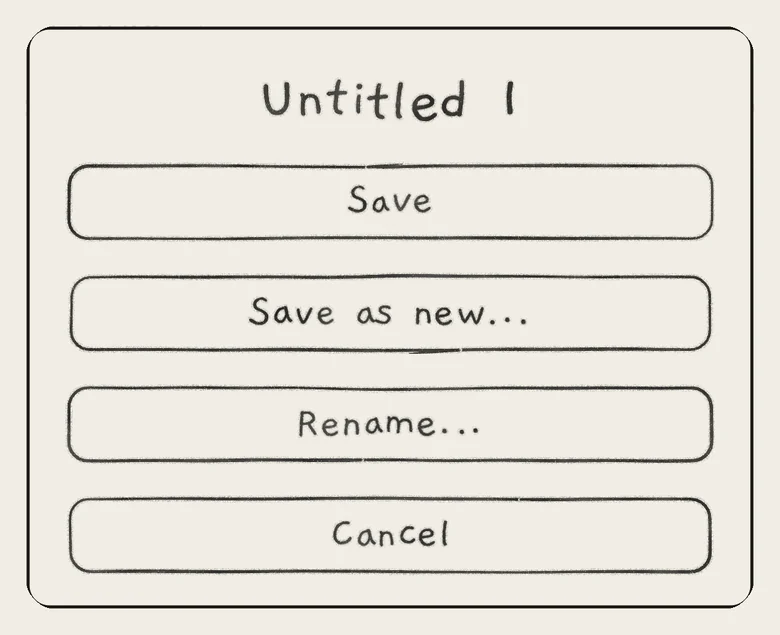
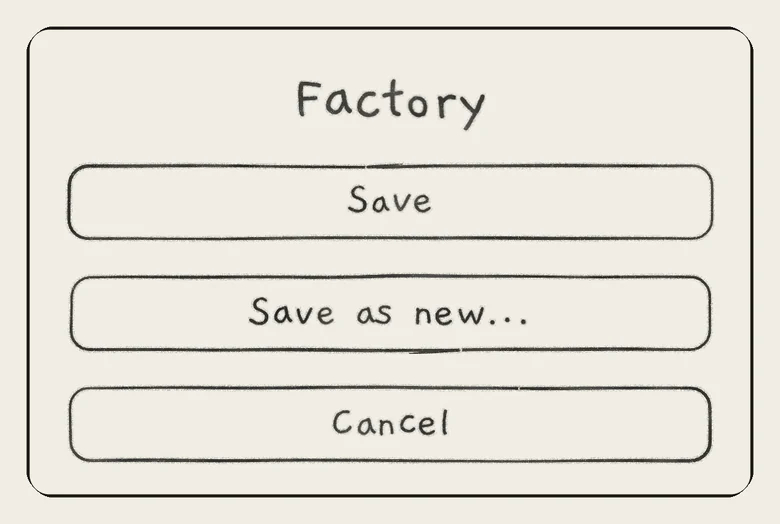
- SaveReplaces the project's last Save with the state as it plays. Unsaved patterns stay unsaved.
- Save as new...Asks for a name ("Name the new project", default "<name> 2"; Save or Back). Copies the project, its banks and its unsaved pattern edits under the new name, and opens the copy. The original keeps its last Save.
- Rename...Asks for a new name (Rename or Back). Not on Factory. The project keeps its saved day and its place in the list.
- CancelCloses the card.
Save as new... at the top of the list goes straight to the name. The sound card's Save saves a sound, never the project.
A failed write shows "Not saved" ("The project could not be saved. It still plays as it is.") or "Not renamed" ("The project keeps its name."), with the reason above.
#Leave a changed project
Opening another project, or New, while the open one has unsaved changes or unsaved patterns shows the leave card. A line under the title names the unsaved patterns: "Unsaved patterns: A3, B1", up to eight, then "and n more".
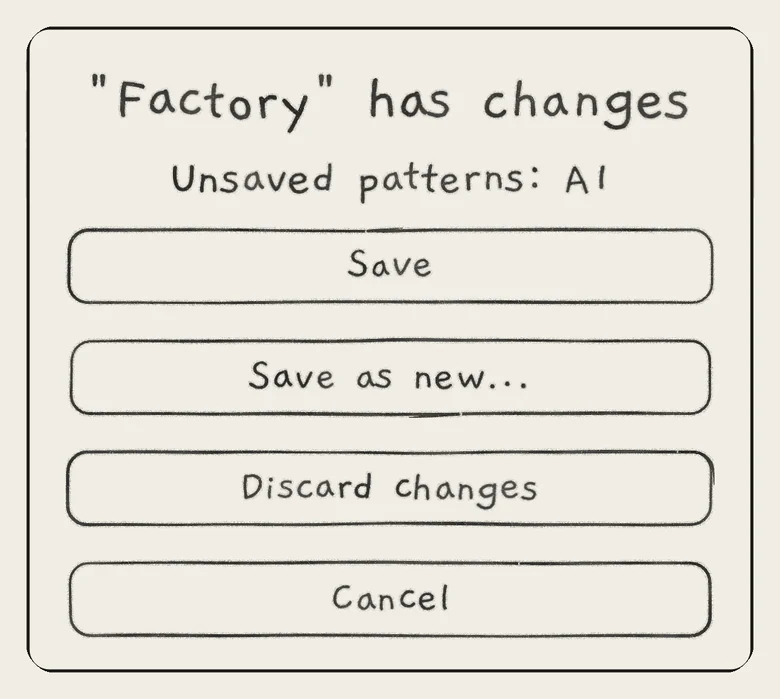
Save or Save as new... saves, then opens the other project. Discard changes drops the changes since the last Save and opens it. Cancel stays.
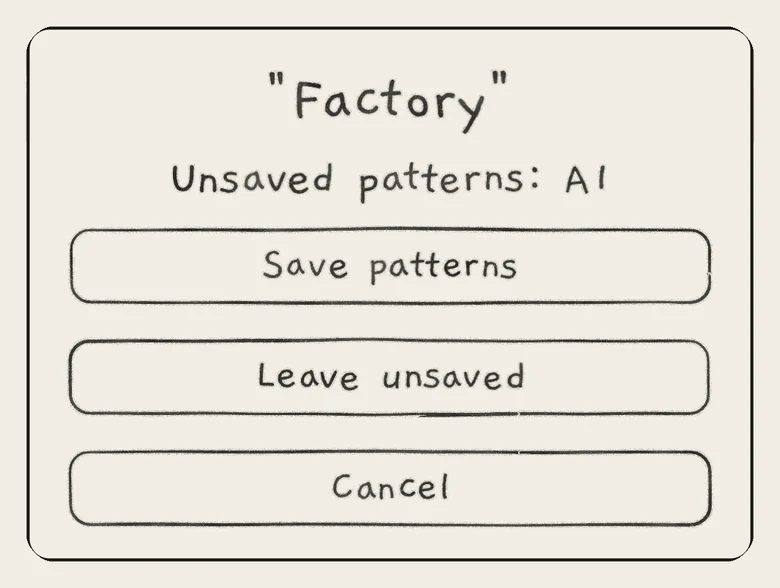
When only patterns are unsaved, the title is the project's name alone and the choices are Save patterns, Leave unsaved and Cancel. Save patterns saves each unsaved pattern into its own slot, as the pattern's Save does, then opens the other project.
A project's Save never saves patterns. Every choice that leaves the project, Discard changes and Leave unsaved included, stores the unsaved pattern edits in it. Open the project again and those patterns are still marked edited, with their saved versions behind Discard (Edit and save patterns).
#The Factory project
The Factory project is the one INK opens on first launch. Its bank A holds the factory patterns; banks B to D are yours. In your own projects all four banks are yours.
Factory can be saved. It has no Rename... and cannot be deleted.
#Export
An .inkproject file carries projects to another device or another person. Tap Select, tick projects, then tap Export.
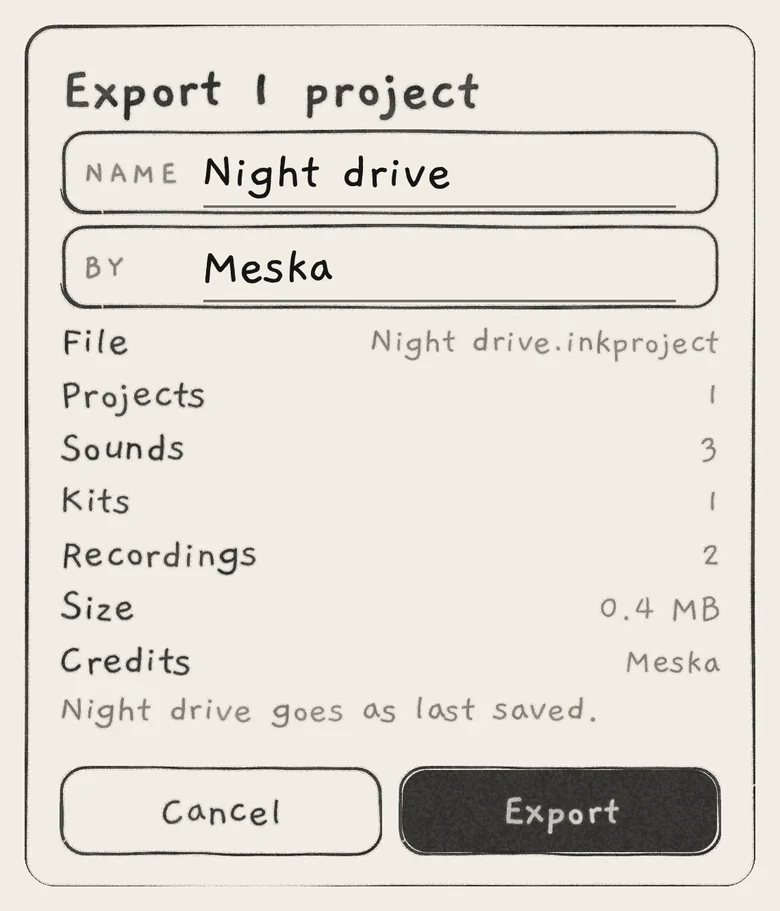 123456
- 1Name
- 2By
- 3File and contents
- 4Credits
- 5Goes as last saved
- 6Export
- NameThe name inside the file and the file's name. Default: the project's name, or "INK projects" for several.
- ByThe author. Starts with the last name used in any Export card. A project that came in a file keeps its own author.
- FileThe file's name, from Name.
- Projects,Sounds,Kits,Recordings,WavetablesHow many of each go in the file. Wavetables shows only when there are any.
- SizeThe file's estimated size.
- CreditsThe sounds' authors, most sounds first. A sound without an author takes the By name.
- Left outHow many projects cannot go, such as one with no Save yet. When none can go, the card reads "Nothing to export" with each project's reason.
- ExportWrites the file and opens the share sheet. Cancel sends nothing.
A project goes as last saved, with its unsaved pattern edits. When the open project has unsaved changes, the card says "<name> goes as last saved."
The file holds your own sounds, your saved versions of factory sounds, and the kits, recordings and wavetables they use, each once. Factory sounds and factory audio stay out: every INK has them. A factory kit you changed goes as a kit of your own. Export and import also work in the AUv3.
#Import
Tap Import, beside Select at the bottom of the Projects list, and pick a file, or open an .inkproject file from Files or the Finder; it opens in the Projects list. A card reports the result.
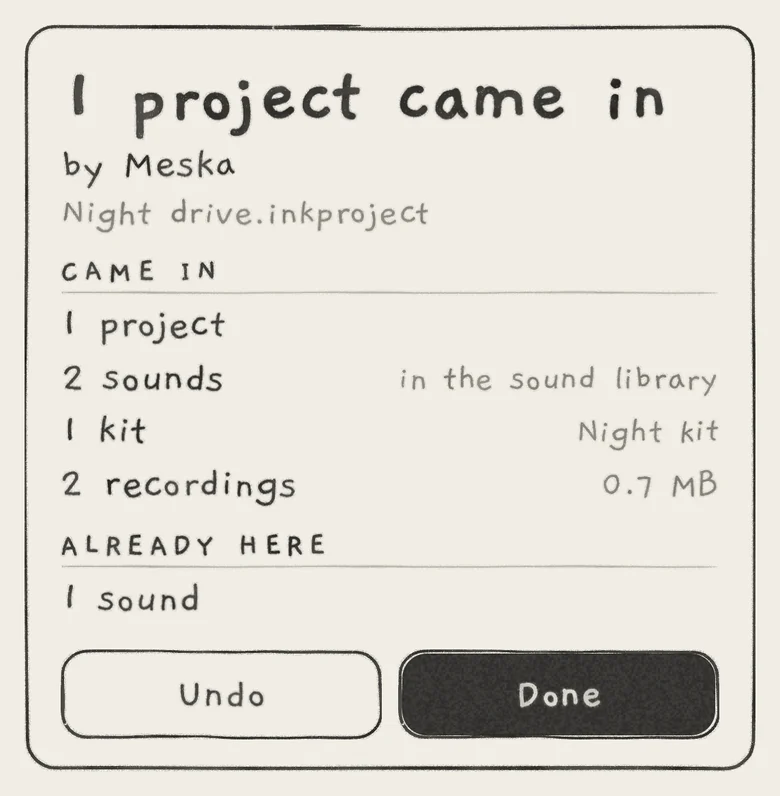 12345
12345- 1Title and author
- 2CAME IN
- 3Sounds, in the sound library
- 4ALREADY HERE
- 5Undo and Done
- n projects came inThe title, with "by" and the author and the file's name under it; "Nothing new" when everything was already here.
- CAME INProjects; sounds, "in the sound library"; kits, with a kit name; recordings, with their size; wavetables.
- CREDITSThe sounds' authors, when there is more than one.
- ALREADY HEREWhat was on this device already and was not stored again.
- LEFT OUTOne line for each thing that could not come in.
- UndoTakes the whole import back. Not shown with "Nothing new".
- DoneCloses the card.
A sound already in your Library, with the same name and content, is not stored again; the project uses yours. A project identical to one here is not stored again either. The other sounds come into the Library as a pack named after the file (the Name it was exported under), listed under From (Sound library).
An unreadable file shows "Can't import" with the reason, and "Nothing was changed."
#Star and delete
Tap Select and tick projects. The bar shows Star (or Unstar when all ticked projects are starred), Export and Delete. The status line shows "n selected", Select all with the number of projects shown, and Deselect all. While selecting, Done reads Cancel.
Delete asks "Delete n projects?" with Cancel and Delete. A ticked Factory is never deleted or counted. Deleting the open project opens Factory.
#App and plug-in together
The app and the AUv3 share one set of projects. If one deletes the project the other has open, the other shows "Project deleted": "<name> was deleted elsewhere. It still plays here: Save the project to keep it, or Save as new." It plays on. Save makes the project again; Save as new... keeps it under a new name. A rename takes effect with that Save.
A host session restored after its project is gone stays in that project, marked changed: "<name> is not among the projects on this device." Save makes it again on this device.
#Damaged and missing files
An engine whose sound is no longer in the Library plays the sound the project stored, under its saved name; a later Save keeps that name.
INK never writes over a project file it cannot read at the moment, or one a newer INK wrote. A damaged file is set aside as a copy before a Save replaces it. A failed open ("Not opened"), New or Save as new leaves INK in the project it was in, playing what it played.
- In a project of your own, edit the playing pattern on Seq and turn Cutoff.
- Open the Projects list and tap another project. The leave card lists the pattern under "Unsaved patterns".
- Tap Discard changes. The other project opens.
- Open the first project again. Cutoff is back at its saved value; the pattern still reads edited, with your notes.