CHAPTER 28 OF 54 · MAKE IT MOVE
LFOs and Freeze
Each engine has four LFOs, each with its own section on the Sound tab. LFO X and LFO Y are free sources you route in the Matrix. Mod A and Mod B move the macros.
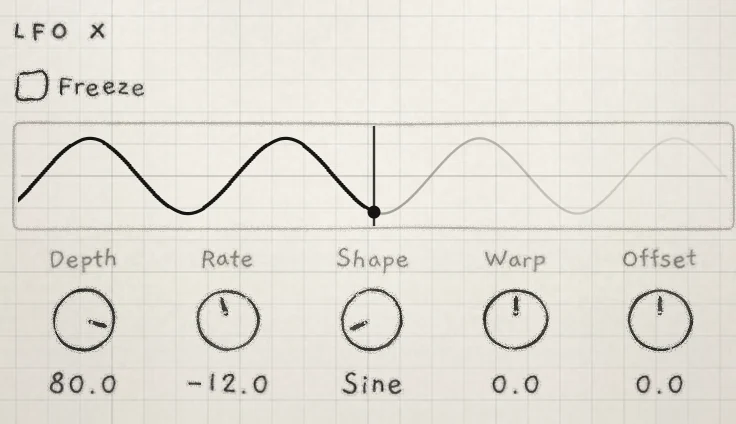 1234
1234- 1Freeze
- 2Output as it played
- 3Now
- 4Output to come, from the settings
#One LFO for the whole engine
Each LFO is shared by all the notes of its engine and keeps running between notes. A chord moves together, and a new note joins the wave wherever it is.
#LFO X and LFO Y
LFO X and LFO Y are the Matrix sources X and Y: route them to anything (Modulation matrix). Here X and Y mean these LFOs, not the All page's XY pad.
#Mod A and Mod B
Mod A puts an LFO on Macro A: everything Macro A modulates moves on its own, around wherever the macro is set. Mod B does the same for Macro B (Macros and dice). Their Offset is not on the Sound tab: MIDI CC 26 (Mod A) and CC 29 (Mod B) set it, and it is saved with the sound.
#Controls
The four sections share one layout: a strip that draws the LFO's output (The strip), then the controls below. LFO X and LFO Y add Offset and the Freeze box.
- DepthAmount of the shape in the output. −100.0 to +100.0; negative inverts the shape. Init: 0.0. Matrix: LFO depth. CC 25 (Mod A), 28 (Mod B), 77 (X), 80 (Y).
- RateLFO speed. −100.0 to +100.0, about 0.047 Hz to 77 Hz (table below); a synced LFO shows a division. Init: 0.0 (Mod A), 9.7 (Mod B), −12.0 (X), −30.7 (Y). Matrix: LFO rate. CC 24, 27, 76, 79.
- ShapeWaveform; see Shapes below. Init: Triangle. Matrix: LFO shape, which steps from shape to shape. No CC.
- WarpMoves the turning point inside each cycle. −100.0 to +100.0; 0.0 splits the cycle evenly. Init: 0.0. Matrix: LFO warp. No CC.
- OffsetConstant added to the output. −100.0 to +100.0. Init: 0.0. A control on LFO X and LFO Y; on Mod A and Mod B, CC only. Matrix: Offset (LFO X, LFO Y). CC 26 (Mod A), 29 (Mod B), 78 (X), 81 (Y).
All LFO settings are saved with the sound. Because an LFO is shared, pressure routed to an LFO row follows the hardest-pressed note.
#Depth and Offset
On the strip and in the Matrix, ±100.0 is full scale (±1). Depth 100.0 swings a bipolar shape from −1 to +1. Square, Trigs, Env and Geiger are unipolar, 0 to +1; a negative Depth turns them into 0 to −1.
Offset shifts the whole output. With Depth at 0.0, Offset is a constant. Init sets every Depth to 0.0, so X → Cutoff, +40 moves nothing until LFO X's Depth is raised.
#Rate
Rate shows a number, not Hz. Higher is faster:
| Rate | Frequency | Cycle |
|---|---|---|
| −100.0 | 0.047 Hz | 21 s |
| −50.0 | 0.30 Hz | 3.3 s |
| 0.0 | 1.91 Hz | 0.52 s |
| +50.0 | 12.1 Hz | 83 ms |
| +100.0 | 77 Hz | 13 ms |
#Warp
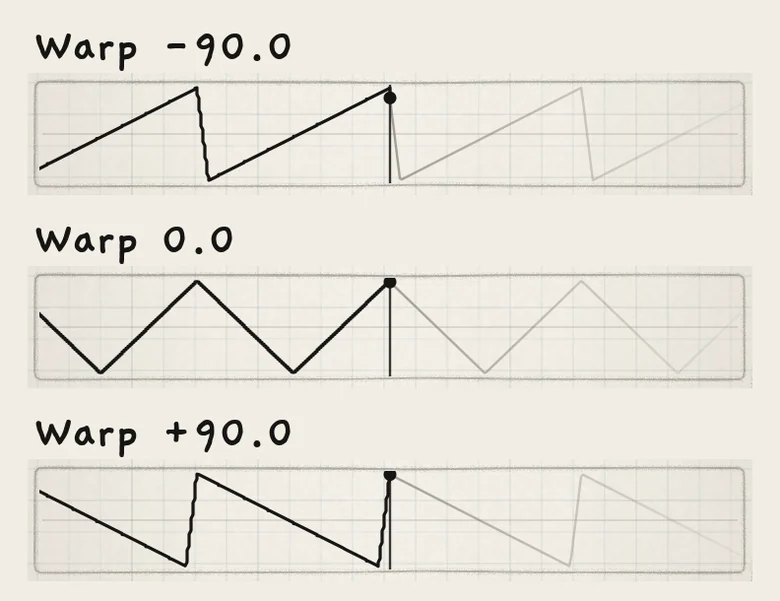
Warp sets the share of each cycle taken by its first half: 50% at 0.0, 99% at +100.0, 1% at −100.0. On Triangle the first half is the fall from +1 to −1, so ±100.0 turns it into a ramp. On Square and BiSquare, Warp sets the pulse width. On Env it sets the rise time against the fall time. On the random shapes it alternates long and short steps.
#Shapes
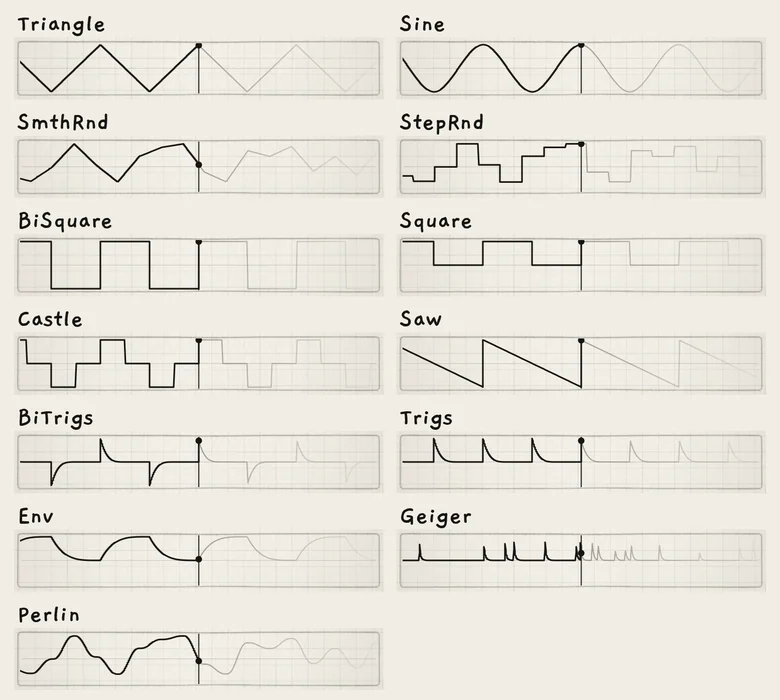
Shape steps through the shapes in this order. Each cycle has two halves; the random shapes take a new level every half cycle.
| Shape | Output | Range |
|---|---|---|
| Triangle | Linear fall from +1 to −1, then rise. | ±1 |
| Sine | Curved fall and rise. | ±1 |
| SmthRnd | Random levels joined by straight lines. | ±1 |
| StepRnd | Random levels, held. | ±1 |
| BiSquare | +1 for the first half, −1 for the second. | ±1 |
| Square | +1 for the first half, 0 for the second. | 0 to +1 |
| Castle | +1, 0, −1, 0, a quarter cycle each. | ±1 |
| Saw | Linear fall from +1 to −1 over the cycle, then a jump to +1. | ±1 |
| BiTrigs | A decaying positive spike at the start of the cycle, a negative one at the middle. | ±1 |
| Trigs | Decaying positive spikes at the start and the middle. | 0 to +1 |
| Env | A curved rise from 0 to +1 and fall to 0 (an LFO shape, not Envelope 2). | 0 to +1 |
| Geiger | Decaying spikes of random height at random moments, about three a cycle. | 0 to +1 |
| Perlin | Random levels joined by smooth curves. | ±1 |
#The strip
The strip draws the section's output. The vertical line is now. Left of it is the output of the last 1.5 s as it played. It includes Depth, Offset, Freeze, any Matrix modulation of the LFO's own rows and, on Mod A and Mod B, the macro.

Right of it are the next 1.5 s, calculated from the current settings and joined to the output at the now line. Matrix modulation is not in this half; it appears on the left once it has played. The centre line is 0, the top +1 and the bottom −1; values beyond are drawn at the edge.
A fast LFO draws as a band. When audio stops, the strip stops.
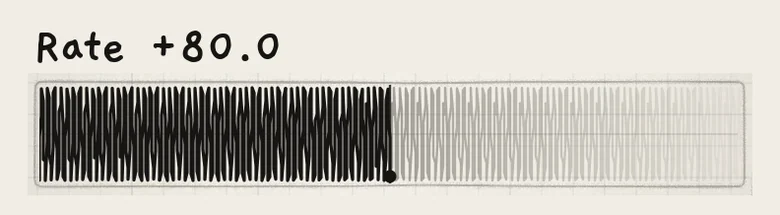
A flat line means Depth is 0.0 or Freeze is holding. At Depth 0.0 the line sits at Offset, and on Mod A and Mod B at the macro.
#LFO Sync
A sound can sync each of its LFOs to the engine's tempo. LFO Sync is stored in the sound and set by no control on screen, in the Matrix or by CC. To get a synced LFO, start from a sound whose LFO Rate shows a division; several factory sounds have one. Saving keeps the sync with the sound.
A synced LFO's Rate shows a division instead of a number. From slow to fast: 8 bars, 4 bars, 2 bars, 1 bar, 1/2., 1/2, 1/4., 1/2T, 1/4, 1/8., 1/4T, 1/8, 1/16., 1/8T, 1/16, 1/32., 1/16T, 1/32. A dot marks a dotted value, T a triplet.
Rate picks the division nearest the free rate it would play at 120 BPM. Modulating Rate steps between divisions. The LFO follows the engine's clock: its tempo, a host or a MIDI clock (Clock and sync). Its phase locks to the beat, so it stays aligned with the arp, the pattern's steps and the transport.
The Sync switch on the Arp and Seq tabs is a different control: it belongs to the pattern and sets whether the engine follows the master clock (Arp rhythm and tempo).
#Freeze
Freeze holds the output of LFO X or LFO Y while notes sound, so each note or phrase keeps one value of the LFO. With a random shape, this is a sample and hold set off by the notes. Tick Freeze above the strip. Freeze is on LFO X and LFO Y, saved with the sound, and has no Matrix row or CC.
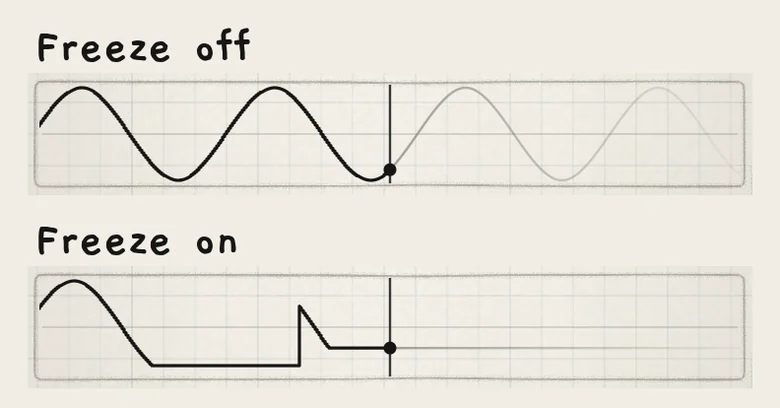 123
123- 1First note: held
- 2Silence: the output jumps to the LFO's value
- 3Second note: a new value, held
When a note starts and nothing sounds, the output is held at its value in that moment, Depth and Offset included. Every destination receives the held value. Later notes and pattern steps take the same value.
Freeze lets go when no note is held and every voice has faded out, so a release tail keeps the value to its end. Delay and reverb tails do not count. When it lets go, the output jumps to the LFO's current value. The LFO keeps running underneath, so a synced LFO stays on the beat.
Ticking Freeze while notes sound holds the value of that moment. Clearing it frees the output at once.
With the arp on, held keys do not count; the arp's notes do. An arp note ends at Gate and then releases. With Gate under 100.0 and a short Release, the voices fall silent between steps and each arp note takes a new value (Arp). With Strum, held keys count, as with the arp off.
- Load Init. On the Sound tab set Cutoff to about 1.0 kHz.
- In LFO X set Shape to SmthRnd and Depth to 100.0.
- On the Matrix tab set the X cell of the Cutoff row to +40: X → Cutoff, +40.
- Tick Freeze in LFO X. Keep Hold off, with a short Release (Init: 12.5).
- Play chords with silence between them. Each chord takes its own cutoff and keeps it until it has faded.