CHAPTER 24 OF 54 · SHAPE THE SOUND
Reverb and mix
Each engine has its own reverb, fed by a send, and a MIX section that sets the level, low cut and width of its signal and the balance against the effect returns. Both are sections of the Sound tab, with MULTIBAND between them (Multiband).
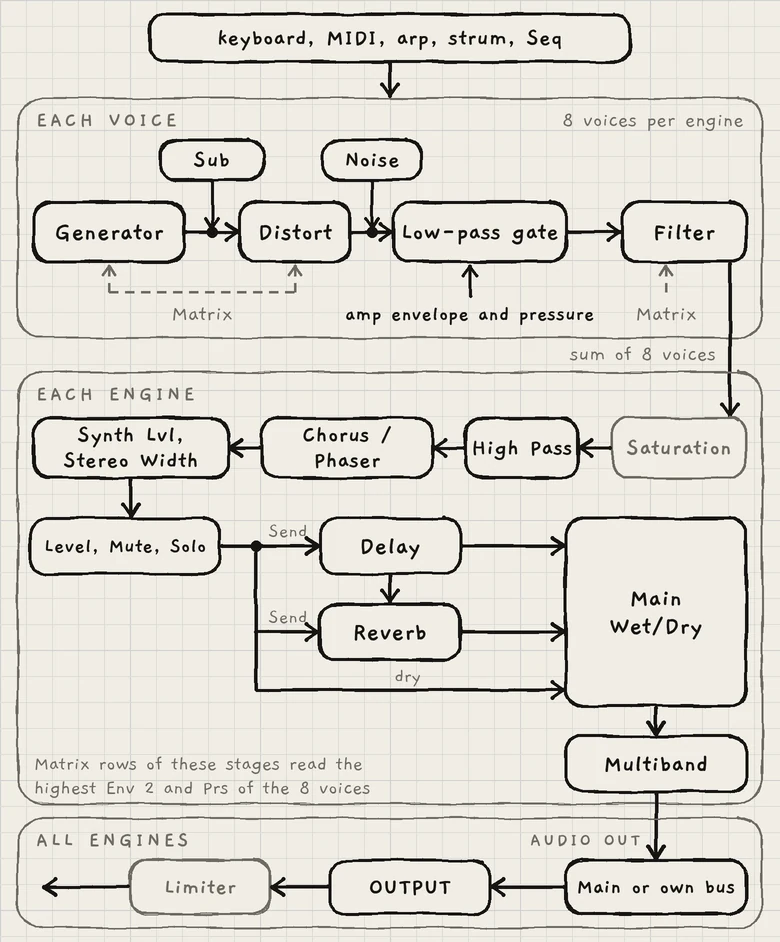
Each MIX control acts at its own point in the engine's chain, shown above and in full in The three engines. The engine's Level, Mute and Solo act after Synth Lvl, before the sends (Mixer and All page). After Main Wet/Dry the signal passes MULTIBAND and leaves INK on the bus set in engine sheet › AUDIO OUT, Main or Multibus (INK in a host).
#REVERB
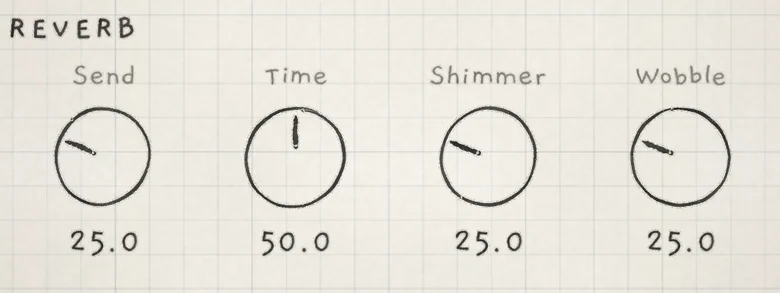
- SendLevel into the reverb. 0.0 to 100.0. Init: 25.0. CC 91.
- TimeDecay time, set by the feedback of the reverb's loop. 0.0 to 100.0. Init: 50.0. CC 92.
- ShimmerLevel of an octave-up pitch shifter inside the loop. 0.0 to 100.0. Init: 25.0. CC 93.
- WobbleDepth of slow modulation on the loop's delay times, which detunes the tail. 0.0 to 100.0. Init: 25.0. CC 114.
The reverb is one feedback loop of all-pass diffusers and delay lines, with a stereo output. Time, Shimmer and Wobble all act inside that loop, so each one changes every pass of the tail.
The REVERB controls are rows of the REVERB group in the Matrix, under the same names, and are saved with the sound. They are engine-wide rows: Env and Prs drive them with the highest value among the engine's voices (Modulation matrix). The dice writes cells only on the Send and Shimmer rows (Macros and dice).
#Send
Send sets the level into the reverb. The reverb receives the engine's signal after Synth Lvl and Level, plus the delay's return, so echoes are reverberated too (Delay).
At 0.0 nothing new enters the reverb. A tail already in the loop decays at the current Time.
#Time
Time sets the decay through the feedback of the loop. It also scales the reverb's output, so low settings are quieter as well as shorter. At 0.0 the reverb outputs only its Shimmer signal.
#Shimmer
Shimmer is an octave-up pitch shifter inside the reverb's loop. It comes from Plinky, the instrument INK grew out of (The three engines).
The shifter's output goes to the reverb's output and back into the loop, so each pass adds another octave above the last. A longer Time gives more passes and more octaves. At 0.0 the shifter is silent.
#Wobble
Wobble sets the depth of two slow, fixed-rate LFOs on the delay times of two stages inside the loop. The modulation detunes the tail. At 0.0 the loop's delays are static.
#MIX
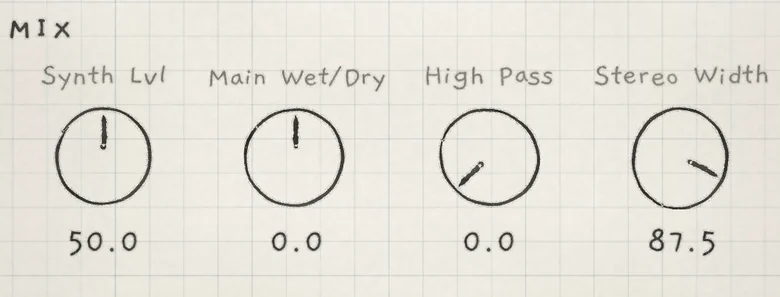
- Synth LvlLevel of the engine's signal into its peak compressor and the sends. 0.0 to 100.0. Init: 50.0. Matrix: Synth level.
- Main Wet/DryBalance of the dry signal against the delay and reverb returns, bipolar. −100.0 to +100.0. Init: 0.0. Matrix: Wet / dry. CC 8.
- High PassCutoff of a 12 dB/oct high-pass that removes low end before CHORUS / PHASER and the sends. 0.0 to 100.0 (3 Hz to 7.8 kHz). Init: 0.0. Matrix: High pass. CC 31.
- Stereo WidthWidth of the dry signal, bipolar; negative values swap the sides. −100.0 to +100.0. Init: 87.5. Matrix: Stereo width.
The MIX controls are rows of the MIX group in the Matrix and are saved with the sound. Like REVERB, they are engine-wide rows. The dice can write cells on every MIX row.
#Synth Lvl
Synth Lvl sets the gain of the engine's signal after CHORUS / PHASER, into a peak compressor. Below the compressor's threshold it is a plain gain: 0 dB at 40.0, about +2 dB at Init and +8 dB at 100.0. At 0.0 the engine is silent, effects included.
Above the threshold the compressor holds the output peaks near one level. Raising Synth Lvl further lifts quiet passages and compresses loud ones.
Synth Lvl comes after the engine's saturation, the soft clipper on the voice sum, so it does not change the distortion; Distort does (Oscillators). The delay and reverb sends take the signal after Synth Lvl, so it also sets how hard the effects are fed. The returns are not compressed.
Synth Lvl has no CC. CC 7 sets the engine's Level on the mixer instead (MIDI implementation).
#Main Wet/Dry
Main Wet/Dry sets the balance of the dry signal against the delay and reverb returns. At 0.0 both are at full level.
Negative values lower the returns: at −100.0 only the dry signal is heard. Positive values lower the dry signal: at +100.0 only the returns are heard. At −50.0 the returns are at half level (−6 dB).
Main Wet/Dry does not change the sends: the delay and reverb are fed at every setting, so their tails are already sounding when you bring the returns back.
#High Pass
High Pass is a 12 dB/oct high-pass with no peak at the cutoff. It removes low frequencies from the engine's signal after the saturation and before CHORUS / PHASER and the sends, so the chorus, delay and reverb receive the filtered signal.
The knob is finer at the low end. The table gives the cutoff at common settings.
| High Pass | Cutoff |
|---|---|
| 0.0 | 3 Hz |
| 25.0 | 42 Hz |
| 30.0 | 84 Hz |
| 50.0 | 620 Hz |
| 75.0 | 3.1 kHz |
| 100.0 | 7.8 kHz |
#Stereo Width
Stereo Width scales the side signal and leaves the mid signal whole. 0.0 is mono and 100.0 is the normal image, the widest setting.
Negative values invert the side signal. At −100.0 left and right are swapped; −50.0 is as narrow as 50.0, with the sides swapped. Base value and modulation together are held to −100.0 to +100.0.
Stereo Width acts at the same point as Synth Lvl, after CHORUS / PHASER, so it narrows the chorus or phaser too. The delay and reverb come after it and make their own stereo image: at 0.0 the dry signal is mono, while the reverb tail stays wide and the delay keeps its own left and right taps (Delay).
- Load Init. In REVERB, set Send to 50.0 and Time to 90.0.
- Set Shimmer to 60.0.
- In MIX, set Main Wet/Dry to 100.0.
- Play a short chord and release it. Only the reverb sounds, and each pass through the loop adds an octave above the last.