CHAPTER 52 OF 54 · REFERENCE
MIDI implementation
INK's MIDI implementation is fixed: each CC sets the same control on every engine, in every sound and project. The tables below give each message, each CC and what it sets.
Each engine receives on its MIDI In channel or MPE zone and sends on its MIDI Out. Both are Off by default in every project; set them up in MIDI in and MIDI out. A message reaches every engine whose In matches its channel.
#Implementation chart
| Message | Received | Transmitted | Notes |
|---|---|---|---|
| Note On, Note Off | Yes | Yes | Chromatic, every note number; on a Chords engine, as Keys play sets. 8 voices per engine: a new note takes a free voice, else the quietest voice in its release. A note that arrives while all 8 voices are held is dropped (Voices and polyphony). |
| Velocity | Yes | Yes | Sets the strike and starts the note's pressure (Matrix source Prs). 127 matches INK's hardest tap at the default Touch settings. |
| Poly aftertouch | Yes | No | The note's pressure. |
| Channel pressure | Yes | Yes | Pressure of every note on the channel; on an MPE manager channel, of every finger in the zone. Out: per note on an MPE Out, the highest sounding pressure on a plain channel. |
| Pitch bend | Yes | Yes | Per channel. On MPE member channels per finger, plus the manager channel's bend for the whole zone. |
| Control Change | Yes | CC 74 | Map below. Out: CC 74 carries MPE Slide and the Strings pluck brightness. Turning a knob sends no CC; to send CCs to other instruments, use INK MIDI. |
| RPN 0, bend range | Yes | Yes | Per channel. Default: 2 st on a plain channel, 48 st on a member channel. A Bend range other than Auto on the engine's In page overrides it, except on a manager channel. Out: before a plain channel's first bend, and on every member channel of an MPE Out. |
| MPE Configuration Message | Yes | Yes | RPN 6 on channel 1 (lower zone) or 16 (upper zone). Out: with an MPE Out. |
| Other RPN, NRPN | Ignored | No | INK reads RPN messages only for the bend range and the MPE setup. CC 6, 38 and 96 to 101 carry those messages and never move a control. |
| Program Change | Ignored | No | Choose sounds and projects on screen. CC 83 selects a pattern (CC map). |
| Clock, Start, Stop, Continue | Yes | Standalone app | Received while Receive on the Clock page is not Off; a host's tempo and transport come first. Out: Send set to Clock sends the clock; Clock and transport adds Start and Stop of INK's own transport. While following a MIDI clock, INK passes on its Start, Stop and Continue. |
| Song Position | Yes | Passed on | Ignored while a host gives the tempo. Sent only while INK follows an incoming clock, with Send on Clock and transport. |
The Clock page is at Settings › MIDI › Clock on iPhone and iPad, and at Settings › Clock on a Mac and in a plug-in (Clock and sync).
#Under an MPE zone
- CC 1, 7, 30 and every CC in the CC map act only on the zone's manager channel.
- On a member channel only CC 64, 69, 74, 120, 121 and 123 act. INK ignores every other CC there.
- CC 74 is Slide on every channel of a zone: per finger on a member channel, for every finger on the manager channel. It sets Cutoff only on a plain channel. A member channel of a zone the controller announced counts as a zone channel, even when no engine plays that zone.
#Macros and Volume
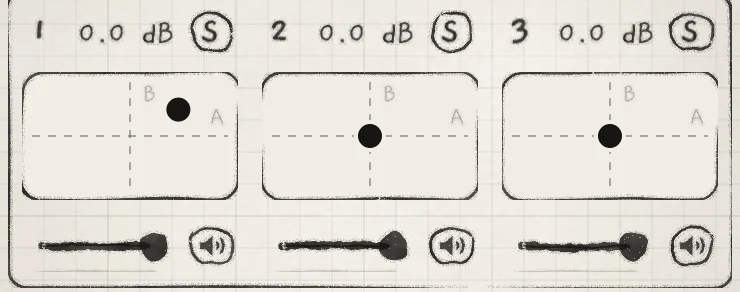
CC 1, CC 30 and CC 7 set the two macros and the engine's level. They are the same on every engine, in the app and in a host.
 123
123- 1CC 1, Macro A
- 2CC 30, Macro B
- 3CC 7, Level
| CC | Control | Values |
|---|---|---|
| 1 | Macro A | Moves every Matrix cell in column A. 0 is −100%, 64 the centre, 127 is +100%. The A knob and the XY pad's horizontal axis. |
| 30 | Macro B | The same for column B. The B knob and the XY pad's vertical axis. |
| 7 | Volume | The engine's Level on the mixer, as linear gain: 0 is silent, 127 is 0 dB. It acts before the delay and reverb sends, so tails ring out. Synth Lvl in MIX is a different control and has no CC. |
The macro positions are saved with the sound, Level with the project. In a host, the same three values are the parameters "1: Macro A", "1: Macro B" and "1: Volume" for Engine 1, and likewise for Engines 2 and 3 (INK in a host).
#Switches and channel mode
| CC | Function | Values and behaviour |
|---|---|---|
| 64 | Sustain pedal | 64 and above is down. Keys let go keep sounding until the pedal lifts. A sustained note struck again restarts on its own voice at the new velocity. When the voices are full, the note the pedal has held longest gives way; a key held down is never taken. Works apart from Hold. |
| 69 | Hold | 64 and above is on. The same switch as the on-screen Hold, saved with the sound. On Grid and Keys engines it latches touched notes, not MIDI notes; hold MIDI notes there with CC 64 (MIDI in). |
| 102 | Free / Arp | The switch at the top of the Arp tab. 0 to 8 selects Free; 9 and above selects Arp, or keeps Strum on an engine set to Strum. |
| 120 | All Sound Off | Stops every voice of the engine at once, without release, and ends the notes it sends on MIDI out. |
| 121 | Reset All Controllers | Lifts the sustain pedal, centres pitch bend, sets pressure to 0 and clears the RPN selection. |
| 123 | All Notes Off | Lets every key up. The sustain pedal still holds its notes. |
#CC map
Each CC below sets one control's base value on the engine that receives it. Section is the heading on the Sound tab, or the Arp or Seq tab. Ranges and Init values are in Parameter reference; each control's home chapter explains it in full.
| CC | Control | Section | What it sets |
|---|---|---|---|
| 2 | Noise | OSC | White-noise level. |
| 3 | Sensitivity | ENVELOPE | How much of the note's pressure reaches the amp envelope. |
| 4 | Distort | OSC | Gain into the low-pass gate and saturation. Bipolar. |
| 5 | Glide | OSC | Portamento time. |
| 8 | Main Wet/Dry | MIX | Dry signal against the delay and reverb returns. Bipolar. |
| 9 | Pitch | OSC | Tuning of every note of the sound; the key stays. Bipolar. |
| 11 | Gate | Arp and Seq | Share of each step a note sounds. One value for both tabs. |
| 12 | Time | DELAY | Delay time. Bipolar: below 64 synced, above 64 free. |
| 13 | Detune, Width, Position or Wave | OSC | The generator's main tone control: Detune on Supersaw, Width on Pulse, Position on Wavetable, Wave on Phase. No knob on the Granular sampler. |
| 14 | Interval | OSC | Transposition of one stereo channel of each voice. Bipolar. |
| 15 | Scrub | SAMPLER | Offset of each new grain's start from the playhead. |
| 16 | Grain size | SAMPLER | Time between grain starts. |
| 17 | Rate | SAMPLER | Speed and direction of grains and playhead together. Bipolar. |
| 18 | Timestretch | SAMPLER | Speed of the playhead only. Bipolar. |
| 19 | Env Level | ENVELOPE 2 | Output level of Envelope 2; scales every Env cell. |
| 20 | Attack | ENVELOPE 2 | Rise time to the peak. |
| 21 | Decay | ENVELOPE 2 | Fall time to the Sustain level. |
| 22 | Sustain | ENVELOPE 2 | Level held while the note is down. |
| 23 | Release | ENVELOPE 2 | Fall time after the note ends. |
| 24 | Rate | MOD A | Speed of Macro A's LFO. Bipolar. |
| 25 | Depth | MOD A | Amount of Macro A's LFO. Bipolar. |
| 26 | Offset | MOD A | Constant added to Matrix column A, with Macro A and its LFO. No control on screen. Bipolar. |
| 27 | Rate | MOD B | Speed of Macro B's LFO. Bipolar. |
| 28 | Depth | MOD B | Amount of Macro B's LFO. Bipolar. |
| 29 | Offset | MOD B | As CC 26, for column B. |
| 31 | High Pass | MIX | High-pass cutoff before CHORUS / PHASER and the sends. |
| 71 | LPG Filter | OSC | Resonance of the low-pass gate. No knob on the Granular sampler. |
| 72 | Release | ENVELOPE | Amp envelope release time. |
| 73 | Attack | ENVELOPE | Amp envelope attack time. |
| 74 | Cutoff | FILTER | Filter cutoff. Slide under an MPE zone (above). |
| 75 | Decay | ENVELOPE | Amp envelope decay time. |
| 76 | Rate | LFO X | LFO speed. Bipolar. |
| 77 | Depth | LFO X | LFO amount. Bipolar. |
| 78 | Offset | LFO X | Constant added to the LFO's output. Bipolar. |
| 79 | Rate | LFO Y | LFO speed. Bipolar. |
| 80 | Depth | LFO Y | LFO amount. Bipolar. |
| 81 | Offset | LFO Y | Constant added to the LFO's output. Bipolar. |
| 82 | Sample | SAMPLER | The kit slot the engine plays, 1 to 8, stepped. 0 to 28 selects slot 1. |
| 83 | Pattern | Seq | The playing pattern: slot 1 to 24 in the engine's current bank. |
| 85 | Step offset | Seq | Moves the loop along the pattern, in steps. Bipolar. |
| 86 | Sustain | ENVELOPE | Amp envelope sustain level. |
| 91 | Send | REVERB | Level into the reverb. |
| 92 | Time | REVERB | Reverb decay time. |
| 93 | Shimmer | REVERB | Level of the octave-up shifter in the reverb. |
| 94 | Send | DELAY | Level into the delay. |
| 95 | Feedback | DELAY | How long the repeats last. |
| 103 | Mode | Arp | The order the held notes play in. Stepped. |
| 104 | Division | Arp | Arp step length. Bipolar: below 64 free, above 64 synced. |
| 105 | Probability | Arp | Chance that a step plays, or the hits in the Euclid loop. |
| 106 | Euclid | Arp | Length of the Euclidean loop; the sign sets what a gap does. Bipolar. |
| 107 | Range | Arp | Number of passes, 1 to 4. |
| 108 | Direction | Seq | The playhead's order through the loop. Stepped. |
| 109 | Division | Seq | Step length, 1/32 to 256/32. |
| 110 | Probability | Seq | Per-step chance, or the hits in the Euclid rhythm. Bipolar. |
| 111 | Euclid | Seq | Length of the Euclidean rhythm; the sign sets what a gap does. Bipolar. |
| 112 | 2nd Tap | DELAY | Time of the right side as a share of Time. |
| 113 | Wobble | DELAY | Random drift of the delay time. Classic only. |
| 114 | Wobble | REVERB | Slow modulation that detunes the reverb tail. |
| 116 | Scrub jit. | SAMPLER JITTER | Random delay of each grain's start. |
| 117 | Grain jit. | SAMPLER JITTER | Random lengthening of each grain's interval. |
| 118 | Rate jit. | SAMPLER JITTER | Random rise in each grain's read speed. |
CC 71 to 75 follow the General MIDI sound-controller numbers: 71 resonance (here the low-pass gate's), 72 release, 73 attack, 74 brightness, 75 decay. Every CC not in these tables sets no control, CC 0, 10, 32 to 63, 89, 90 and 119 included.
#How a CC edits
A mapped CC sets the control's base value, as a turn of its knob does: 0 is the bottom of the range, 127 the top. On a bipolar control, 64 is the centre. Stepped controls such as Mode, Division and Sample move from step to step. Modulation from the Matrix adds to the new base value.
The edit is stored where the knob's value is stored. Sound and Arp controls belong to the sound: a CC marks the sound as changed, and Save keeps the new value. The Seq controls, Gate and Pattern belong to the playing pattern, as their knobs do (Pattern playback). A CC sweep becomes one undo step when the controller stops (Undo and redo).
#Controls without a CC
A control with a Matrix row can still be played from a controller: route Macro A or B to it and send CC 1 or CC 30 (Play a control without a CC). Choices without a row are set on screen.
| Section | Through a macro | On screen only |
|---|---|---|
| OSC | Octave, which transposes the sound in octaves; Degree, Stride and Microtone, which set the Grid's layout and bend (Play the Grid) | The generator and the wavetable (Oscillators, Wavetables) |
| Engine sheet | Root and Scale (Keyboard, key and scale) | Key lock and Follow (Key lock and Follow) |
| PHASE, SUB, MULTIBAND | Every control (Phase, Sub oscillator, Multiband) | – |
| FILTER | Mode, Resonance and Filter Spread (Filter) | Band-pass |
| LFOs | Shape and Warp of all four (LFOs and Freeze) | Freeze on LFO X and LFO Y. LFO Sync has no control; it comes with the sound (LFO Sync) |
| CHORUS / PHASER | Every control (Chorus and phaser) | The effect type |
| DELAY | – | The delay type (Delay) |
| MIX | Synth Lvl, the level into the peak compressor and the sends, and Stereo Width (Reverb and mix) | – |
| Arp | Shift, the interval between the arp's passes (Arp) | Transpose, the order of the passes; choosing Strum (Strum) |
| Arp and Seq | – | Tempo and Sync, the pattern's loop, and Quantize (Pattern playback) |
| Mixer | – | Mute and Solo (Mixer and All page) |
| Matrix | – | Every cell (Modulation matrix) |
#Play a control without a CC
Give the control a cell in the Matrix's A column and send CC 1. With A → Filter Spread, +100, CC 1 at 127 adds the full amount and CC 1 at 0 subtracts it (Macros and dice). Column B and CC 30 work the same way. A macro's LFO, MOD A or MOD B, moves the same cells.
A stepped row, such as Octave, Degree or Shift, moves its destination in whole steps (Stepped rows).