CHAPTER 20 OF 54 · SHAPE THE SOUND
Amp envelope
The amp envelope sets each note's level and brightness over time. It follows the note's pressure: the envelope aims at a level set by how hard you play, so a held note swells and fades with the finger, as on Plinky.
It is the ENVELOPE section of the Sound tab and the AMP ENV group of the Matrix, and it works the same on every generator.
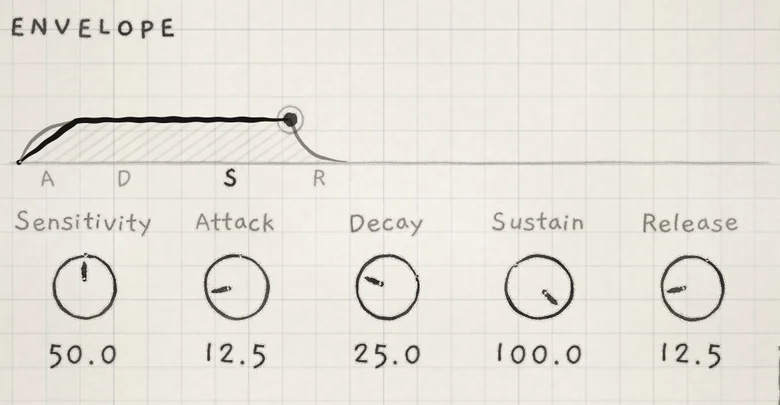 1234567
- 1Envelope drawing
- 2Level of the last note played
- 3Sensitivity
- 4Attack
- 5Decay
- 6Sustain
- 7Release
#How the envelope follows pressure
Each voice runs its own amp envelope. Its target is the note's pressure scaled by Sensitivity. The stages set how the level moves toward that target:
- Attack. The level rises toward the target. Near the target, or at full level, Decay takes over.
- Decay. The level falls to the target times the Sustain level.
- Sustain. While the note is down, the level follows pressure: it rises at the Attack rate and falls at the Decay rate.
- Release. When the note ends, the level falls to silence.
Every stage is an exponential curve.
#Level and brightness
The envelope drives the voice's low-pass gate, one stage whose level and cutoff both follow it. Attack, Decay and Release therefore shape brightness as well as loudness: a firmer note is brighter, and a fading note darkens. The gate comes before the Filter (Voice signal flow).
On the oscillator generators (all but the Granular sampler), the target rises slightly with pitch, so higher notes open the gate further.
The amp envelope acts only on the gate. To shape cutoff or any other destination over time, route Envelope 2 from the Env column of the Matrix (Envelope 2 and Random).
#Controls
- SensitivityHow much of the note's pressure reaches the target. 0.0 to 100.0: at 50.0 pressure passes unscaled, at 100.0 a quarter of full pressure reaches full level, at 0.0 the sound is silent. Init: 50.0. CC 3.
- AttackTime to rise to the target. 0.0 to 100.0: 2 ms to 7.1 s. Init: 12.5 (0.11 s). CC 73.
- DecayTime to fall from the peak to the Sustain level. 0.0 to 100.0: 2 ms to 16.3 s. Init: 25.0 (1.0 s). CC 75.
- SustainLevel held while the note is down, as a share of the target. 0.0 to 100.0, squared taper: 50.0 holds 25% of the target. Init: 100.0. CC 86.
- ReleaseTime to fall to silence after the note ends. 0.0 to 100.0: 2 ms to 16.3 s. Init: 12.5 (0.26 s). CC 72.
The times follow a squared taper. Attack times run to 95% of the target, where Decay takes over; Decay and Release times run to −60 dB.
| Value | Attack | Decay or Release |
|---|---|---|
| 0.0 | 2 ms | 2 ms |
| 12.5 | 0.11 s | 0.26 s |
| 25.0 | 0.44 s | 1.0 s |
| 50.0 | 1.8 s | 4.1 s |
| 75.0 | 4.0 s | 9.2 s |
| 100.0 | 7.1 s | 16.3 s |
The ENVELOPE controls are saved with the sound. Each is a row of the same name in the Matrix's AMP ENV group, evaluated per voice while it plays, so a Prs or Rnd cell on Decay gives every note its own shape (Modulation matrix).
#Two Sensitivity controls
Sensitivity in ENVELOPE belongs to the sound: it sets how much pressure this sound's envelope needs. With it low, a firm press is needed to reach full level and full brightness.
The Sensitivity slider in Settings › PLAYING › Touch belongs to the app: it sets how a finger's contact becomes pressure, for every sound (Set up your playing). On a Mac the Touch page has Mouse expression in its place.
#Retrigger, slides and Hold
- New note. A new note on a voice starts Attack. If the voice is still sounding, its level is first multiplied by the Sustain level: at Sustain 100.0 the attack continues from the current level, at 0.0 it starts from silence.
- Slides. A finger that is already down does not retrigger. On the Grid a slide changes pitch and the envelope continues (Slide). On Keys the same holds with Slide control on In tune or Free; on Piano each key the finger crosses strikes a new note on another voice, with its own Attack (Set up your playing).
- Arp. Each arp note retriggers the envelope. With Gate shorter than the step, Release starts when the Gate ends (Arp).
- Hold. A latched note keeps its latched pressure, so the envelope stays at the Sustain level. Release starts when the note is released (Hold).
- Strings. A harder pluck stretches Decay and Release and raises Sustain, but the string's own fade ends every pluck, whatever the Sustain (Ring).
#Voices and long releases
Each engine has 8 voices. A note in its Release still sounds and keeps its voice, and so does a held note whose level has fallen to a low Sustain. With a long Release, new notes take voices that are still ringing and cut their tails (Voices and polyphony).
#The envelope drawing
The drawing above the controls shows the envelope the engine evaluates for the voice played last, with Matrix modulation, pressure and Sensitivity included. The letters A, D, S and R under it mark the stages; the current stage is printed in bold.
- Each segment's width follows its control's value, not a time scale. Sustain is a plateau of fixed width; while a note holds, its level runs across it.
- The ink line ending in a dot is the note's real level. Where pressure or modulation takes the level off the shape, the line leaves it.
- When modulation moves the settings, the line shows their average and a pencil band covers the range of shapes they make. Turning a control moves the line at once, without a band.
#Pluck, pad and keys
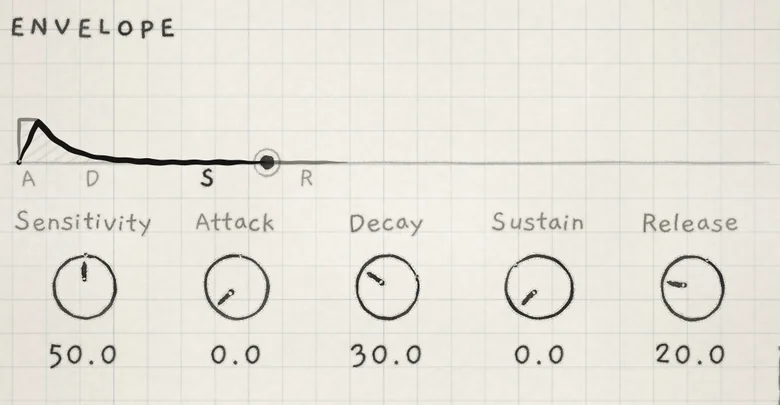
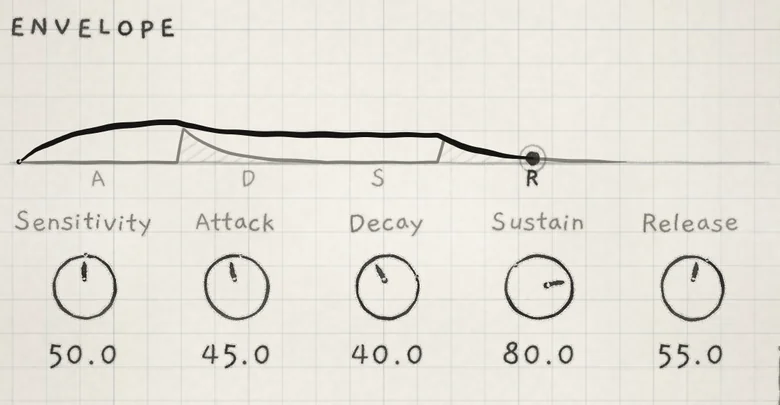
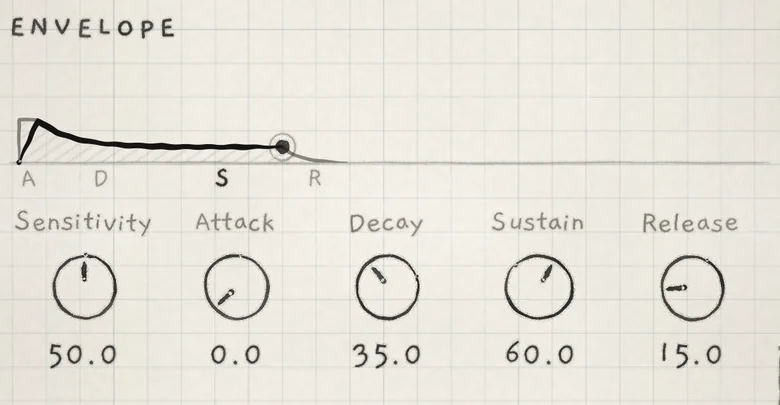
Three envelopes on the Init sound, with Sensitivity at 50.0:
| Sound | Attack | Decay | Sustain | Release |
|---|---|---|---|---|
| Pluck | 0.0 | 30.0 | 0.0 | 20.0 |
| Pad | 45.0 | 40.0 | 80.0 | 55.0 |
| Keys | 0.0 | 35.0 | 60.0 | 15.0 |
- Load Init from the Library and scroll the Sound tab to ENVELOPE.
- Set Attack to 0.0, Decay to 30.0 and Sustain to 50.0.
- Play a note on the Grid and keep the finger down until the level settles.
- Press harder, then lighter. The level rises at the Attack rate and falls at the Decay rate, and the sound brightens and darkens with it.