CHAPTER 5 OF 54 · START HERE
The three engines
INK is a polyphonic synthesizer and granular sampler built as three engines. Each engine is a complete instrument with its own sound, keyboard and effects; the three share a mixer, a clock and the outputs. This chapter gives the specifications and the signal flow the rest of the guide refers to.
#Where INK comes from
INK grew out of Plinky, an 8-voice polyphonic touch synthesizer. The Grid, the low-pass gate in every voice, the Matrix and its sources, the arp, the sequencer, the Classic delay and the reverb come from Plinky's firmware, and the engines run at Plinky's sample rate. INK imports Plinky presets and samples (Save and share sounds).
#At a glance
| Item | Specification |
|---|---|
| Engines | 3, each with its own sound, keyboard, key, effects and MIDI |
| Polyphony | 8 voices per engine, 24 in all |
| Generators | Supersaw, Pulse, Wavetable, Granular sampler, Phase |
| Voice | Generator with Noise and Distort, low-pass gate, SEM-style multimode filter |
| Per engine | Sub oscillator; Chorus or Phaser; Delay (Classic, Reverse, Octave, Ping-Pong); Reverb with Shimmer; three-band Multiband; MIX for the engine's level, high-pass, stereo width and wet/dry balance |
| Modulation | Matrix with 7 sources: Env (Envelope 2), Prs (pressure), A and B (Macro A and Macro B with their LFOs), X and Y (LFO X and LFO Y), Rnd (random) |
| Keyboards | Grid (8 × 8 pads in key), Keys (continuous keybed), Chords (chord tiles), Strings (strumplate); one at a time per engine |
| Note playing | Per engine: held notes as played (Free), arpeggiated (Arp) or strummed (Strum) |
| Sequencer | Up to 64 steps per pattern; 4 banks (A to D) of 24 patterns per project |
| Sampler | 8 slots per kit; mono samples up to 67.1 s |
| Engine sample rate | 31,250 Hz, converted to the device's rate at the output |
| Formats | iPhone and iPad app, Mac app; AUv3 instrument INK Synth (outputs Main and Engine 1 to 3); AUv3 MIDI processor INK MIDI |
| MIDI | In and out per engine, MPE in and out, clock in and out. Clock out from the standalone app. The Mac app opens no MIDI inputs: on a Mac, play INK from MIDI as a plug-in in a host |
#Three engines
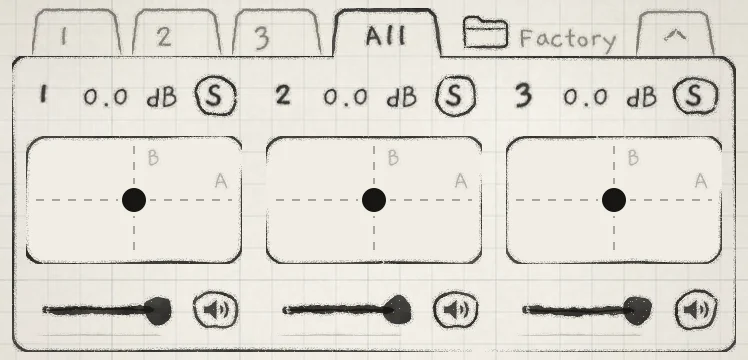 123
123- 1Engine tabs
- 2All
- 3Engine 1 column
An engine is a complete instrument. Each engine has its own sound, keyboard, key (Root and Scale), playing pattern, arp and strum, effects, and MIDI input and output.
Tabs 1, 2 and 3 open one engine. All shows the mixer and a keyboard band for each engine (Mixer and All page).
The engines share the project's pattern banks and, with Sync on, one clock (Clock and sync). Their outputs meet at Main; in a host, each engine can leave on its own bus instead.
#Five generators
The generator is the sound source of a sound. Choose it in the generator box at the top of the Sound tab's first section: OSC, or SAMPLER on the Granular sampler. The choice is saved with the sound.
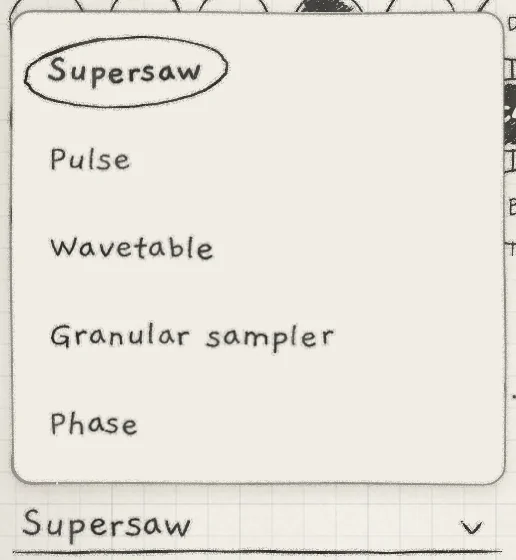 12
12- 1Current generator
- 2Generator box
The first OSC knob is the generator's tone control. Its label and job change with the generator.
- SupersawA stack of detuned saw oscillators. The tone control, Detune, spreads the saws apart. See Oscillators.
- PulseA pulse oscillator. The tone control, Width, sets the pulse width, from square to narrow. See Oscillators.
- WavetablePlays a factory or imported wavetable. The tone control, Position, scans through its waves. See Wavetables.
- Granular samplerPlays the samples of the sound's kit as grains. The SAMPLER and SAMPLER JITTER sections lead the Sound tab; OSC has no tone control and no LPG Filter. See Granular sampler.
- PhasePhase distortion in the style of the Casio CZ. The tone control, Wave, picks the wave; the PHASE section sets the second oscillator and how the two combine. See Phase.
In the Library, the Engine filter shows sounds by generator, not by Engine 1 to 3.
#Voices and polyphony
Each engine has 8 voices. A note takes one voice; a chord takes one voice per note.
How a new note finds a voice depends on what plays it:
- Grid: a touch takes its column's voice. If a finger or a latched note already holds it, the touch takes the first free voice.
- Keys: a finger takes a voice that no finger and no latched note holds. With Hold on and every voice latched, a new note replaces the oldest latched note.
- Chords: a chord's notes take voices that no finger and no latched note holds, silent voices first. When every voice is ringing, the quietest are taken first.
- Strings: a pluck takes the voice already playing its note, else a silent voice, else the voice plucked longest ago.
- MIDI: a note takes a silent voice. If none is silent, it takes the quietest voice that no key or finger holds and cuts that voice's release. With all 8 voices held, the new note is dropped. While the sustain pedal is down, the note the pedal has held longest gives up its voice first.
A voice in its release counts as sounding. With a long Release, new notes take voices that are still ringing and cut their tails.
#Signal flow
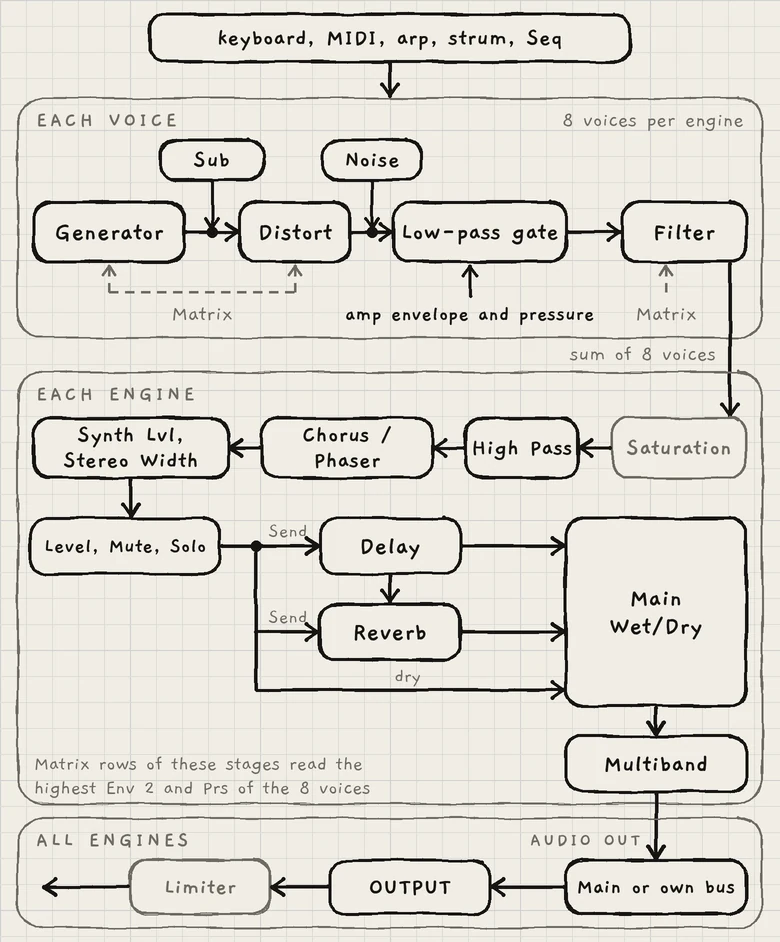 1234567
- 1Each voice
- 2Low-pass gate
- 3Sub
- 4Level, Mute, Solo
- 5Delay and Reverb sends
- 6Multiband
- 7OUTPUT
#Each voice
The generator and the Sub pass through Distort; Noise joins after it. The signal then passes the low-pass gate and the Filter.
- Distort is a gain stage before the gate. The engine's saturation after the voice sum turns the extra level into distortion.
- The low-pass gate comes from Plinky. It is a resonant low-pass whose cutoff follows the amp envelope, so one stage sets level and brightness together. The amp envelope follows the note's pressure, scaled by ENVELOPE's Sensitivity (Amp envelope). LPG Filter sets the gate's resonance (Oscillators).
- On the Granular sampler the gate is a low-pass without resonance, followed by a level stage driven by the same envelope.
- The Filter is an SEM-style multimode filter in every voice (Filter).
INK reverses the usual oscillator, filter, amplifier order: the gate, which sets the level, comes before the Filter. The Filter receives the enveloped signal.
The Sub is made once per engine, in the voice that plays the lowest held note. It joins before Distort, so that voice's gate and Filter shape it (Sub oscillator).
#Each engine
The 8 voices sum to one stereo signal. The MIX controls act at different points in the chain that follows.
| Stage | Where it acts |
|---|---|
| Saturation | A soft clipper on the voice sum, with no control of its own. Distort drives it harder. |
| High Pass (MIX) | After the saturation, before Chorus / Phaser. |
| CHORUS / PHASER | An insert on the whole engine (Chorus and phaser). |
| Synth Lvl (MIX) | The engine's level after Chorus / Phaser, into a peak compressor (Reverb and mix). |
| Stereo Width (MIX) | Mid/side width at the same point as Synth Lvl. Delay and reverb come after it. |
| Level, Mute, Solo | On the engine strip and the mixer, before the sends. Echoes and reverb tails ring out after the engine is lowered or muted (Mixer and All page). |
| DELAY, REVERB | Send effects. The delay's Send takes the signal after Level; the reverb's Send takes the same signal plus the delay's output (Delay, Reverb and mix). |
| Main Wet/Dry (MIX) | The balance of the dry signal against the delay and reverb returns. |
| MULTIBAND | An insert on the engine's output, after Main Wet/Dry. It adds a small fixed latency at every setting (Multiband). |
#All engines
AUDIO OUT sends an engine to Main or, with Multibus in a host, to its own bus, Engine 1 to 3 (INK in a host). It is on the engine sheet, which opens from the key in the top row (Find your way). In the standalone app AUDIO OUT is greyed and every engine goes to Main.
OUTPUT, at the bottom of the Sound and Arp tabs, sets the gain of every output (Mixer and All page). A safety limiter follows on each output.
#Modulation in the chain
The amp envelope modulates the gate only. For a filter envelope, route Env (Envelope 2) to Cutoff in the Matrix. The Matrix sources reach any Matrix row:
- Rows inside the voice (OSC, PHASE, SUB, FILTER, PITCH, AMP ENV, ENV 2, and SAMPLER except Sample) read each voice's own Env 2, pressure and Random.
- Rows at the engine stages (CHORUS / PHASER, DELAY, REVERB, MULTIBAND, MIX) read the highest Env 2 and the highest pressure of the engine's voices, and one Random value that changes with each new note.
- The LFOs run once per engine: every voice reads the same LFO values.
#Base value and modulation
A knob sets the base value. You hear the base value plus all modulation; the knob shows only the base.
Modulation amounts are set in the Matrix, one cell per source and destination (Modulation matrix). The base value and every amount add up, and the sum is held to the control's range.
The guide writes a modulation as source, destination and amount: Prs → Cutoff, +30.
#What belongs where
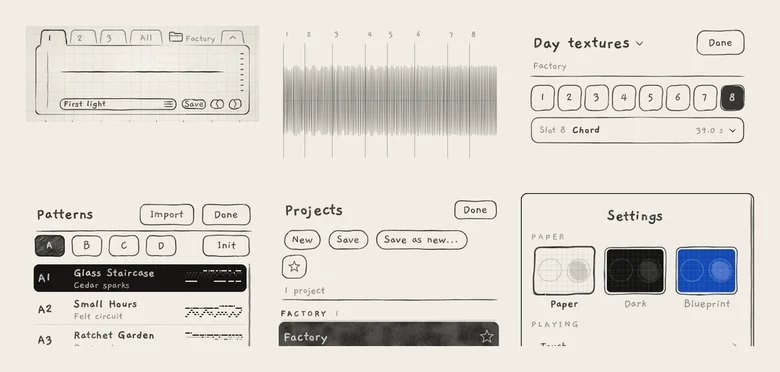 123456
- 1Sound
- 2Sample
- 3Kit
- 4Pattern
- 5Project
- 6App settings
| Kind | What it holds | Chapter |
|---|---|---|
| Sound | One engine's generator, every Sound tab section, its Matrix amounts and its arp and strum settings. | Save and share sounds |
| Sample | One mono recording, imported or recorded, up to 67.1 s. | Import and record |
| Kit | Eight sample slots. A Granular sampler sound names its kit. | Trim, slices and kits |
| Pattern | Up to 64 steps of notes, with the pattern's own Tempo, Sync, Division, loop and, when it has one, its key. | Record patterns |
| Project | The three engines' sounds and keys, Level, Mute and Solo, Audio out, MIDI In and Out, MIDI routes, and four pattern banks. | Projects |
| App settings | The theme (Paper), touch response, Slide control, each engine's keyboard, MIDI device, bend, MPE and clock settings, and what the Library's play button plays. In a host, the keyboards and MIDI settings are the instance's. | Settings and background audio |
| Host session | In a host: the project as it plays (sounds, patterns, mixer, held notes) and the instance's keyboards and MIDI settings, saved with the host's song. | INK in a host |
Each engine's key (Root and Scale) belongs to the project, not the sound: loading a sound keeps the engine's key (Keyboard, key and scale). A pattern's Tempo belongs to the pattern, so loading a sound leaves it unchanged.
MIDI In and Out and the MIDI routes are set under Settings › MIDI but are saved with the project (MIDI in, MIDI out).
#Try it
- On Engine 1, load a Bass from the Library. On Engine 2, load a Pad.
- On Engine 1, tap the key in the top row to open the engine sheet, and tap D under KEY. Load another Bass: the key stays D.
- On Engine 2, raise Send in DELAY, play a short note and tap Mute (speaker icon) on the engine strip while it echoes. The echoes ring out.
- Tap All and play both engines' keyboard bands.