CHAPTER 38 OF 54 · PERFORM AND RECORD
Pattern playback
The controls under the Seq lanes set how the engine plays its pattern: which steps, in what order, how often and for how long. They come from Plinky's sequencer (Where INK comes from), and all of them except Quantize belong to the pattern.
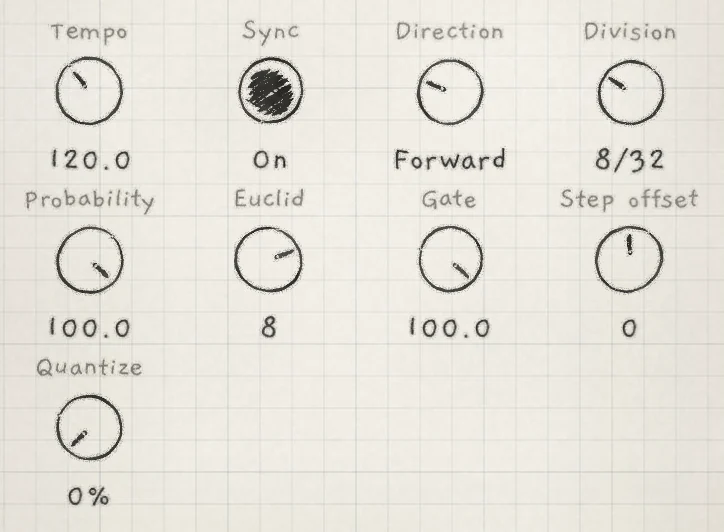
- Tempo,SyncThe pattern's tempo, 20.0 to 300.0 BPM, and whether the engine follows the master clock. New pattern: 120.0, On (Arp rhythm and tempo).
- DirectionThe order the playhead takes through the loop: forward, backward, back and forth, random, or held on one step. New pattern: Forward. CC 108.
- DivisionStep length in 32nd notes, 1/32 to 256/32. New pattern: 8/32, one beat. CC 109.
- ProbabilityPer-step chance, or the number of hits in the Euclid rhythm. −100.0 to +100.0; its sign and Euclid's set what a gap does. New pattern: 100.0. CC 110.
- EuclidLength of the Euclidean rhythm in steps. −16 to +16; −1, 0 and +1 turn the rhythm off. New pattern: 8. CC 111.
- GateShare of each step during which notes sound. 0.0 to 100.0. New pattern: 100.0. CC 11.
- Step offsetMoves the loop along the pattern, in steps. −63 to +63. New pattern: 0. CC 85.
- QuantizeMoves live takes toward the step grid, 0 to 100%. Saved with the project, not the pattern (Record patterns).
Changing any of these controls except Quantize marks the pattern edited, and Save stores the value with the pattern (Edit and save patterns). Choosing another pattern brings its own values. Double-tap a control to return it to its new-pattern value.
Gate is the same control as Gate on the Arp tab, and the only one of these controls with a Matrix row (ARP › Gate). Its Matrix amounts belong to the sound. Probability and Euclid here are the pattern's own, apart from the arp's.
#Loop
The loop is the run of steps that repeats: 1 to 64 steps, 8 in a new pattern. Steps outside it are hatched in the lanes and the page strip, and do not play. With nothing selected, the edit bar shows it as "Loop 1-8".
Select a step, then:
- Loop start starts the loop there and keeps its end, or its length when the end would come first. Set this way, the loop ends at step 64 at the latest.
- Loop end ends the loop there. On a step before the loop start, it makes a one-step loop on that step.
Both set the loop where the lanes show it, whatever the Step offset.
#Step offset
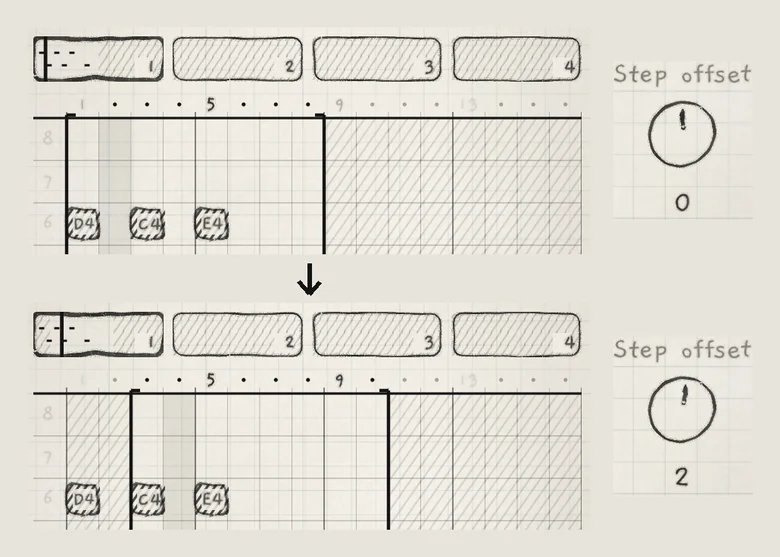
Step offset moves the loop window along the pattern. The loop keeps its length and the notes stay where they are, so different steps play. A positive offset moves the window later, a negative one earlier. The window wraps from step 64 to step 1.
 1234
1234- 1Loop start, offset 0
- 2Step offset
- 3Loop start, offset 2
- 4D4, outside the loop
#Direction
Direction sets the path through the loop. In the order the control steps through them:
- PauseThe playhead stays on its step and plays it again on every Division. A note that fills the step sounds as one held note; with Gate below 100.0 it strikes again on every Division.
- ForwardFirst step to last, then again.
- ReverseLast step to first, then again.
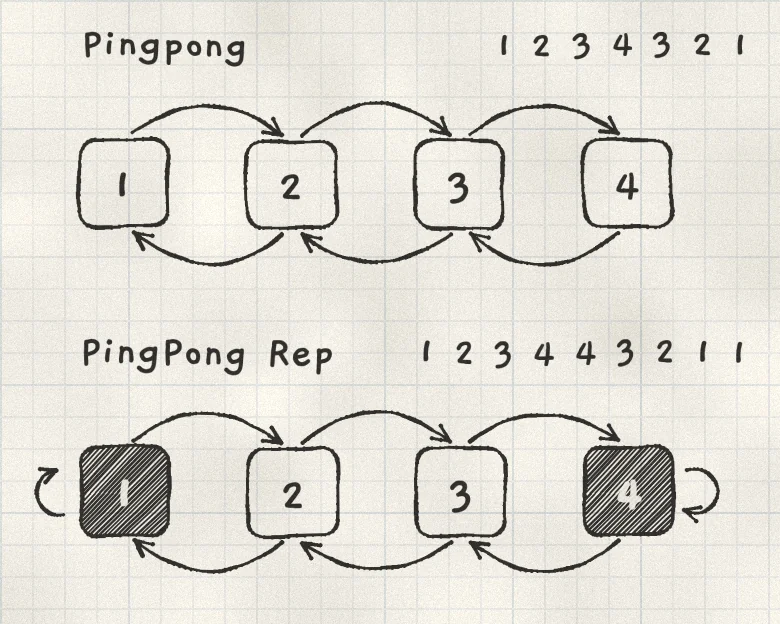
- PingpongForward, then back. The end steps play once at each turn.
- PingPong RepForward, then back. The end steps play twice at each turn.
- RandomEvery loop step once, in random order, then a new order.
 12
12- 1Pingpong: 1 2 3 4 3 2 1
- 2PingPong Rep: 1 2 3 4 4 3 2 1 1
#Division and Gate
Division sets the length of one step in 32nd notes at the pattern's tempo: 1, 2, 3, 4, 5, 6, 8, 10, 12, 16, 20, 24, 32, 40, 48, 64, 80, 96, 128, 160, 192 or 256 /32. At 8/32 a step is one beat; at 2/32 a 16th note.
Past 256/32, the last position of the control reads (Gate CV). On Plinky it steps the pattern from the gate input jack; in INK the playhead stays on its step. Turn Division down to play the pattern again.
Gate sets the share of each step during which the pattern's notes sound. Below 100.0 each step's notes stop at that point and release, so a note longer than a step strikes again on every step it covers. The stored notes do not change; the lanes draw the gated notes as they play.
#Probability and Euclid
Probability works in one of two ways, chosen by Euclid.
- Euclid −1, 0 or +1: Probability is a per-step chance. Each step plays or misses at random.
- Euclid 2 to 16, either sign: the steps follow a Euclidean rhythm. Euclid without its sign is the rhythm's length n. Probability sets how many of the n steps are hits, from 1 at low values to all n at 100.0, spread as evenly as possible. At 0.0 there are none. Nothing is random: the rhythm repeats every n steps.
The rhythm counts Division ticks from the start of play and ignores the loop: Euclid 5 on an 8-step loop repeats every 5 ticks, so it shifts against the loop on each pass.
The signs of Euclid and Probability set what a gap or a missed step does; Euclid 0 counts as positive:
- Same sign (both positive, or both negative): the pattern waits. On a gap the playhead stays on its step and no step is lost. With Gate at 100.0 the last note keeps sounding through the gap; below 100.0 the gap is silent.
- Opposite signs: the playhead keeps moving at the Division, and the steps that land on a gap are silent. Those steps are skipped.
At Probability 100.0 every step is a hit and Euclid has no audible effect.
In the tables, one column is one Division tick from the start of play: a number is the step that plays, counted from the loop start, and · is a gap. Each row repeats after n ticks.
#Same sign: the pattern waits
| Probability | Euclid 3 | Euclid 4 | Euclid 5 | Euclid 7 |
|---|---|---|---|---|
| 25.0 | ||||
| 50.0 | ||||
| 75.0 | ||||
| 100.0 |
#Opposite signs: the playhead keeps moving
| Probability | Euclid −3 | Euclid −4 | Euclid −5 | Euclid −7 |
|---|---|---|---|---|
| 25.0 | 1 · · | 1 · · · | 1 · · · 5 | 1 · · · 5 · · |
| 50.0 | 1 · 3 | 1 · 3 · | 1 · 3 · 5 | 1 · 3 · 5 · 7 |
| 75.0 | 1 · 3 | 1 · 3 4 | 1 · 3 4 5 | 1 · 3 4 5 · 7 |
| 100.0 | 1 2 3 | 1 2 3 4 | 1 2 3 4 5 | 1 2 3 4 5 6 7 |
Euclid −4 at 50.0 plays every other step: 1, 3, 5 and so on. Euclid 4 at 50.0 plays every step, each one twice as long. A negative Probability with a positive Euclid behaves as the second table: Euclid 5 at −50.0 plays as Euclid −5 at 50.0.
- On a pattern with a note on each of its 8 steps, set Euclid to −5 and Probability to 50.0.
- Tap Play. Three of every five steps play, and the silent steps fall on different notes on each pass of the loop.
- Set Euclid to 5. Every step plays in turn, the playhead waiting on the gaps.