CHAPTER 29 OF 54 · MAKE IT MOVE
Macros and dice
A macro is a bipolar control that modulates whatever its Matrix column is set to reach. Every sound has two, Macro A and Macro B, INK's version of Plinky's A and B knobs (The three engines). One macro can move several parameters together. The dice in the Matrix header writes a random Matrix as a starting point for a patch.
#Macro A and Macro B
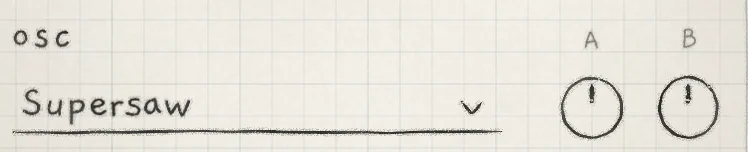 12
12- 1A
- 2B
The macros, labelled A and B, sit at the right of the first section on the Sound tab: OSC, or SAMPLER on a Granular sampler sound. They print no value; pointing straight up is 0%.
- AMacro A: moves every destination with a cell in the Matrix's A column. −100% to +100%, 0% at the centre. Init: 0%. CC 1.
- BMacro B: the same for column B. −100% to +100%, 0% at the centre. Init: 0%. CC 30.
At 0% a macro adds nothing. Above 0% each cell in its column moves its destination by the cell's amount, scaled by the macro's position. Below 0% it moves the destination the other way. A macro with no cells in its column does nothing.
The macro positions are saved with the sound. Double-tap a macro to return it to its reference value, the position saved with the sound. On a Mac: double-click.
CC 1 and CC 30 set the macros on the engine's MIDI channel (MIDI in). In a host, each engine's Macro A and Macro B are automation parameters (INK in a host). On the All page, each engine's two macros are one XY pad (Mixer and All page).
#MOD A and MOD B
Each macro has its own LFO: MOD A for Macro A, MOD B for Macro B, both sections on the Sound tab (LFOs and Freeze). Column A carries the knob's position plus the MOD A output; column B the same with MOD B. The knob itself does not move.
With Depth at its Init value of 0.0 on MOD A and MOD B, the A and B columns follow the knobs alone.
#One macro, several destinations
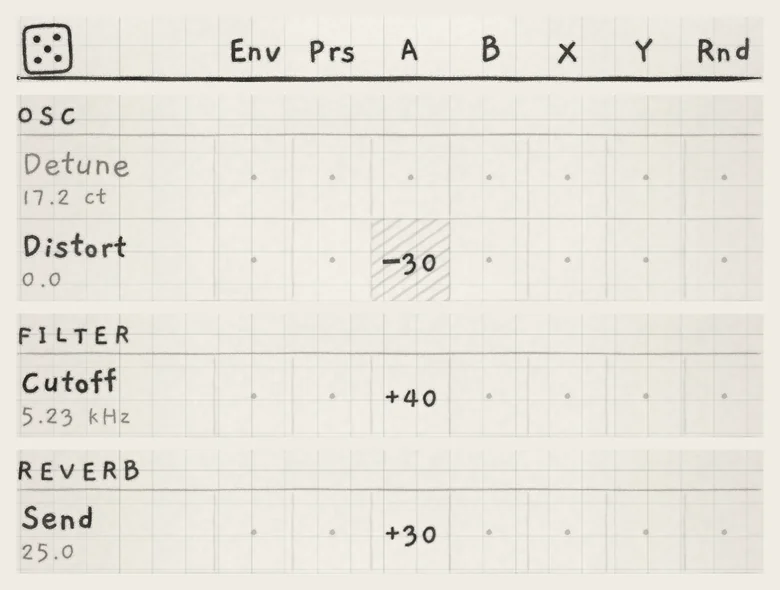 123
123- 1Cutoff: A +40
- 2Send (REVERB): A +30
- 3Distort: A −30, hatched
Cells on several rows, with different signs, make one macro move several destinations together. With the cells above, Macro A above 0% opens Cutoff, raises the reverb send and lowers Distort. Below 0% it does the reverse.
Modulation stops at the ends of a destination's range, so a macro moves a destination only where its base value leaves room on that side (Modulation matrix). Here every base value leaves room both ways: Cutoff sits at 5.23 kHz, and Distort at 0.0 is the centre of its bipolar range.
#Modulate an LFO
The four LFO groups of the Matrix, MOD A, MOD B, LFO X and LFO Y, each have the rows LFO depth, LFO rate, LFO shape and LFO warp; LFO X and LFO Y also have Offset. Any source can modulate these rows, a macro or another LFO included.
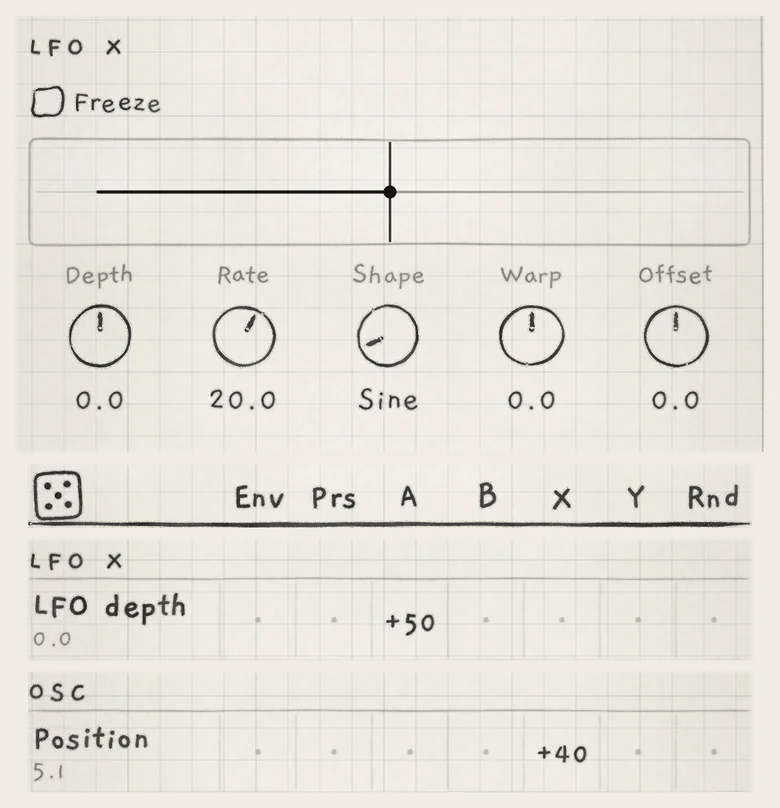 123
123- 1LFO X Depth: 0.0
- 2A → LFO depth, +50
- 3X → Position, +40
In the figure, LFO X's Depth is 0.0, so X → Position, +40 moves nothing on its own. The cell A → LFO depth, +50 gives LFO X's depth to Macro A. At 0% Position stays still. Away from 0% LFO X moves Position, by more the further A turns; below 0% the LFO is inverted.
A macro on LFO rate changes the LFO's speed. LFO shape moves in steps, from one shape to the next.
#Stepped rows
Most rows move continuously. A stepped row moves its destination in whole steps, such as octaves, scale degrees, sample slots or LFO shapes. A source jumps it from one step to the next.
| Group | Stepped rows |
|---|---|
| PHASE | B Pitch |
| SUB | Octave |
| PITCH | Root, Octave, Degree, Scale, Stride |
| SAMPLER | Sample |
| MOD A, MOD B, LFO X, LFO Y | LFO shape |
| ARP | Mode, Division, Euclid, Shift, Range |
ARP Probability and Gate move continuously. On a Chords keyboard the Stride and Degree rows are named Voicing and Spread and are read at each strike (Chord colour).
Root sits in the middle of its semitone, so a small amount in either direction keeps the same note.
Choices made from a menu or a box, such as the generator, the wavetable, the chorus or phaser type, the delay type and Band-pass, have no Matrix row. They change only by hand.
#The dice
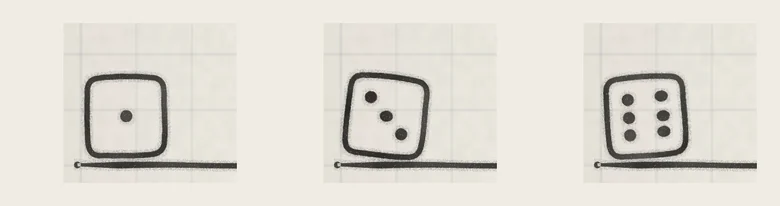 123
123- 1Face 1: 32 cells
- 2Face 3: 95 cells
- 3Face 6: 190 cells
The dice sits at the top left of the Matrix header. Tap it to replace the Matrix of the engine's sound with a random set of cells. It tumbles and lands on a face from 1 to 6.
The face sets how many cells the roll writes: 32 on face 1, then 63, 95, 126, 158 and 190 on face 6. The middle faces come up most often, face 3 in about a third of rolls. One row can receive several sources.
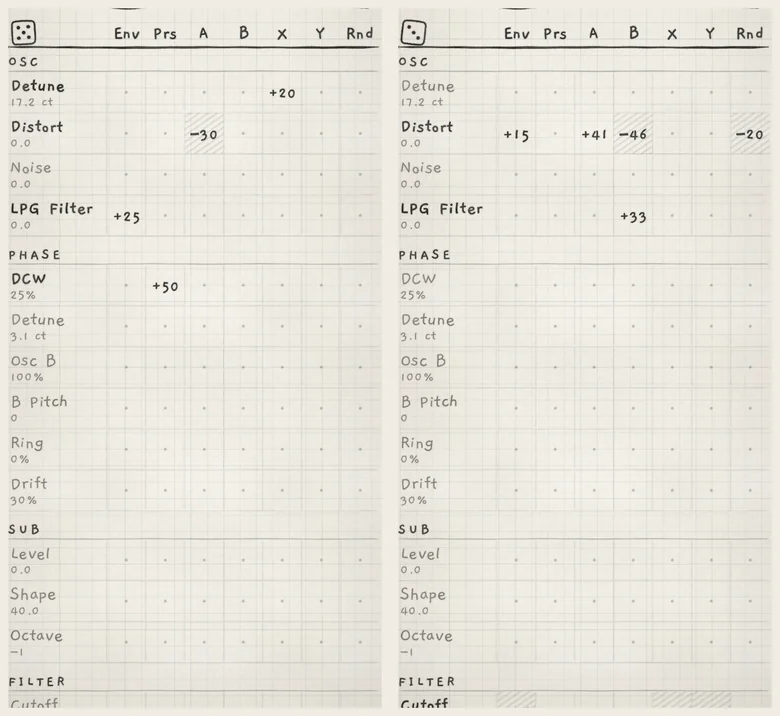 12
12- 1Before: Distort, A −30
- 2After: Distort, four new cells
#What a roll writes
Each new cell gets an amount from 15 to 60; about 30% are negative. Two FILTER rows are shaped. Cutoff cells are mostly negative, because a filter that is fully open can only be heard moving down. Mode cells stay between 15 and 30, so from LP they move the filter toward the notch, never to high-pass.
| Group | Rolled rows |
|---|---|
| OSC | the first row (Detune, Width, Position, Wave or Shape), Distort, LPG Filter |
| FILTER | Cutoff, Mode, Resonance, Filter Spread |
| AMP ENV, ENV 2 | every row |
| SAMPLER | Scrub, Grain size, Rate, Timestretch |
| SAMPLER JITTER | every row |
| MOD A, MOD B, LFO X, LFO Y | LFO depth, LFO rate, LFO warp; Offset on LFO X and LFO Y |
| DELAY | Send, Feedback |
| REVERB | Send, Shimmer |
| MIX | every row |
A roll never writes the stepped rows, Noise, Pitch, Interval, Glide or Microtone, the delay's Time, 2nd tap and Wobble, the reverb's Time and Wobble, or any row in CHORUS / PHASER, ARP, PHASE, SUB and MULTIBAND. Pressure (Prs) and Random (Rnd) never land on either envelope's Release or on ENV 2 Level; the other sources can.
- Load Init and choose Wavetable in the generator drop-down.
- In LFO X set Shape to Sine and leave Depth at 0.0.
- On the Matrix tab set X → Position, +40 in the OSC group.
- In the LFO X group set A → LFO depth, +50.
- Play a note, keep it down and turn A on the Sound tab above 0%. Position moves at LFO X's rate, by an amount that follows A.