CHAPTER 11 OF 54 · PLAY
Play Chords
Chords plays a whole chord from one touch, always in the engine's key. It is laid out as Roman-numeral harmony: each column is a degree of the scale, I at the left, and the rows run from the plain triad at the bottom to the richest chord at the top. Each chord note takes one of the engine's 8 voices and runs through the sound, Matrix and effects like any played note.
#Choose Chords
Tap the key in the top row to open the engine sheet, then tap Chords under KEYBOARD. Root and Scale are in the same sheet, under KEY (Keyboard, key and scale).
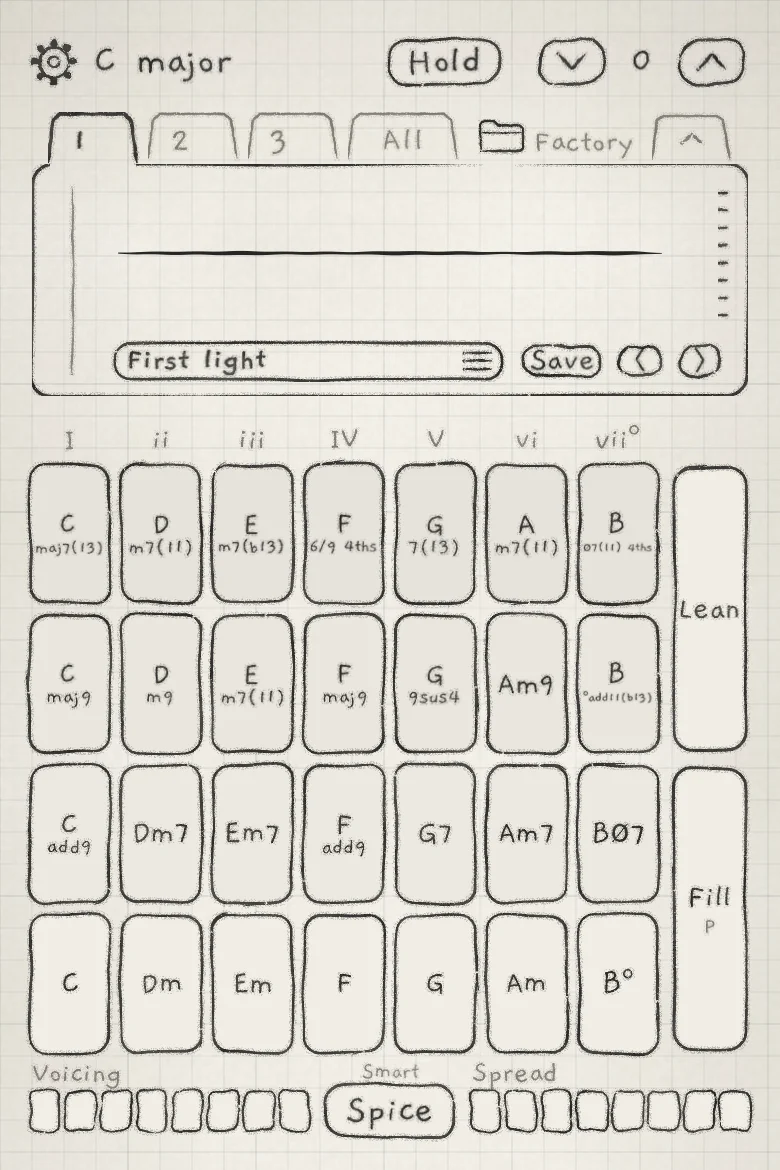 12345678
- 1Degree numerals
- 2Row 4
- 3Row 1
- 4Lean
- 5Fill
- 6Rails and Spice
- 7Octave arrows
- 8Waveform display
Each rectangle is a tile: one chord, named on its face in lead-sheet form (Dm7, Cmaj9, G7(13)). A fourths voicing adds "4ths" to the name; a triad over the column's root is written as a slash chord (G/C). A touch on a tile plays its chord.
The controls around the tiles shape the chord a touch plays:
- VoicingThe left rail under the tiles. Sets the inversion and spacing of the next chord (Chord colour).
- SpreadThe right rail. Sets the width and octave doublings of the next chord (Chord colour).
- SpiceThe button between the rails. Adds tensions to the next chord (Chord colour).
- LeanThe upper button right of the tiles. Makes a chord change walk voice by voice (Lean and Fill).
- FillThe lower button. Plays single notes over the sounding chord (Lean and Fill).
- HoldTop row. Keeps the chord sounding after you lift (Hold on Chords).
- Octave arrowsTop row, ˅ ˄. Move the next chord down or up an octave (Octave).
On a Chords engine, Stride and Degree in OSC are greyed: chord notes do not use them. Their Matrix rows modulate the Voicing and Spread rails instead (Rails in the Matrix).
#Columns
Each column is one degree of the scale, the root at the left. The numeral over a column names the degree and the quality of its row 1 chord: lower case where that chord is minor or diminished, capitals otherwise, ° for diminished and + for augmented. In C Major the columns read I ii iii IV V vi vii°, and row 1 plays C, Dm, Em, F, G, Am and B°.
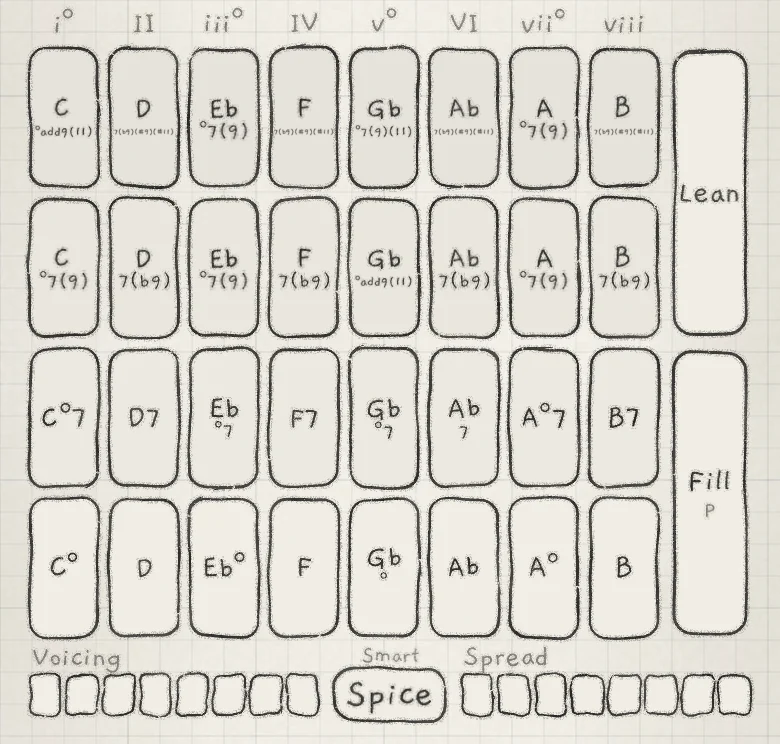 1
1- 1Eighth column
- Seven-note scales: seven columns.
- Diminished (eight notes): eight columns. The eighth is always numbered viii.
- Scales with two to six notes (the Penta, blues and Japanese scales, Wholetone, Harmonics, Hexany, Fifths, Triad Maj, Triad Min): seven columns. After the last degree the degrees start again one octave up, never higher. In C Penta Maj the columns play C, D, E, G, A, then C and D an octave up. The numerals count columns, I to VII.
- Chromatic: no chord set of its own. The engine keeps the chords of its previous scale, or of Major.
#Rows
Row 1 is at the bottom. Every row builds on the column's degree. With both rails at 0, every row plays its chord in close position on the root.

| Row | Chord |
|---|---|
| 1 | Three notes: the degree's triad in the scale. Where the scale has no triad on the degree, a sus, inverted or quartal shape; on Fifths, root and fifth. |
| 2 | Four notes, always the same chord: row 1 plus one scale tone. The 7th on minor, dominant and diminished chords (m7, 7, ø7 or °7); on other major chords the 9 (add9), else the 6 or the maj7. |
| 3 | Four to six notes: the degree's chord extended with scale tones (maj9, m9, 6/9, 13, 9sus4 and similar), chosen at each strike. |
| 4 | Up to six notes: the degree's full stack in the scale and its re-voicings (without the 9, a triad over the root, fourths, 9sus, b13), chosen at each strike. |
#Rows 3 and 4
INK chooses the chords of rows 3 and 4 at each strike, from the scale and the chords played before, so the same tile can play a different chord from one strike to the next. Each of these tiles names the chord its next touch plays, and the names change after each chord.
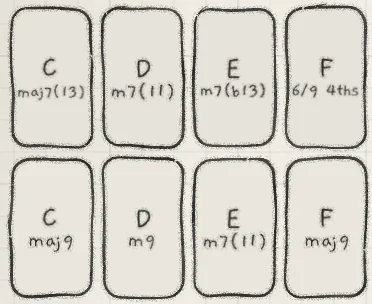 1
1- 1Row 3, column I
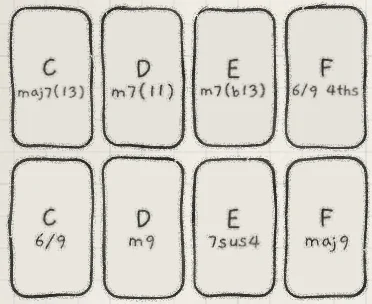 1
1- 1Row 3, column I
A finger that slides off a tile and straight back gets the same chord again. With Spice off, rows 3 and 4 stay in the scale. The one exception is the dominant with a raised 7th, which row 4 can play on a minor scale.
#Strike and pressure
A tile strikes on touch-down. The finger's pressure is the pressure of every chord note (Matrix source Prs), at the strike and for as long as the finger stays down. The sounding tile is hatched, denser the harder it is pressed.
One chord sounds per engine at a time:
- A slide onto another tile changes the chord live. A finger keeps its tile slightly past the edge, so a finger that drifts over the border does not change the chord.
- A second finger on another tile changes the chord. Lifting it hands the chord back to the finger still down.
On a Mac: a click plays at the pressure set by Mouse expression (Set up your playing).
#Chord changes
When a new chord replaces a sounding one (a slide, a second finger, a strike over Hold's chord), the chord is led rather than struck again. This is a held change: each voice moves to a note of the new chord, paired for the least total movement, at the sound's Glide time and without a new attack. Extra notes start on free voices; voices the new chord does not need stop.
A strike shortly after a lift is led too. A strike on rows 1 to 3 within 2 s of the last chord ending is placed from where that chord sat, with every note struck new. Later strikes, and strikes on row 4, are voiced afresh from the rails.
With PLAY set to Strum on the engine sheet, a held change strikes the new chord again (Strum). With Lean on, a held change walks voice by voice (Lean and Fill).
#Octave
The Octave arrows in the top row move the surface's octave, −3 to +3 (Keyboard, key and scale). The next chord moves by the new octave; a sounding chord keeps its pitches. Octave in OSC transposes the sound itself.
#Hold on Chords
Hold works as on the Grid (Play the Grid), with these differences:
- Hold latches the whole chord, at the strongest pressure shortly before the lift.
- An engine holds one chord. A new strike is a held change from it and latches on the lift.
- With Hold off and a chord still latched, any strike borrows the latched chord's voices. When the last finger lifts, the latched chord sounds again.
- A finger on the held chord's tile plays its pressure. A quick tap lets the chord go; a longer press keeps it at the pressure it lifted with.
- A double-tap on Hold also returns both rails to 0 and turns off Spice where Hold latched it (Chord colour).
#MIDI keyboards
On a Chords engine a MIDI key plays the row 2 chord of the scale degree at or below it, in any octave; the sound's Octave in OSC sets the register, the Octave arrows do not. Keys play can split the keyboard into chords below a note and single notes above (MIDI in).
#Chord piano
On a Chords engine's page, a tap on the waveform display replaces it with the chord piano: piano keys with a dot on every note the engine plays.
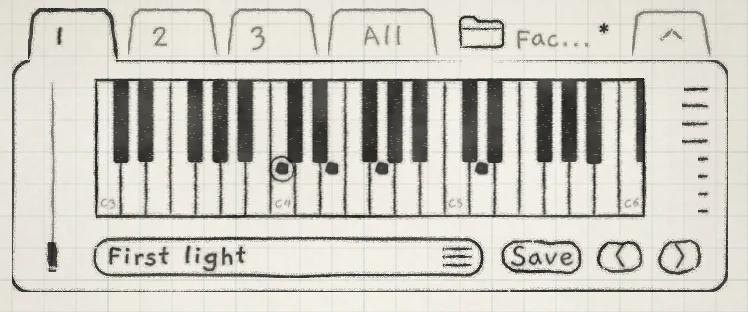 123
123- 1Root, ringed
- 2Pressed notes
- 3Octave label
- Dots mark each note pressed now: from a finger, Hold or MIDI, and with the arp on, each arp note as it plays. The chord's root is ringed. Dots follow the press, not the release tail.
- The keys span three octaves and stay put while the chord fits. Otherwise they move so the chord's lowest note is the first key; a chord wider than three octaves shows more, thinner keys. Each C carries its octave number.
- Further taps step through the card's views back to the waveform.
The piano shows only on the engine's own page, not on All. A folded card keeps the waveform.
- Tap the key in the top row, tap Chords under KEYBOARD, and set Root to C and Scale to Major.
- Tap the waveform display to open the chord piano.
- Tap Hold.
- On row 2, play columns I, vi, IV and V in turn, lifting between them. Each chord replaces the held one without a new attack, and its dots move to the nearest notes of the chord before.