CHAPTER 50 OF 54 · REFERENCE
Performance recipes
Each recipe is a setup for live play that combines engines, Follow, Strum, patterns, effects or macros. It starts from Init (Library › START FROM SCRATCH › Init) on every engine it names, and uses the notation of Sound recipes. The values are starting points.
Tables list the values that matter as the screen shows them; "(Init)" marks one that needs no change. Engine sheet rows are named as on the sheet (KEYBOARD, PLAY, FOLLOW).
The keyboard of each engine is an app setting, stored in neither Init nor a project, so each recipe names the keyboard it uses. A project's Save keeps the rest of a setup: every engine's sound as it plays, its key and its Follow setting (Projects).
#Broken tape rhythm
Slices of a recording played from a pattern, slowed and reversed by Macro A.
Start from: Init on the Grid, generator Granular sampler, with a recording of separate hits in slot 1.
Init on the Granular sampler plays a factory kit. In the kit view (Kit), tap the kit's name and tap New first, then bring the recording in with Import or Record (Import and record).
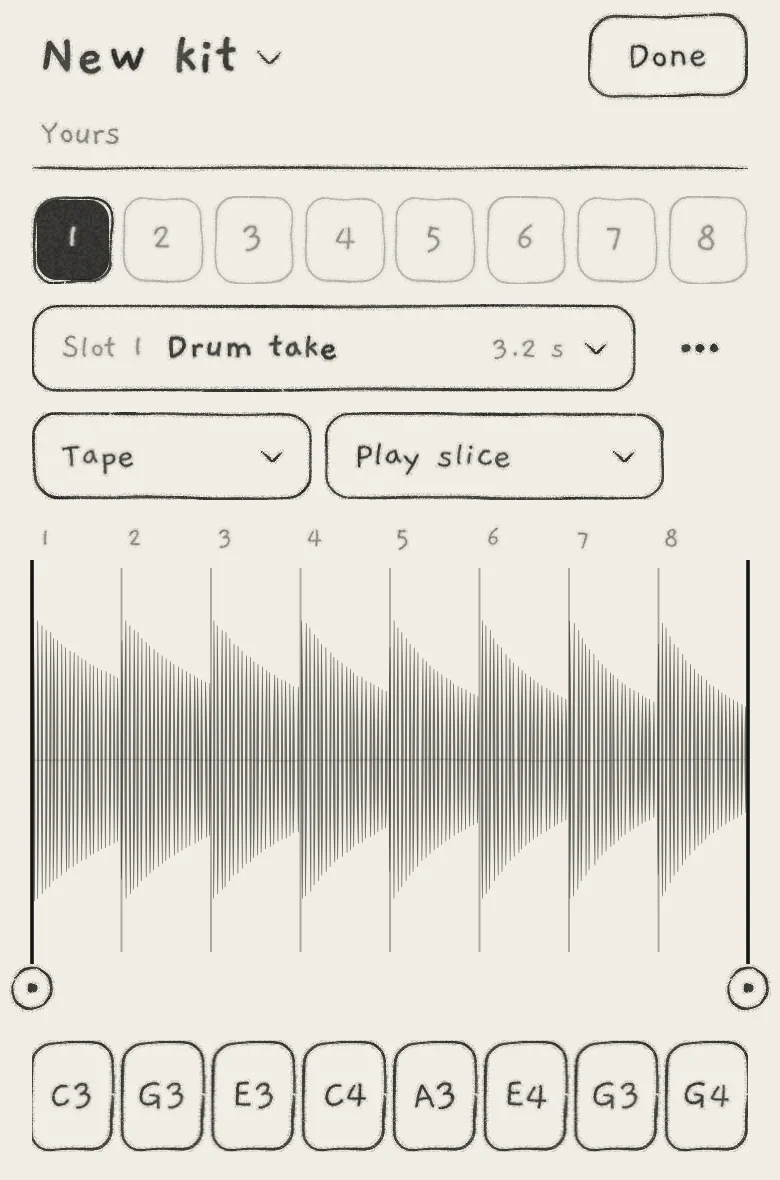 12345
12345- 1Kit name and Yours
- 2Tape
- 3Play slice
- 4Slice lines
- 5Slice pads
| Section | Control | Value |
|---|---|---|
| SAMPLER | Tape or Pitched | Tape |
| SAMPLER | Play style | Play slice (as imported) |
| SAMPLER | Grain size | 25.0 (33 ms) |
| SAMPLER JITTER | Rate jit. | 20.0 |
| ENVELOPE | Attack | 0.0 |
Matrix: A → Rate, −100.
 1
1- 1A → Rate, −100
Tape lays the slices out on the Grid: the column chooses the slice, the row the start point inside it. Play slice plays each slice once and stops at its end. Rate jit. raises each grain's read speed by a random amount, so the hits waver in pitch (Granular sampler).
Play: Drag the slice lines onto the hits (Trim, slices and kits). Record a sparse pattern on the Seq tab across several columns (Record patterns).
While the pattern plays, turn Macro A (A, top of the Sound tab) up from 0%. Rate falls from 100.0 and passes 0.0 halfway up (+50%). Beyond that the slices play backwards, at the recorded speed at +100%.
The amount sets where the reversal falls. At −50, Rate reaches 0.0 only at +100%; an amount more negative than −50 is needed for full A to play the slices backwards.
#Chords that carry the band
Engine 1 plays chords; a bass on Engine 2 and an arp on Engine 3 follow its progression.
Start from: Init on Engines 1, 2 and 3.
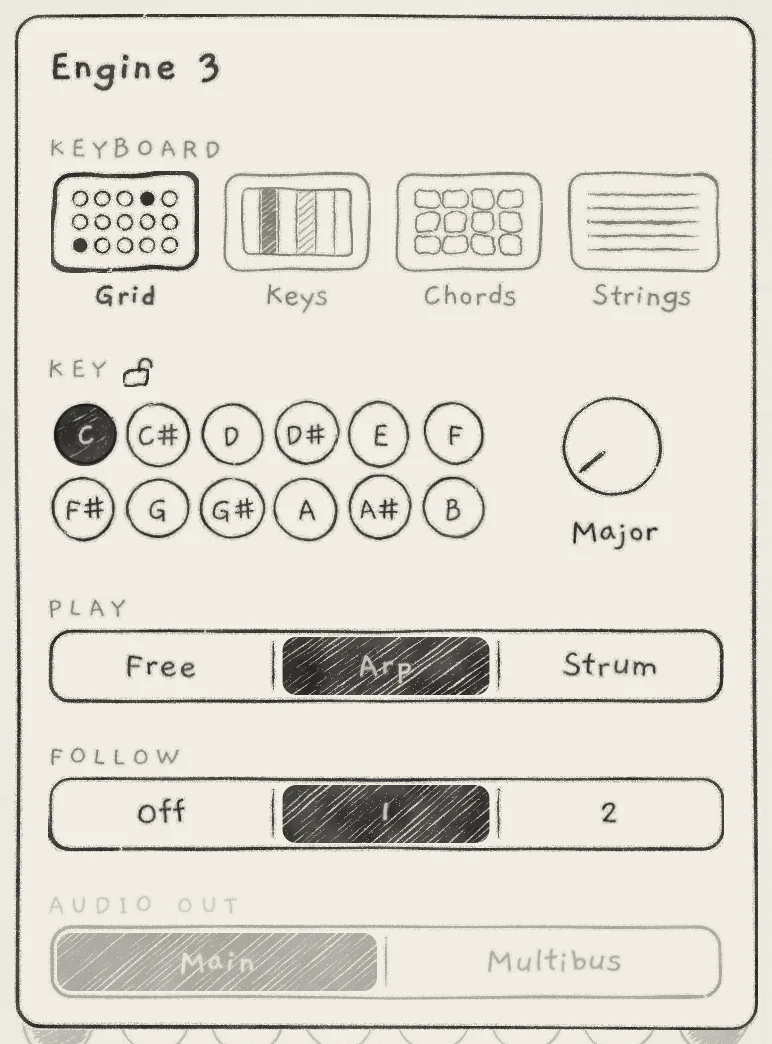 123
123- 1Grid
- 2PLAY: Arp
- 3FOLLOW: 1
| Section | Control | Value |
|---|---|---|
| Engine 1 · engine sheet | KEYBOARD | Chords |
| Engine 1 · ENVELOPE | Attack, Decay, Sustain, Release | 0.0, 35.0, 60.0, 15.0 |
| Engine 2 · engine sheet | KEYBOARD, FOLLOW | Grid, 1 |
| Engine 2 · OSC | Octave | −1 |
| Engine 2 · FILTER | Cutoff | about 530 Hz |
| Engine 2 · ENVELOPE | Attack, Decay, Sustain, Release | 0.0, 25.0, 50.0, 12.5 |
| Engine 2 · REVERB | Send | 0.0 |
| Engine 3 · engine sheet | KEYBOARD, PLAY, FOLLOW | Grid, Arp, 1 |
| Engine 3 · ENVELOPE | Attack, Decay, Sustain, Release | 0.0, 30.0, 0.0, 20.0 |
Play: On Engine 2, tap Hold and play one note in the bottom row. On Engine 3, tap Hold and play two or three notes higher up. On Engine 1, play I, vi, IV and V on row 1.
At each chord, both followers move by the chord's distance from degree I, in scale steps, and keep their shape in the scale (Key lock and Follow). Engine 3's arp keeps its rhythm; only its notes move.
Only the leader's column moves the followers. Rows 2 to 4, Spice, Voicing and Spread change Engine 1's chord, not the followers' notes (Play Chords, Chord colour). For an engine that plays the lead chord itself, with its colour, put it on Strings (Strings over a chord engine).
#One-shot strummed keys
Notes struck together enter one after another, then ring with the amp envelope.
Start from: Init on the Grid.
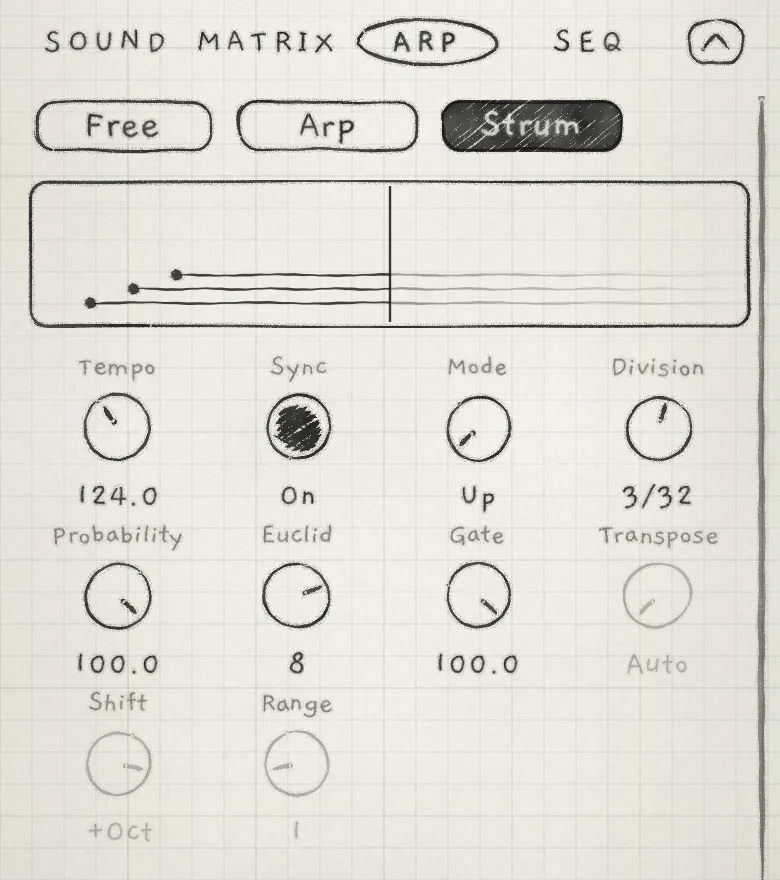 1234
1234- 1Strum
- 2Three notes, one Division apart
- 3Division
- 4Transpose, Shift and Range, greyed
| Section | Control | Value |
|---|---|---|
| Arp tab | Free / Arp / Strum | Strum |
| Arp tab | Mode, Division | Up, 3/32 (Init) |
| ENVELOPE | Attack, Decay, Sustain, Release | 0.0, 50.0, 0.0, 25.0 |
Play: Touch three pads together and keep them down. The first note touched sounds at once; the others enter after it in Up order, 3/32 apart at the engine's tempo. A note released before its turn is skipped, so hold the chord until its last note enters.
For a faster rake, turn Division left of centre to a free value such as 90.0. Free values run independently of tempo and strum faster as the number rises (Strum).
Then set engine sheet › KEYBOARD › Chords. Every chord change strikes the whole new chord again as a strum, starting on the lowest note.
For gaps, lower Probability to 50.0. At Init's Euclid of 8, every second step is then a rest.
#Rising octave cloud
Echoes that each sound an octave above the one before.
Start from: Init.
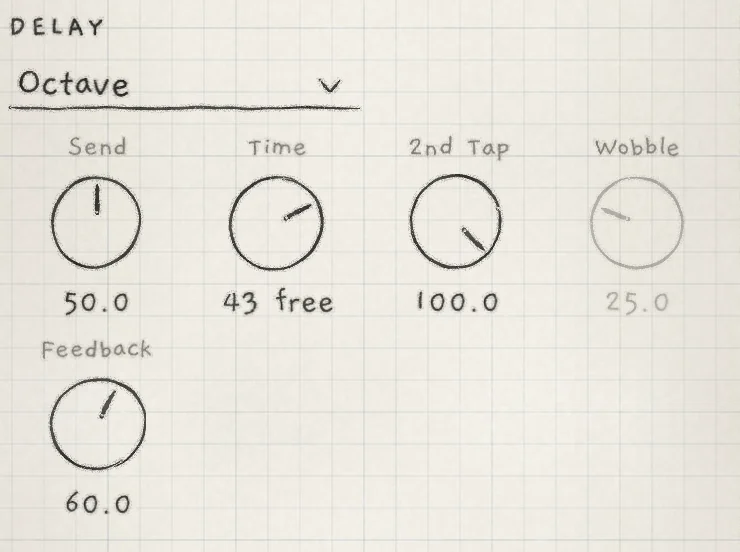 12345
12345- 1Type menu
- 2Send
- 3Time
- 4Wobble, greyed
- 5Feedback
| Section | Control | Value |
|---|---|---|
| ENVELOPE | Attack, Decay, Sustain, Release | 0.0, 30.0, 0.0, 20.0 |
| DELAY | Type | Octave |
| DELAY | Send | 50.0 |
| DELAY | Feedback | 60.0 |
| REVERB | Shimmer | 40.0 |
Matrix: A → Send (DELAY), +30. B → Send (REVERB), +30.
Play: Play single notes with space between them. Time stays at Init's 43 free, about 400 ms. Each repeat sounds an octave above the last and loses top end, and the repeats die away at every Feedback setting (Delay).
On the last note of a phrase, turn A up to send more of it into the delay. B raises the reverb send. The reverb also takes the delay's output, so the echoes pass through the Shimmer as well (Reverb and mix).
#A macro that adds motion
Macro A sets how far LFO X moves the wavetable position, and adds chorus.
Start from: Init, generator Wavetable.
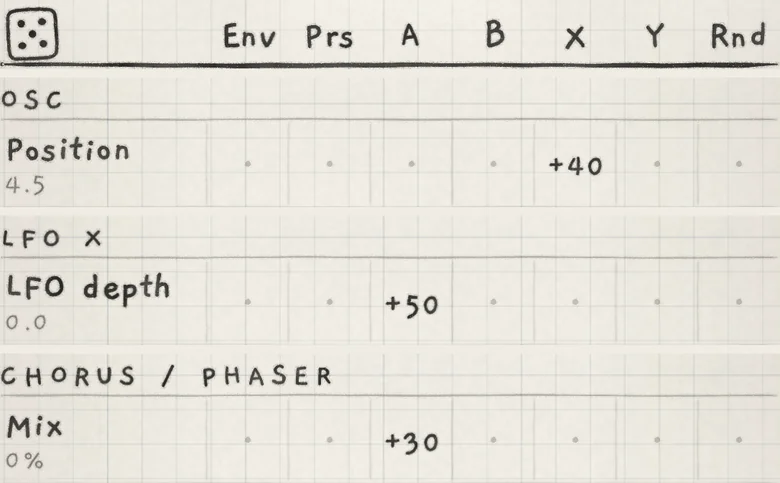 123
123- 1X → Position, +40
- 2A → LFO depth, +50
- 3A → Mix, +30
| Section | Control | Value |
|---|---|---|
| OSC | Position | 4.5 |
| LFO X | Shape | Sine |
Matrix: X → Position, +40. A → LFO depth (LFO X), +50. A → Mix (CHORUS / PHASER), +30.
Play: Hold a note and turn A up from 0%. LFO X's Depth stays at Init's 0.0, so at 0% Position does not move. As A rises, LFO X moves Position further and the chorus Mix rises, to 30% at +100%. Position 4.5 is the middle of its range, so the bipolar LFO has room on both sides (Macros and dice).
In a host, Macro A is one automation parameter, so one lane plays the whole movement (INK in a host). On the All page, the engine's XY pad moves Macro A across (Mixer and All page).
#Strings over a chord engine
Engine 2's strings take the chord Engine 1 plays; strum them with the other hand.
Start from: Init on Engines 1 and 2.
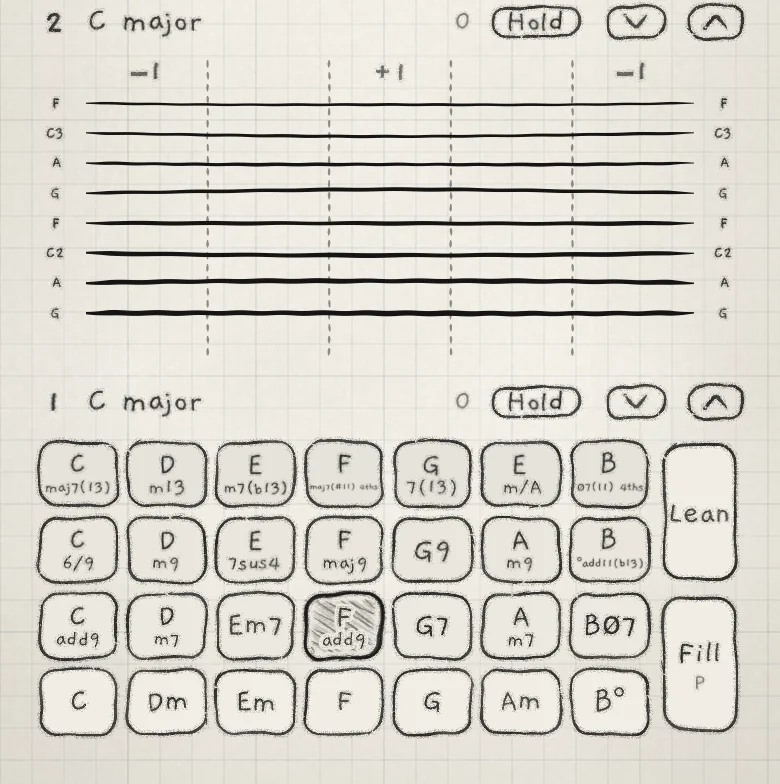 123
123- 1Engine 2 on Strings
- 2String notes of Fadd9
- 3Struck tile
| Section | Control | Value |
|---|---|---|
| Engine 1 · engine sheet | KEYBOARD | Chords |
| Engine 1 · ENVELOPE | Attack, Decay, Sustain, Release | 0.0, 35.0, 60.0, 15.0 |
| Engine 2 · engine sheet | KEYBOARD, FOLLOW | Strings, 1 |
| Engine 2 · ENVELOPE | Attack, Decay, Release | 0.0, 30.0, 20.0 |
| Engine 2 · DELAY | Type, Send, Time | Ping-Pong, 30.0, 8 /32 sync |
Play: On the All page, touch a tile on Engine 1, then strum Engine 2. The strings play every note of the chord, its colour and Spice tones included, laid out across the strings their own way; the chord's Voicing, Spread and doublings stay on Engine 1 (Play Strings).
A chord change retunes only the plucks after it; strings still ringing keep their notes. The strings keep the last chord until the next one, so Engine 1 needs no Hold.
Strum speed sets each pluck's level, brightness and ring. Each pluck ends with the string's own fade, not with Sustain, so the table leaves Sustain at Init.