CHAPTER 8 OF 54 · PLAY
Keyboard, key and scale
Each engine plays from a keyboard, its playing surface, and in a key, Root plus Scale. The key decides which notes every keyboard, the arp and the patterns play. Both are set in the KEYBOARD and KEY rows of the engine sheet (Find your way).
Every choice in the sheet applies at once, and the sheet stays open until you tap beside it. Its other rows have their own chapters: PLAY in Arp and Strum, FOLLOW in Key lock and Follow, AUDIO OUT in INK in a host.
#The key in the top row
 12345
12345- 1Key
- 2Hold
- 3Octave down
- 4Octave
- 5Octave up
The top row shows the focused engine's key, for example "D dorian". A closed lock in front of it means the key is locked (Key lock and Follow).
Tap the key to open that engine's sheet. On the All page, each engine's band shows its own key, which opens the sheet for that engine (Mixer and All page).
#Choose a keyboard
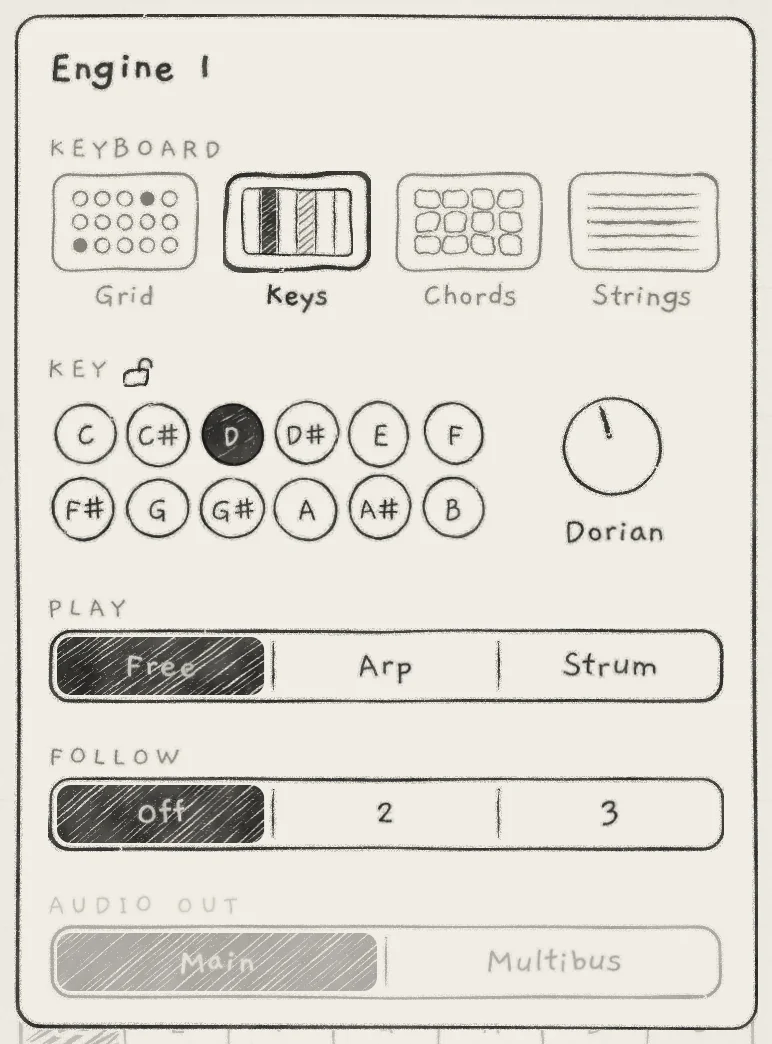 12345
12345- 1KEYBOARD
- 2Lock
- 3Root pads
- 4Scale knob
- 5Scale name
The KEYBOARD row shows each keyboard as a small drawing. The chosen one has a heavier box and its name in bold. Tap a drawing to switch.
| Keyboard | What it plays | Chapter |
|---|---|---|
| Grid | 8 by 8 pads in the key; each column rises in scale steps, Stride sets the interval between columns | Play the Grid |
| Keys | A continuous keybed, one strip per scale note; pitch follows the finger sideways, pressure shapes the note | Play Keys |
| Chords | A whole chord from one touch; the columns are the scale's degrees | Play Chords |
| Strings | Eight strings tuned to one chord, strummed or plucked | Play Strings |
Switching the keyboard releases the notes latched with Hold, turns Hold off and ends the engine's notes on MIDI out. When an engine leaves Chords, its chord piano closes (Play Chords), and engines that follow it play their own notes untransposed (Key lock and Follow).
The keyboard is an app setting, one per engine. Loading a sound or a project does not change it. In a host, each INK instance keeps its keyboards in the host's session.
#The key: Root and Scale
The KEY row sets the engine's key. The padlock right after the label KEY locks it.
- RootThe key's tonic, C to B. Tap a pad; the chosen pad is inked. Default: C. Matrix: Root (PITCH).
- ScaleThe notes the key contains. Turn the knob to step through the scales; tap the name under it to open the list. Default: Major. Matrix: Scale (PITCH).
- Lock(padlock)Closed, the engine keeps its key when another engine or a pattern changes key (Key lock and Follow).
The key belongs to the project, one per engine. A sound carries no key, so loading a sound keeps the engine's key. A saved pattern can carry a key of its own (Edit and save patterns).
With no engine locked, a key change on one engine applies to all three. With locks, the rules in Key lock and Follow apply.
#Root
Root sets the key's tonic in semitones, C to B. It covers one octave; to transpose the sound by octaves, use Octave in OSC (Oscillators). The Octave arrows move what the keyboard plays.
#Root and Pitch
Root is the key. Pitch in OSC is the sound's own tuning, applied to every note (Oscillators).
- Notes from the Grid, Keys, Chords and Strings, the arp and patterns play at Root plus Pitch.
- Incoming MIDI notes play the note received plus Pitch and Octave, without Root.
- On a Chords engine, Keys play can set MIDI keys to play the key's degree chords, which are built on Root (MIDI in).
#Scale
Scale selects the notes of the key. Turn the knob to step through the scales in the order of the table below; the name under the knob shows the current one.
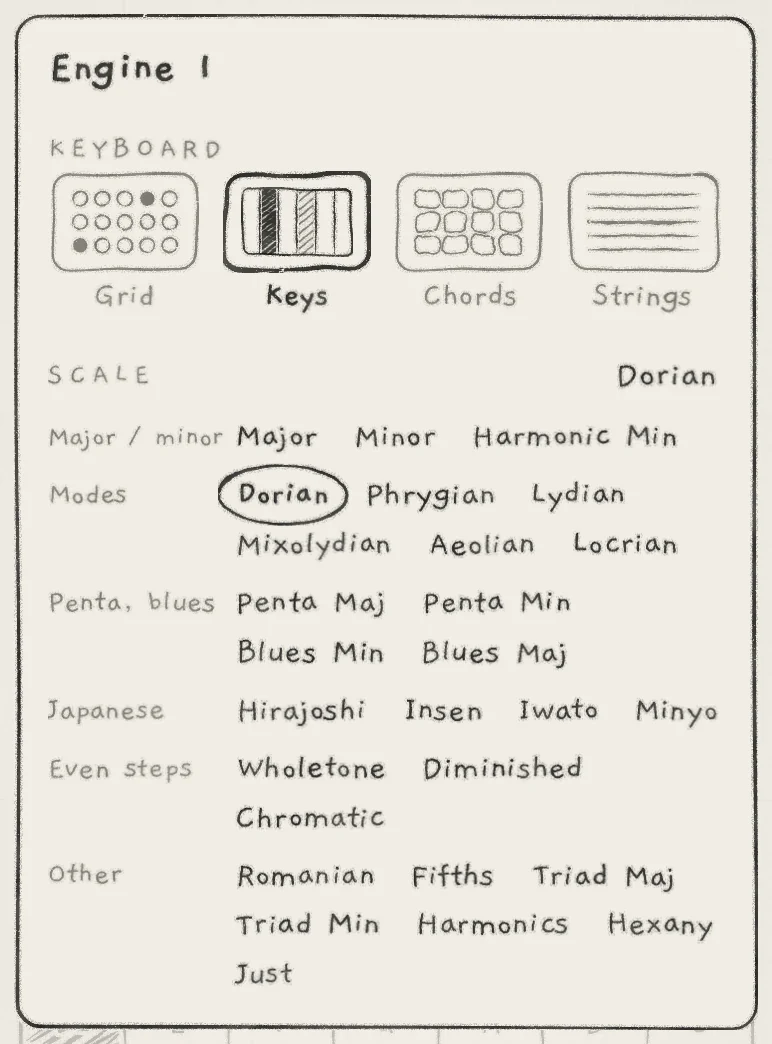 1234
1234- 1SCALE title
- 2Scale name
- 3Families
- 4Chosen scale
Tap the scale's name to open the list of every scale, grouped by family. The list takes the place of the rows under KEYBOARD, with the title SCALE and the current name at the right. On a phone on its side it fills the right column of the sheet.
Tap a scale to choose it: a circle draws round it and the list closes. A tap on the name, or on the list between the scales, closes the list without a change. Escape on a hardware keyboard closes the list, then the sheet.
#Scale reference
Steps are in semitones above Root. The microtonal scales are given in cents (ct).
| # | Scale | Family | Notes | Steps |
|---|---|---|---|---|
| 1 | Major | Major / minor | 7 | 0 2 4 5 7 9 11 |
| 2 | Minor | Major / minor | 7 | 0 2 3 5 7 8 10 |
| 3 | Harmonic Min | Major / minor | 7 | 0 2 3 5 7 8 11 |
| 4 | Penta Maj | Penta, blues | 5 | 0 2 4 7 9 |
| 5 | Penta Min | Penta, blues | 5 | 0 3 5 7 10 |
| 6 | Hirajoshi | Japanese | 5 | 0 2 3 7 8 |
| 7 | Insen | Japanese | 5 | 0 1 5 7 10 |
| 8 | Iwato | Japanese | 5 | 0 1 5 6 10 |
| 9 | Minyo | Japanese | 5 | 0 2 5 7 9 |
| 10 | Fifths | Other | 2 | 0 7 |
| 11 | Triad Maj | Other | 3 | 0 4 7 |
| 12 | Triad Min | Other | 3 | 0 3 7 |
| 13 | Dorian | Modes | 7 | 0 2 3 5 7 9 10 |
| 14 | Phrygian | Modes | 7 | 0 1 3 5 7 8 10 |
| 15 | Lydian | Modes | 7 | 0 2 4 6 7 9 11 |
| 16 | Mixolydian | Modes | 7 | 0 2 4 5 7 9 10 |
| 17 | Aeolian | Modes | 7 | 0 2 3 5 7 8 10 |
| 18 | Locrian | Modes | 7 | 0 1 3 5 6 8 10 |
| 19 | Blues Min | Penta, blues | 6 | 0 3 5 6 7 10 |
| 20 | Blues Maj | Penta, blues | 6 | 0 2 3 4 7 9 |
| 21 | Romanian | Other | 7 | 0 2 3 6 7 9 10 |
| 22 | Wholetone | Even steps | 6 | 0 2 4 6 8 10 |
| 23 | Harmonics | Other | 4 | 0, 386, 702, 969 ct |
| 24 | Hexany | Other | 5 | 0, 386, 498, 702, 814 ct |
| 25 | Just | Other | 7 | 0, 204, 386, 498, 702, 884, 1088 ct |
| 26 | Chromatic | Even steps | 12 | 0 1 2 3 4 5 6 7 8 9 10 11 |
| 27 | Diminished | Even steps | 8 | 0 2 3 5 6 8 9 11 |
Minor and Aeolian have the same steps.
Harmonics, Hexany and Just are microtonal: their steps are just-intonation intervals, not equal-tempered semitones. Harmonics uses the 4th to 7th harmonics (4:5:6:7). Just is a just-intoned major scale.
#Scale steps on the Grid
The Grid's columns climb in scale steps, so a column spans a wider range in a scale with fewer notes. Stride, the interval between columns, is set in semitones and moved onto the nearest note of the scale. Degree moves the whole layout in scale steps. The same Stride and Degree therefore give different intervals in different scales (Play the Grid).
#Modulate the key
Root and Scale are rows in the Matrix's PITCH group, and both are stepped. The base value is the project's key; the modulation amounts belong to the sound.
- Root moves in whole semitones, between −24 and +23 st from C. It never wraps: B plus 2 st is the C# above, not the C# below.
- Scale moves through the scales in the knob's order.
The dice never modulates Root or Scale (Macros and dice).
#Octave
 123
123- 1Octave down
- 2Range shown
- 3Octave up
The Octave arrows (˅ ˄) sit right of Hold in the top row. They move the octave the keyboard plays in, not the sound. Each engine has its own, saved with the project. To transpose the sound, turn Octave in OSC: it belongs to the sound, is stored by Save and marks the sound as edited (Oscillators); Matrix: Octave (PITCH).
Grid, Chords and Strings. Each tap moves the keyboard down or up one octave, −3 to +3. The value shows between the arrows; an arrow greys at its end of the range. A note keeps the octave it was struck in: held and latched notes stay where they sound, and only the next note moves.
- Grid. The pad names follow the arrows. A latched note, the arp and a recorded take keep the octave each note was played in. On a sliced sample kit the arrows are greyed: its rows are its slices.
- Chords. The next chord a finger strikes moves; the sounding chord stays.
- Strings. The next plucks move; ringing strings keep their notes.
MIDI notes and patterns never move with the arrows: a MIDI note plays at the sound's Octave, and a recorded note keeps the octave it was recorded in.
Keys. The arrows move the octaves the keybed shows; the sound is not transposed. The range shown, for example "2–3", takes the place of the number, and an arrow greys at the end of the keybed's range. While a note sounds above or below the visible range, the arrow on that side flickers. The range is saved with the project.
On the All page, each band has its own arrows: on Chords and Strings they move the keyboard's octave as above, on Grid and Keys they move the range shown (Mixer and All page).
- Tap the key in the top row. The engine sheet opens.
- Under KEYBOARD, tap Keys.
- Under KEY, tap the D pad.
- Tap the scale's name, then tap Dorian in the list.
- Tap beside the sheet. The top row reads "D dorian" and the keybed plays D Dorian.