CHAPTER 39 OF 54 · PERFORM AND RECORD
Clock and sync
Each engine's sequencer and arp run on a clock. With Sync on, an engine follows the master clock that all synced engines share; with Sync off, it runs at its own tempo. This chapter covers which clock leads, how engines and patterns come in on the bar, and how INK follows and sends MIDI clock.
#The master clock
The master clock is the first of these that is present:
- The host's tempo, when INK runs as a plug-in in a host that gives one.
- A MIDI clock coming in, when Receive on the Clock page is not Off. Receive is Any by default, so any clock that arrives takes over.
- Engine 1's Tempo, from Engine 1's current pattern.
With no host and no clock coming in, Engine 1 sets the tempo even when its own Sync is off. Choosing another pattern on Engine 1 then changes the tempo of every synced engine.
Synced engines follow the master clock tick for tick. An engine with Sync off runs at its own Tempo, and outside tempo changes do not move it.
Tempo and Sync belong to the pattern, so choosing another pattern can change an engine's clock. Both controls, and how Tempo reads on a synced engine, are in Arp rhythm and tempo.
The arp, Strum and Fill run at their engine's tempo without waiting for the bar. The arp starts on the clock's next 32nd note; a strum and a Fill phrase count from the strike (Arp, Strum, Lean and Fill).
#Start and arm
Play, the triangle on the Seq tab, starts and stops the engine's pattern (Record patterns). On a synced engine, when it starts depends on what else plays.
Tap Play on a synced engine while no other synced engine plays: it starts at once, on beat 1.
Tap Play on a synced engine while another plays: the engine is armed. It starts on the first beat of the next bar, on the step it would have reached had it played from bar 1, so it lands in place with the others. Tap Play again before the bar to cancel.
 123
123- 1Playing
- 2Armed
- 3Stopped
The engine tabs show each engine's state: a dot while its sequencer plays, changing size on each step, and a dashed ring while it is armed. Play on a playing engine stops it at the end of the current step.
A bar is 16 sixteenths (4/4). In a host, the bar follows the host's time signature: a 3/4 bar is 12 sixteenths, a 7/8 bar 14. On an engine with Sync off, bars count in its own sixteenths from the moment it started.
#Pattern swaps on the bar
A pattern chosen while its engine plays waits for the bar. The old pattern plays to the end of the bar; the new one comes in on the next bar's first beat, on the step it would have reached had it played from bar 1. Until then its number and name on the Seq tab are in pencil.
The new pattern's Tempo, Sync, Division and other sequencer settings take effect at the swap. On a stopped engine a swap is immediate.
#Host and MIDI transport
A host's start, or a MIDI Start or Continue, starts every engine. Each synced engine comes in on the step the song position implies: the position is counted from bar 1 and wrapped to the pattern's loop, so a start mid-song, a loop or a seek lands every pattern in place. Engines with Sync off start from their first step at their own tempo. A Stop stops every engine.
Play on an engine and the outside transport act on the same engines; the later action decides. While the outside transport is stopped, Play starts one engine: a synced one on the clock's next sixteenth, one with Sync off at once. While it plays, Play on a stopped engine waits for the next bar.
In a host, a label beside Play reads DAW plays or DAW stopped, the state of the host's transport (INK in a host).
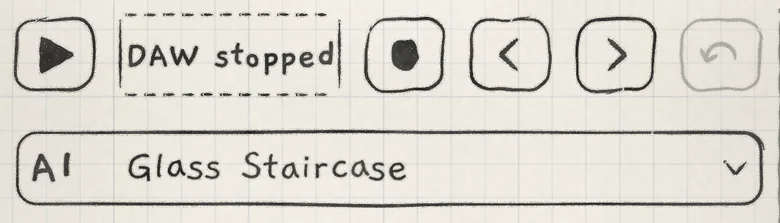 123
123- 1Play
- 2DAW label
- 3Pattern button
#Clock page
The Clock page holds INK's MIDI clock settings. On iPhone and iPad it is at Settings › MIDI › Clock; in the Mac app and the plug-ins, at Settings › Clock. Its settings belong to the app, not to the project.
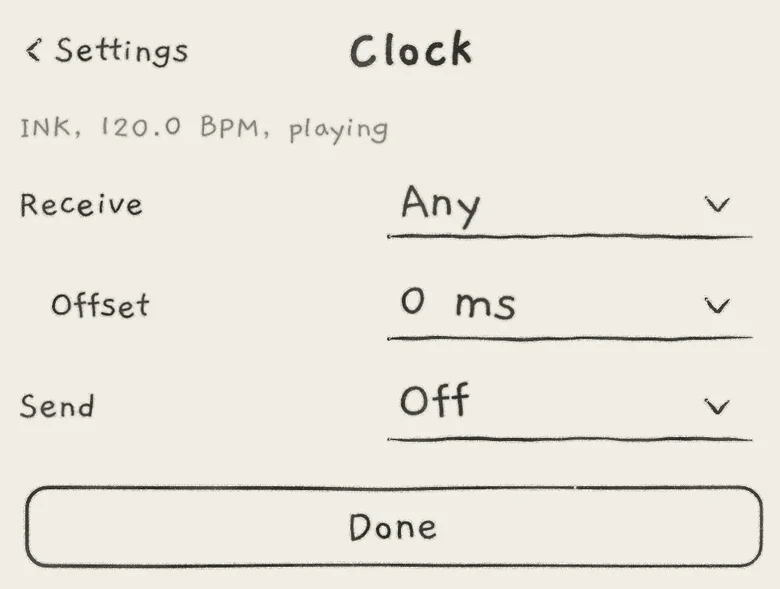 1234
1234- 1Clock line
- 2Receive
- 3Offset
- 4Send
The top line names the clock INK runs on (INK, Host or MIDI in), its tempo, and whether it is playing or stopped.
- ReceiveThe MIDI clock INK follows: Off, Any, or one port. Default: Any.
- OffsetMoves INK's steps against an incoming clock: −50 to +50 ms; positive plays later, negative earlier. Default: 0 ms. Shown while Receive is not Off.
- SendSends MIDI clock: Off, Clock, or Clock and transport. Default: Off. Standalone app only.
Receive. Off ignores an incoming clock and its Start, Stop and Continue. Any follows the first port that sends a clock or a transport message and ignores the others, so two clocks never mix; another port takes over once that one has sent nothing for 2 s. A named port is followed alone; when it is gone it stays listed as "<name>, not connected". In a plug-in, Receive offers Off and Any only, and a host that gives a tempo always comes first.
On a Mac the standalone app receives no MIDI clock; run INK as a plug-in in a host to follow one.
Offset lines INK up with gear that sounds early or late. It moves in 1 ms steps up to 20 ms either way, then through 25, 30, 40 and 50 ms. At 0 ms the standalone app already sounds on the tick: it allows for its own latency and the device's output latency.
Send sends the clock INK runs on, also while stopped. Clock and transport adds Start and Stop: INK's own transport sends Start, always from beat 1, when the first engine starts, and Stop when the last one stops. While INK follows a MIDI clock, it passes on that clock's Start, Stop, Continue and Song Position as they came. MIDI out, the clock included, is delayed by INK's own latency so it lines up with INK's audio (MIDI out).
Send is hidden in the AUv3s, where the host sends the clock. With Clock and transport on, the app sends Stop before it sleeps in the background if its transport was playing. INK MIDI has no Clock page (INK MIDI).
#MIDI clock in
INK smooths an incoming clock: steps play on a steady beat fitted to the recent clocks, not on each clock as it arrives. The jitter of single clocks, Bluetooth included, does not reach the steps, the tempo shown stays steady, and real tempo changes are followed.
- Start plays from beat 1. Continue resumes at the last Song Position received; without one, after the last sixteenth played before the Stop.
- A clock that stops without a Stop: while an engine plays, it plays on at the last tempo. When the clock returns, INK moves onto it without a jump in steps; after a Start in the gap, the returning clock is beat 1. With nothing playing, INK returns to its own clock.
A clock alone sets the tempo; it does not start the engines. For an outside start, the device must send Start or Continue as well as clock.
#Polymeter
Each engine loops its own pattern, also with Sync on, so patterns of different loop lengths run as a polymeter: 8 steps against 7 shift by one step each cycle and line up again after 56 steps. Loop length and Division are per pattern (Pattern playback).
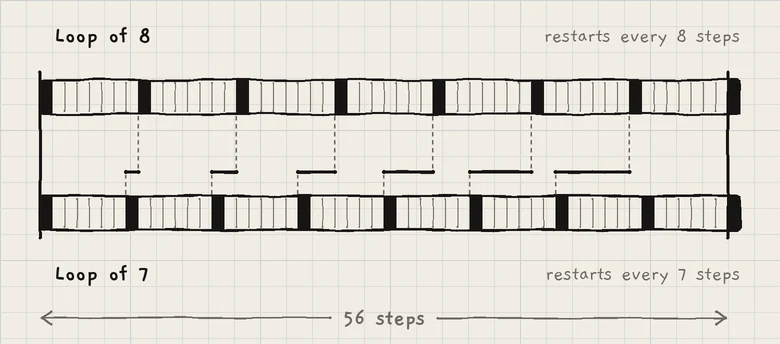 123
123- 1Loop of 8
- 2Loop of 7
- 3Offset grows by one step per cycle
With different Divisions, loops line up after the least common multiple of their lengths in time. Because an outside start or seek counts the position from bar 1, the polymeter plays the same from any bar of the song.
- On Engine 1 and Engine 2, choose patterns with the same Division and Sync on.
- Set Engine 1's loop to 8 steps and Engine 2's to 7.
- Tap Play on Engine 1.
- Tap Engine 2's tab and tap Play. The tab carries a dashed ring until the next bar.
- Engine 2 starts on the bar; the two loops line up again every 56 steps.