A lookup for the whole instrument. Each row names a control or gesture and links the chapter that explains it. Ranges, Init values, Matrix rows and CCs are in Parameter reference.
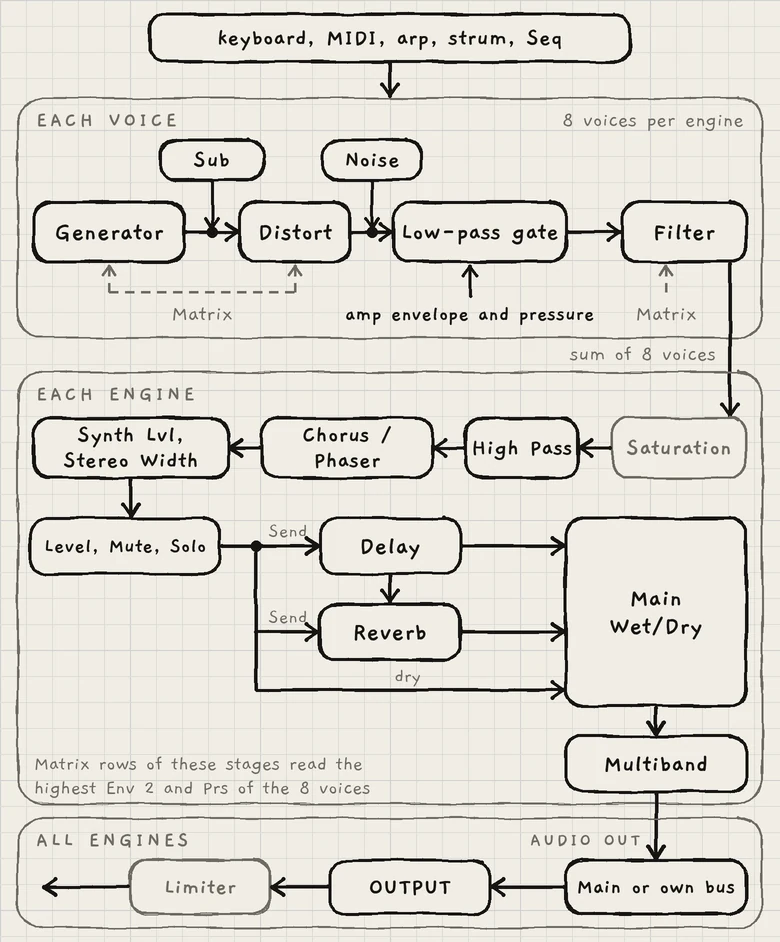
Each voice: generator and Sub → Distort → Noise joins → low-pass gate → Filter. The amp envelope, driven by pressure, modulates the low-pass gate, which sets level and brightness together. The SEM-style Filter follows the gate, so it receives the enveloped signal; INK reverses the usual oscillator → filter → amplifier order.
Each engine: sum of 8 voices → saturation → High Pass → CHORUS / PHASER → Synth Lvl into the peak compressor, with Stereo Width → Level, Mute, Solo → DELAY and REVERB sends → Main Wet/Dry → MULTIBAND → AUDIO OUT (Main or own bus) → OUTPUT → limiter.
The engine's In, Off by default: Settings › MIDI (iPhone, iPad) or Settings › MIDI Settings (plug-ins). On a Mac, run INK as a plug-in in a host to play it from MIDI.
Turns it. A slow drag makes fine changes; a fast sweep covers the range quickly.
Rest the finger on a knob for a moment, then drag
Fine adjust: the whole drag turns at the slow rate. On a Mac: Shift-drag.
Double-tap a knob
Returns it to its reference value, the value saved in the sound.
Quick vertical swipe that starts on a knob
Scrolls the page.
Drag a Matrix cell up or down
Sets its amount, −100 to +100; up is more. A faster drag covers more range; rest the finger first for fine changes. On a Mac the scroll wheel moves the list (Modulation matrix).
Opens a list of the tab's sections; tap one to scroll to it.
Tap the fold handle
Folds the card to one row, or opens it.
Tap the Knobs handle
Next stop. Sound and Arp, upright: full keyboard, half keyboard, controls only, then full keyboard. Matrix and Seq: half keyboard and controls only. A drag up or down moves one stop.
Tap an engine number on the mixer
Opens that engine's page.
Swipe in from the left or right edge
Undo or redo. On a Mac: drag from the window's edge.
Three-finger swipe left or right
Undo or redo anywhere on the screen, also in a host. iPhone and iPad.
Settings (cog); the key, which shows the engine's key and opens the engine sheet; Hold, which latches notes; the Octave arrows, which move the keyboard's octave (on Keys, the octaves shown)
The waveform display; a level meter of this engine's output; a dash per voice that lengthens with its level; the sound name, which opens the Library; Save, which opens the save sheet; the previous and next arrows, which load the neighbouring sounds
The Free / Arp / Strum switch, which turns the arp or Strum on; a strip under it, the trace, which draws each note as it plays; the arp parameters; OUTPUT
The transport row, which plays, records and steps through the pattern, with the pattern button at its right; a strip of the pattern's pages; a lane of notes per Grid column; the edit bar for the selection; the Seq controls
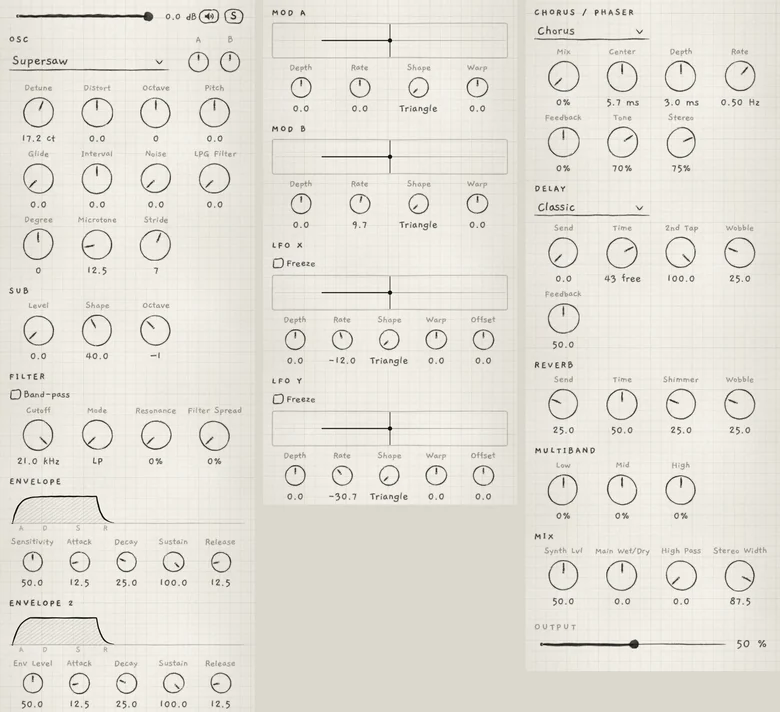
The Sound tab of Init, a Supersaw sound, from the engine strip to OUTPUT, in three columns.
1Engine strip
2OSC
3SUB
4FILTER
5ENVELOPE
6ENVELOPE 2
7MOD A
8MOD B
9LFO X
10LFO Y
11CHORUS / PHASER
12DELAY
13REVERB
14MULTIBAND
15MIX
16OUTPUT
Sections in order, top to bottom. On a Granular sampler sound, SAMPLER and SAMPLER JITTER follow the engine strip; on a Phase sound, PHASE follows OSC.
Section
What it does, and its controls
Home
Engine strip
The engine's level fader with its dB value, Mute (speaker icon) to silence the engine, S to solo it
Which sample plays and how the grains read it. Tape or Pitched sets how a note picks its slice and pitch; the play style, whether the playhead plays once or loops, in the slice or the whole sample. Kit opens the kit view, Sample picks the slot, Scrub offsets each grain's start, Grain size sets the time between grain starts, Rate the speed of grains and playhead, Timestretch the playhead's speed alone.
The generator and the voice before the gate. The generator box chooses the generator (with the bank box under it on Wavetable); A and B are the macros. Detune, Width, Position or Wave is the generator's main tone control. Distort drives the gate and the engine's saturation, Octave and Pitch transpose and tune the sound, Glide sets portamento, Interval transposes one stereo channel, Noise adds white noise, LPG Filter sets the gate's resonance. Degree, Microtone and Stride set the Grid layout. On the Granular sampler, the tone control and LPG Filter are not shown.
The Phase generator's two phase-distortion oscillators, A and B. DCW bends both from a sine to the full wave, Detune detunes B against A, Osc B sets B's level and the ring's depth, B Pitch B's interval, Ring crossfades from the mix to the ring product, Drift adds slow random pitch wander.
The SEM-style multimode filter after the gate: Cutoff, Resonance, Mode from low-pass through notch to high-pass, the Band-pass box for the band-pass output, Filter Spread to widen the sound by detuning the left and right filters
The two free LFOs, Matrix sources X and Y: the same controls, plus Offset, a constant added to the output, and the Freeze box, which keeps one value until every note is silent
An insert on the whole engine. The type menu chooses Chorus or Phaser. Mix sets the effect level (0% bypasses it), Center the chorus delay time, Sweep in its place the phaser's centre frequency. Depth and Rate set the width and speed of the movement, Feedback raises resonant peaks, Tone sets the colour of the effect signal, Stereo sets the left-right difference.
A send delay. The type menu chooses Classic, Reverse, Octave or Ping-Pong. Send sets the level in, Time the delay time, synced or free, 2nd Tap the right side's time as a share of Time, Wobble a tape-like drift of the time (Classic only), Feedback how long the repeats last.
Levels, width and low cut inside the engine's chain: Synth Lvl sets the level into the engine's peak compressor and the sends, Main Wet/Dry the dry signal against the delay and reverb returns, High Pass a low cut before CHORUS / PHASER, Stereo Width the dry signal's width
Pressure: touch, MIDI velocity, aftertouch or MPE Slide. Unipolar.
A, B
Macro A and Macro B, each with its MOD LFO. Bipolar.
X, Y
LFO X and LFO Y, with their Offset. Bipolar.
Rnd
A random value drawn at each new note.
The destination groups follow the sections of the Sound and Arp tabs. In the Matrix's order: OSC, PHASE, SUB, FILTER, PITCH, AMP ENV, ENV 2, SAMPLER, SAMPLER JITTER, MOD A, MOD B, LFO X, LFO Y, ARP, CHORUS / PHASER, DELAY, REVERB, MULTIBAND, MIX. PITCH gathers the tuning and Grid-layout controls with the key's Root and Scale. PHASE rows act only on a Phase sound, SAMPLER and SAMPLER JITTER only on a Granular sampler sound.
Some rows are named differently from their knobs, such as Synth level for Synth Lvl and LFO rate for an LFO's Rate; Parameter reference gives each row's name. On a Chords engine the Stride and Degree rows read Voicing and Spread (Modulation matrix).
The Arp and Seq parameters, in the order of the Arp tab, then the Seq tab:
Parameter
What it does
Tab
Tempo, Sync
The current pattern's tempo, and whether the engine follows the master clock
Arp, Seq
Mode
The order the held notes play in
Arp
Direction
The order the playhead takes through the pattern's loop
Seq
Division
The length of one step
Arp, Seq
Probability, Euclid
Which steps play: by chance, or as a Euclidean rhythm with Probability as its density
Arp, Seq
Gate
How much of each step a note sounds
Arp, Seq
Transpose
The order of the arp's passes
Arp
Shift
The interval between passes
Arp
Range
The number of passes before the figure starts again
Arp
Step offset
Moves the loop along the pattern, in steps
Seq
Quantize
Moves live takes toward the step grid; saved with the project
Seq
Tempo, Sync and Gate are the same controls on both tabs and belong to the engine's current pattern. Division, Probability and Euclid are separate controls on each tab (Arp rhythm and tempo, Pattern playback). On Strum, Transpose, Shift and Range are greyed.
Timing: Tempo and Sync per pattern, Engine 1 or the host as master clock (Clock and sync).
Harmony: FOLLOW for engines that move with another engine's chords; Key Lock for an engine that keeps its key when another engine or a pattern changes key (Key lock and Follow).
 12345678910111213141516