CHAPTER 47 OF 54 · MIDI AND HOSTS
INK MIDI
INK MIDI is an AUv3 MIDI processor that ships inside INK Synth.app. It is INK without the sound. The three engines keep their keyboards, arp, Strum, sequencer, Key lock, Follow and Matrix, and send what they play as MIDI to other instruments in the host. In place of the sound controls, each engine has PARAM knobs that send MIDI controllers, moved by the same macros, LFOs, Envelope 2 and pressure that modulate INK's own sounds.
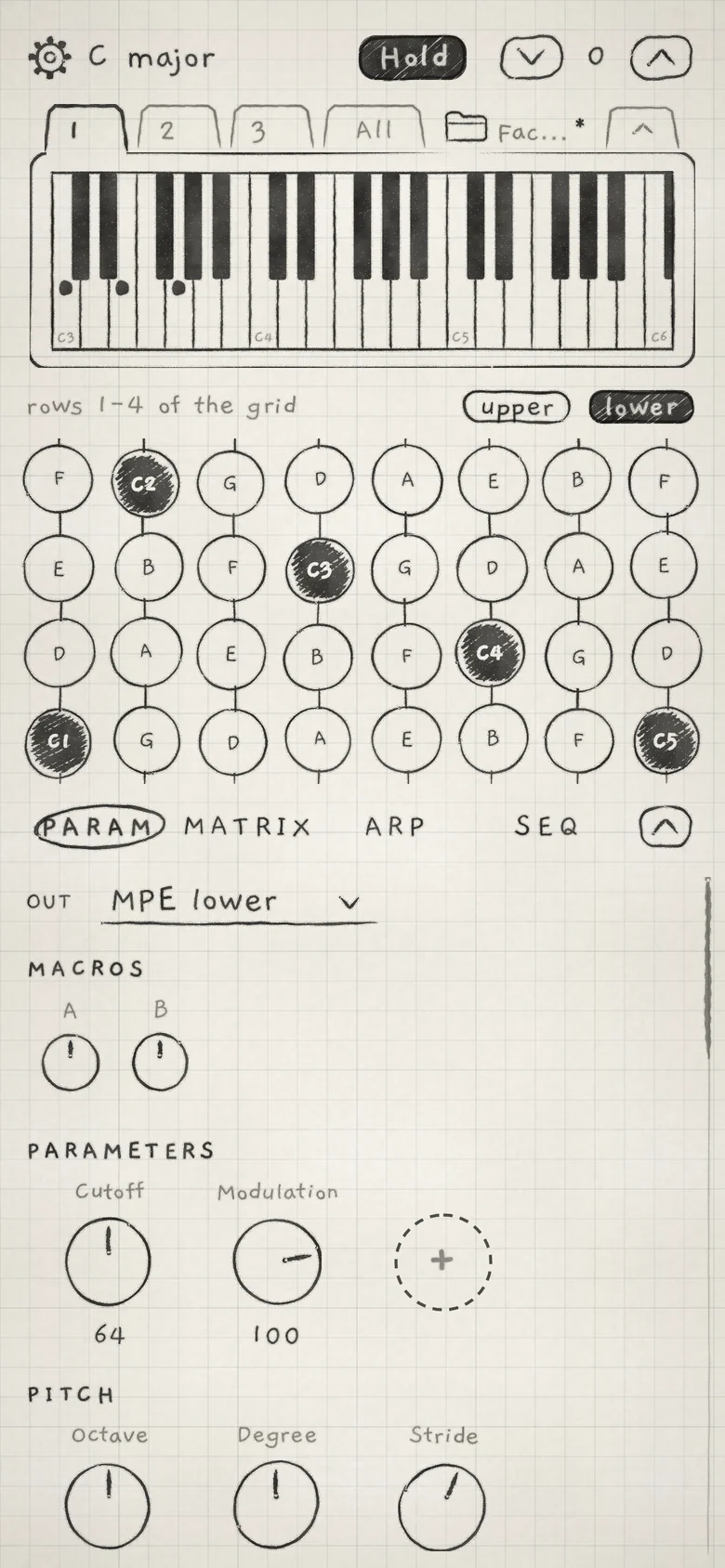 12345
12345- 1Piano of the notes sent
- 2OUT pill
- 3Param tab
- 4PARAM knobs
- 5Dashed + knob
#Outputs and defaults
Load INK MIDI where the host takes AUv3 MIDI processors. It has three MIDI outputs, INK 1, INK 2 and INK 3; connect each to the instrument it plays. Each engine's route starts on the output with its number. MIDI sent into INK MIDI plays its engines as in MIDI in.
| Engine | Output | Out | In |
|---|---|---|---|
| Engine 1 | INK 1 | MPE lower: manager channel 1, member channels 2 to 8 | Channel 1 |
| Engine 2 | INK 2 | Channel 9 | Channel 2 |
| Engine 3 | INK 3 | Channel 10 | Channel 3 |
Channels 9 and 10 sit above the lower zone, so a host that merges the three outputs into one instrument gets no channel clash. In and Out are on when INK MIDI loads; in INK Synth they start Off. Each instance keeps its own MIDI settings in the host session. INK MIDI reports no latency to the host.
#What takes the place of the sound
The receiving instrument makes the sound, so INK MIDI shows controls for what it sends where INK Synth shows the sound.
- Tabs. Param, Matrix, Arp and Seq. The Param tab takes the place of the Sound tab.
- Card. A piano of the notes the engine sends, on every page, in place of the waveform display, sound name, Save and arrows. On a Chords engine the sounding chord's root is ringed. On the All page a piano sits over each keyboard.
- Engine strip and mixer. An Out pill shows where the engine's notes go and opens its MIDI routes (Out and routes), in place of the level fader, meter, Mute and Solo. The XY pad stays (Mixer and All page).
- Sounds. Every engine starts on Init. There is no Library, and Settings has no Audition with row. Loading a pattern never offers the sound saved with it.
- Engine sheet. KEYBOARD, KEY, PLAY and FOLLOW, as in INK Synth. Audio out is the receiving instrument's.
- Settings. MIDI Settings holds each engine's In and the Out row that opens its routes. The host is the clock: tempo and transport come from it (INK in a host), so Settings has no Clock page.
Keyboards (Keyboard, key and scale), the Arp, Strum, the sequencer (Record patterns), Key lock and Follow and the Modulation matrix work as in INK Synth. What goes out, and how, is in MIDI out.
#Param tab
The Param tab holds the controls that change the notes INK MIDI sends, the PARAM knobs, and the modulation sources that move them.
| Group | Contents |
|---|---|
| MACROS | Macro A and Macro B, the Matrix sources A and B (Macros and dice) |
| PARAMETERS | The engine's PARAM knobs, each sending one controller, and the dashed + knob that adds one |
| PITCH | Octave, Degree and Stride transpose the notes sent (Keyboard, key and scale) |
| ENVELOPE 2 | The per-note envelope behind the Matrix's Env column (Envelope 2 and Random) |
| MOD A, MOD B | The LFOs that move Macro A and Macro B (LFOs and Freeze) |
| LFO X, LFO Y | The free LFOs, the Matrix sources X and Y, with Freeze (LFOs and Freeze) |
Root and Scale are on the engine sheet under KEY. Fine tuning and glide belong to the receiving instrument: set them there, or send them from a PARAM knob such as Portamento (CC 5).
#PARAM knobs
A PARAM knob sends one MIDI controller to the receiving instrument. Each engine has up to 12, under PARAMETERS.
- Add. Tap the dashed + knob. A menu card lists the controllers by their MIDI standard names; a name another knob on the engine uses is in pencil and cannot be picked. CC at the end of the list opens the other controller numbers. The pick adds a knob named after it. With 12 knobs, the + knob is gone.
- Change or remove. Tap a knob's name. The same list opens, ending in Remove.
- Value. The knob shows 0 to 127, as the receiver's controller does. A new knob starts at 64; double-tap returns it there. Inside, the knob holds 14 bits, 0 to 16383, which the High resolutions send in full (Resolution).
- Cutoff,ResonanceCC 74, CC 71.
- Attack,Decay,ReleaseCC 73, CC 75, CC 72.
- VariationCC 70.
- Vibrato rate,Vibrato depth,Vibrato delayCC 76, CC 77, CC 78.
- Volume,Pan,Balance,ExpressionCC 7, CC 10, CC 8, CC 11.
- Modulation,Breath,Foot,PortamentoCC 1, CC 2, CC 4, CC 5.
- Effect 1,Effect 2CC 12, CC 13.
- Reverb,Tremolo,Chorus,Detune,PhaserCC 91, CC 92, CC 93, CC 94, CC 95.
The list leaves out the controllers MIDI reserves for other jobs: Bank select (CC 0 and 32), Data entry (6 and 38), Sustain (64), the NRPN and RPN numbers and increments (96 to 101) and the channel mode messages (120 to 127). On a High · 14-bit CC output it also leaves out CC 33 to 63, which carry the LSBs of CC 1 to 31.
On a High · NRPN output the list offers NRPN numbers instead: first the MSB, 0 to 127, then the LSB, listed as "MSB · LSB" (for example "0 · 74"). The list follows the Resolution of the output that the engine's first route uses.
PARAM knobs and their Matrix cells are saved with the project and, in a host, the host session.
#PARAM rows in the Matrix
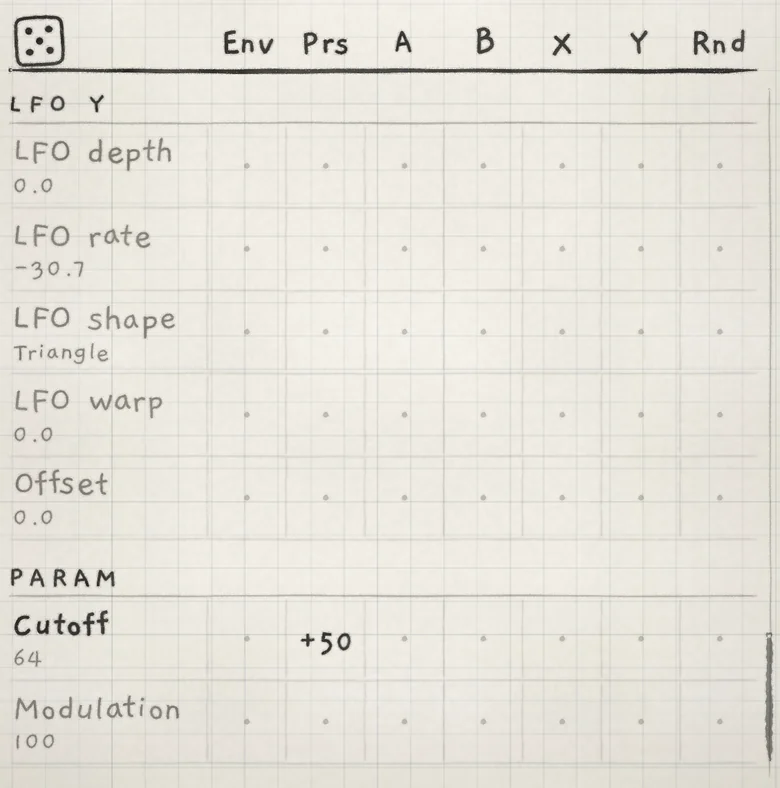 1234
1234- 1PARAM group
- 2Row named by its controller
- 3Base value, 0 to 127
- 4Prs cell
INK MIDI's Matrix keeps the groups that change what it sends: PITCH (Root, Octave, Degree, Scale, Stride), ARP, ENV 2, MOD A, MOD B, LFO X and LFO Y. Each PARAM knob adds a row named after it to a last group, PARAM.
The value sent is the knob plus each cell times its source, held to 0 to 16383. An amount of +100 on a source at full level moves the value across the whole range, as on any Matrix row.
- A, B, X, Y are the engine's macros and LFOs, as in the Modulation matrix.
- Env, Prs, Rnd come from the latest note: the newest note held, or the last note played when none is held.
- Rnd on a PARAM row is a value from 0 to +1 that each note draws once per row. A negative amount moves the value down; it does not spread both ways as a negative Rnd amount does on other rows (Amounts).
#Where PARAM values go
A PARAM value goes on every route of its engine, on the route's channel. On an MPE route it goes on the zone's manager channel: 1 for the lower zone, 16 for the upper. A route set to Off sends none.
A value goes out when it changes at the output's Resolution, as often as the output's link allows (Link). Notes go out first and never wait for PARAM values. When a route, or its output's link or Resolution, changes, the receiver gets every PARAM value again, so it starts in step with the knobs.
#Out and routes
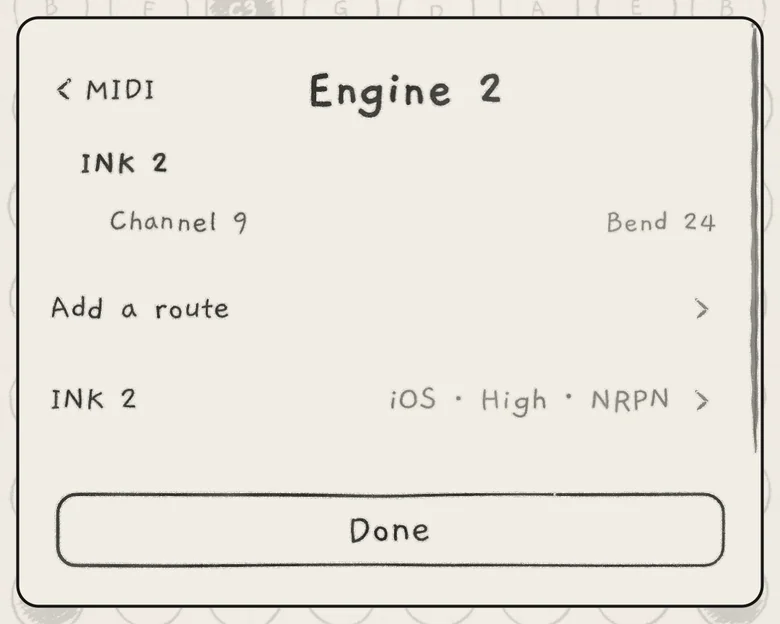 123
123- 1Route: INK 2, Channel 9
- 2Add a route
- 3Output row: link and Resolution
On the All page mixer and on the engine strip at the top of the Param tab, the Out pill shows the engine's Out: Off, the one route's channel or zone ("Channel 9", "MPE lower"), or the number of routes ("2 routes"). Tap it to open the engine's routes, titled with the engine's name. MIDI Settings' Out row for the engine opens the same page. Routes, destinations and channels work as in MIDI out; in INK MIDI the destinations are INK 1, INK 2 and INK 3.
Under the routes is the row of the engine's output, for example INK 2 with "iOS · High · NRPN". Tap it to choose, in two lists in turn, the link and the Resolution. The defaults are DIN MIDI and Standard. Both are saved with the project and the host session.
#Link
The link tells INK MIDI what carries the output to the receiver, so it paces controller traffic to fit. Pick the slowest connection in the chain.
- iOSAn app in the same host or on the same device. No shared limit.
- USB MIDIA device on a USB cable.
- DIN MIDIA 5-pin MIDI cable, also one behind a USB interface. The default.
- BluetoothA Bluetooth MIDI device.
- NetworkA network MIDI session.
Expression (bend, pressure, Slide) and PARAM values from every route on the output share the link's capacity. Notes are never paced. On a slower link, a fast controller move arrives in fewer, larger steps.
#Resolution
- Standard7-bit Control Change, 0 to 127. The default.
- High · 14-bit CCCC 1 to 31 as 14-bit pairs, 0 to 16383: the MSB on the controller, the LSB on the controller + 32. Other controllers stay 7-bit. For receivers that read 14-bit CC pairs.
- High · NRPNNRPN with 14-bit values: the number on CC 99 and CC 98, the value on CC 6 and CC 38. For receivers whose parameters are NRPN numbers.
- In the host, connect INK MIDI's INK 2 to a synth that listens on channel 9.
- On Engine 2's Param tab, tap the dashed + knob and choose Cutoff.
- Set the Cutoff knob to 40.
- On the Matrix tab, set the Prs cell of the Cutoff row in PARAM to +50.
- Play Engine 2. CC 74 on channel 9 rises from 40 with the latest note's pressure.