CHAPTER 13 OF 54 · PLAY
Lean and Fill
Lean and Fill add what a keyboard player plays between and over the chords. Lean moves each voice of a chord change through passing scale notes instead of jumping to the new chord. Fill plays short single-note phrases above the sounding chord. Both place their notes on 16ths at the engine's tempo.
They are the two buttons right of the Chords tiles, Lean above Fill.
 123
123- 1Lean
- 2Fill
- 3Fill style
#Turn Lean and Fill on
Both buttons respond to the same gestures:
- Tap: latches the button on or off. A latched button is inked in.
- Long press: on while the finger stays, off when it lifts. Unlike Spice (Chord colour), a long press stays momentary with Hold on.
- Held while another finger plays a tile: momentary however short the press. The button returns to its state before the press.
The latched state belongs to the engine's pattern, with the rails and Spice (Chord colour). Saving the pattern stores it; choosing or reloading a pattern restores it (Edit and save patterns).
The buttons show wherever the tiles keep a playable width beside them: on the engine's page, in the All page's Chords bands (also where a band hides the rails) and at the Knobs handle's half-keyboard stop (Find your way). Where the surface is too narrow, they are hidden.
#Lean
Lean turns a chord change into voice leading. It acts when the next chord arrives while one is sounding: a slide to another tile, a second finger, or a strike over Hold's chord. A chord struck from silence plays at once.
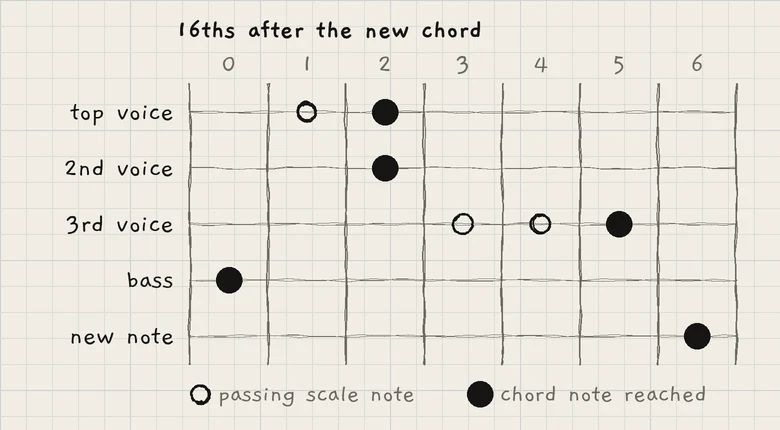
- The bass moves to its new note at once.
- The other voices start from the top down, one 16th apart. Each walks through up to 2 scale notes between its old and new pitch, a 16th per note. A step, or a move of more than 3 scale steps, goes straight to the new note at its turn. A passing note never doubles a pitch another voice holds or is moving to.
- Voices the new chord drops stop at their turn.
- New notes enter one 16th after the last voice arrives.
A new chord before the walk ends completes the walk at once and starts the next change.
How the steps sound depends on how the change was played:
- Slide: legato. Notes shared by both chords ring on, each step is a pitch move that the sound's Glide applies to, and only new notes attack.
- New finger (a press while a chord sounds): every note is played again. Notes that stay attack on the touch, walking voices on each step, new notes on entry.
- A finger taking over when another lifts: legato, as a slide.
- Strum (Strum): each step of a ringing voice is plucked again on its 16th; new notes are strummed.
#Fill
Fill plays single notes over the sounding chord while it is latched. It needs a chord sounding: a finger on a tile, or the chord latched by Hold. When the chord stops, Fill stops.
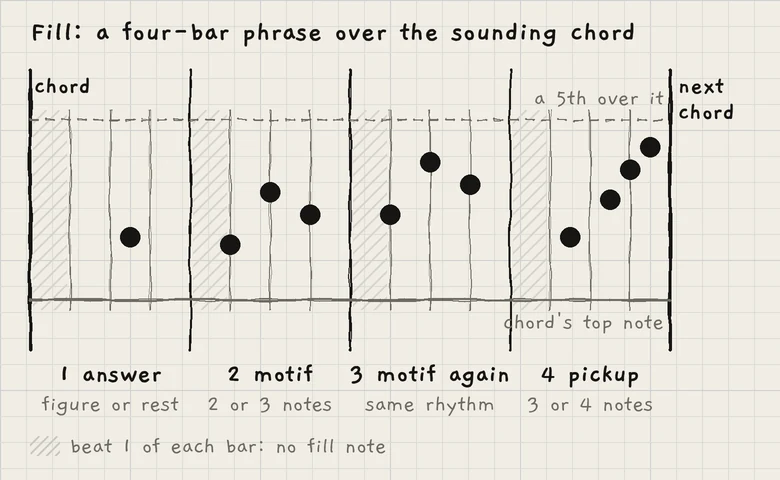
#The phrase
Fill counts bars at the engine's tempo: the pattern's, a host's or an incoming MIDI clock's (Clock and sync). The count starts at your strike, not at the transport's bar line. Strike chord changes on the bar to keep Fill's phrases on it.
- Bar 1 starts at the strike. Turned on over a chord already sounding, Fill counts from that chord's strike and plays from two 16ths after the tap.
- A later strike within a 16th of a bar or half-bar line moves the count onto that line.
- After more than a bar with no chord sounding, the count starts again at the next strike.
The bars form four-bar phrases:
| Bar | Job | Notes |
|---|---|---|
| 1 | Answer | A short figure, or a rest |
| 2 | Motif | 2 or 3 notes |
| 3 | Motif again | The motif's rhythm and contour on the chord now sounding |
| 4 | Pickup | 3 or 4 notes, ending late, leading into the next chord |
Whether a bar plays is a chance set by the style and the bar's job; the pickup is the likeliest. A bar before a chord change plays more often than one before the same chord. At most two bars in a row stay silent.
#Notes and levels
- Notes start on beat 2 at the earliest.
- They are key notes above the chord's top note, within a 5th of it (a 6th when a 5th holds fewer than 3 notes), never a half step or a tritone from a chord note.
- The highest note is C7. A chord with no room under C7 gets its fill below its top, within an octave, on notes the chord does not hold.
- The register follows the chord, so it moves with Octave.
- No fill note lands on a strike. The bar's remaining notes go on a 16th after it, moved to the new chord; notes that no longer fit are dropped.
- A pickup aims at a note of the next chord or a step from one.
Levels follow the chord's touch. Fill plays slightly louder than the chord, loudest in the pickup bar. Notes on the beat are louder than 8ths, 8ths louder than 16ths. Every style but Ambient now and then adds a grace note a whole step below a chord note.
Fill notes play on the engine's free voices. With all 8 voices in use, Fill borrows an inner voice that doubles another chord note and returns it after the phrase. With none to borrow, the note is left out.
#Held Fill: one note per tap
With Fill off, keep a finger on Fill and tap a tile. The tile plays one note over its chord instead of the chord, sounding while the finger stays (a 16th at least).
- The first note sits near a 4th above the top of the sounding chord, or of the last chord, between G4 and C6. With no chord to refer to, it sits near C5. The range moves with Octave; C7 is the highest note.
- Taps less than 4 s apart continue one line from the last note; after a longer pause a new line starts. A slide to another tile plays a note of that tile's chord.
- With Lean on, steps are likelier than leaps.
When the finger lifts from Fill, Fill stays off.
#Fill styles
Swipe sideways on Fill to change its style: right for the next, left for the previous. The swipe does not toggle Fill. On a Mac: scroll sideways over Fill.
The style's first letter is printed under Fill when the button is tall enough. Each style's figures, rhythms and accents come from piano, organ and keyboard parts in a large set of MIDI song files.
| Letter | Style | Bars that play | Grace notes | Other |
|---|---|---|---|---|
| P | Pop | Fewer than Soul and Jazz | Occasional | |
| S | Soul | Many | The most | Loudest over the touch |
| J | Jazz | The most | Often | |
| C | Classical | Fewer than Pop | Rare | Seldom repeats an earlier figure |
| A | Ambient | The fewest | None | Softest |
The style applies to every engine until INK quits. INK starts on P; the style is not saved.
#Chord piano and MIDI out
The chord piano (Play Chords) shows the notes as the engine plays them: Lean's steps, the notes its walk lets ring, and Fill's notes. MIDI out sends them as played (MIDI out).
- Set an engine's keyboard to Chords and tap Hold.
- Tap Lean.
- Strike the I tile on row 2 and lift. The chord keeps sounding.
- Strike the IV tile on row 2. The bass moves at once; the upper voices follow from the top, one 16th apart.