CHAPTER 12 OF 54 · PLAY
Chord colour
The tiles choose the chord (Play Chords); the controls under them choose how it is voiced. Voicing sets the inversion and spacing, Spread the width and octave doublings, and Spice adds colour tones. Set them before you strike: they shape the next chord, never the one sounding. Lean and Fill, the two buttons right of the tiles, have their own chapter (Lean and Fill).
#Voicing and Spread rails
 1234
1234- 1Voicing rail
- 2Chord-engine name
- 3Spice
- 4Spread rail
Voicing and Spread are set on rails: rows of eight boxes that fill continuously from the left. Drag along a rail to set its value. The fill is ink while a finger is on the rail and pencil at rest. Spice is the button between them.
- VoicingWhich chord tone is in the bass and how the upper notes are spaced. 0 at the left to full at the right. Init: 0. Matrix: Voicing (the Stride row).
- SpreadHow wide the chord is and how many tones are doubled in other octaves. 0 at the left to full at the right. Init: 0. Matrix: Spread (the Degree row).
- SpiceAdds 9ths, 11ths and 13ths, and altered tensions on V. Off or on. Init: off.
A rail stays where you leave it, with Hold on or off. A quick tap at the end of its fill returns it to 0. A double-tap on Hold returns both rails to 0.
The rails and Spice act on the next chord: a new touch, a slide to another tile, or a second finger. Moving them never re-voices a sounding chord. With both rails at 0, every row plays its chord in close position on its root.
#Voicing
Voicing sets which chord tone is in the bass and how the upper notes are spaced. From left to right it moves through:
- Close position with the root, then the 3rd, then the 5th in the bass.
- Open, then wide spacings, the bass note changing within each.
- The 7th (or 6th) in the bass at the right end. On rows 3 and 4 the right end also voices clusters: neighbouring semitones inside the chord.
Voicing acts the same on every row.
#Spread
Spread widens the chord and doubles chord tones in other octaves. Its effect grows up the rows: the same rail value widens a row 1 triad least and a row 4 chord most.
#Spice
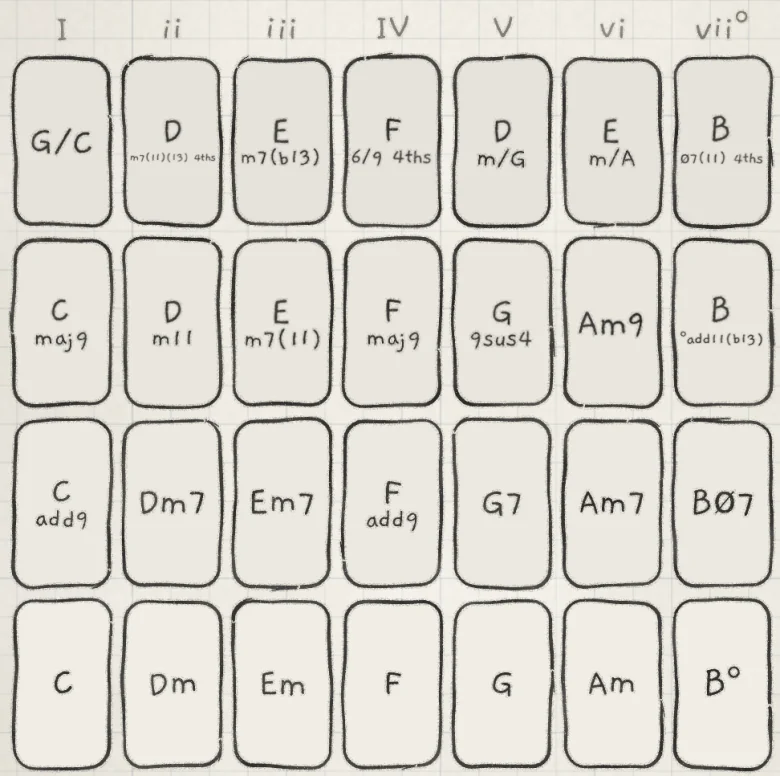
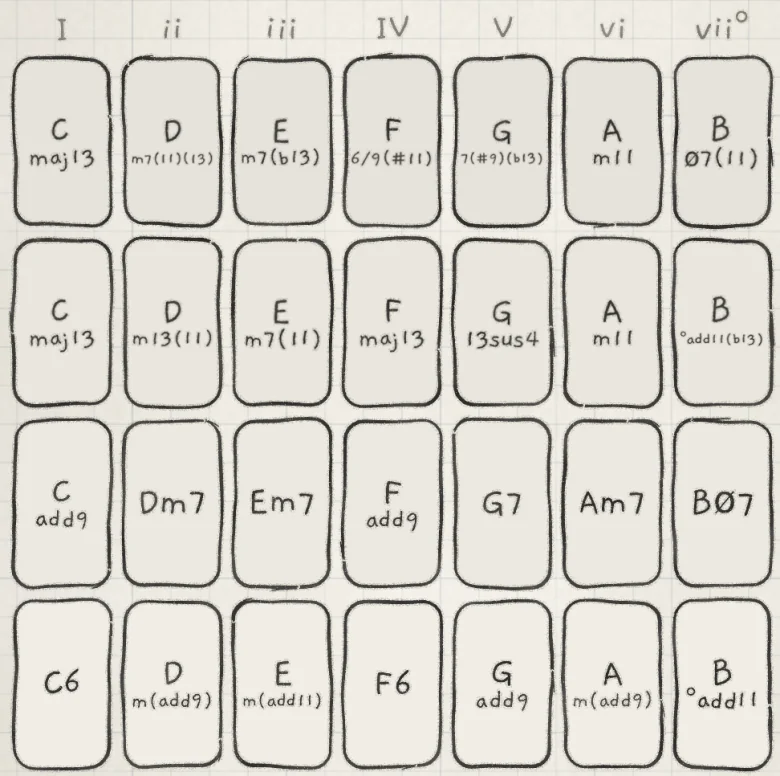
Spice adds tensions to the next chord: 9ths, 11ths and 13ths, and altered tensions on V. The chord keeps its root and its function in the key. Where the chord changes, the tile's name changes with it.
 12
12- 1Row 1 colour chord
- 2Altered tensions on V
- Row 1 plays a colour chord: the triad plus one scale tone (C6, Gadd9).
- Row 2 keeps its chord and its name. The tone row 2 adds to the triad (the 7th, 9th or 6th) moves inside the chord, directly above the root, instead of on top.
- Rows 3 and 4 add tensions from the key. Only V takes the altered tensions ♭9, ♯9 and ♭13; any dominant chord may take ♯11.
With Spice on, the rails keep their jobs: Voicing moves the bass and spacing, Spread widens the chord.
Spice acts on scales built from semitones. On a microtonal scale it leaves the chord as it is.
#Gestures
- Tap: toggles Spice. It stays on until the next tap.
- Long press: Spice is on while the finger stays and off when it lifts.
- Long press with Hold on: Spice stays on after the lift. A tap, or a double-tap on Hold, turns it off.
#Rails in the Matrix
On a Chords engine, the Matrix rows of Stride and Degree are labelled Voicing and Spread and modulate the rails. The Stride and Degree knobs on the Sound tab are greyed (Modulation matrix).
Each time a chord is struck, slid to or changed under a finger, INK adds the modulation of that moment to the rail's value, within the rail's range. With Prs → Voicing at +40, harder strikes land further right on Voicing. Like the rails, the Matrix never re-voices a sounding chord.
Prs, Rnd, A, B, X and Y all work as sources here; Rnd draws a new value at each strike. Env adds nothing, since Envelope 2 is at 0 at the strike.
#What is saved
The rail values and Spice belong to the engine's pattern, with the latched state of Lean and Fill (Lean and Fill). Choosing or reloading a pattern brings them back, and so does reopening the app or the project (Edit and save patterns).
A Chords band on the All page (Mixer and All page), or the Knobs handle's half-keyboard stop (Find your way), shows the rails and Spice only where it is tall and wide enough. The engine's page at the full keyboard always shows them.
- Set an engine's keyboard to Chords, with Voicing and Spread at 0.
- On the Matrix tab, set Prs → Voicing to +60.
- Tap the waveform display to open the chord piano.
- Strike the same tile softly, then hard. The hard strike lands further along Voicing: another bass note and a wider spacing.