CHAPTER 15 OF 54 · PLAY
Mixer and All page
The All page plays and mixes the three engines from one screen. The mixer at the top sets each engine's level, Mute, Solo and macros. Under it, each engine's keyboard sits in a band of its own and plays as on the engine's page. Tap All in the engine tabs to open it.
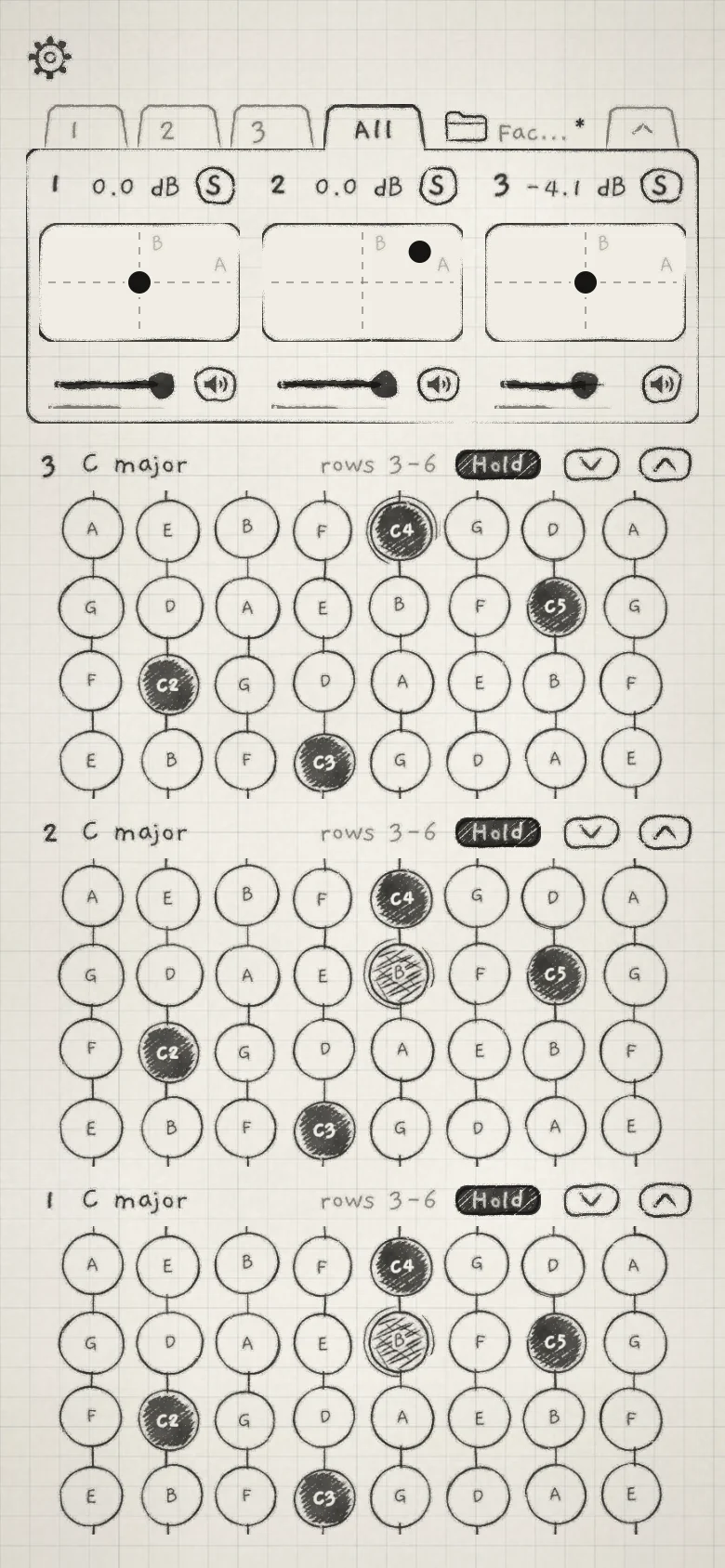 123456789
- 1Engine number
- 2Level in dB
- 3Solo
- 4XY pad
- 5Level fader and meter
- 6Mute
- 7Engine 3 band
- 8Engine 1 band
- 9Fold handle
#Mixer
Upright, the mixer is a card with one column per engine, Engine 1 on the left.
- 1,2,3The engine number. Tap it to open that engine's page.
- LevelThe engine's level, set with the fader; the value in dB shows above the pad. −inf to 0.0 dB. Default: 0.0 dB. Double-tap (double-click on a Mac) returns it to 0.0 dB. CC 7.
- SSolo: while any engine is soloed, only soloed engines sound. Tap to solo the engine, tap again to release it.
- Mute(speaker icon)Silences the engine. The speaker is inked solid and crossed out while muted.
- XY padPlays the engine's Macro A across and Macro B up (XY pad).
The meter under the fader shows the engine's output after Level, Mute, Solo and OUTPUT.
Level, Mute and Solo act after Synth Lvl's compressor and before the delay and reverb sends (Reverb and mix). A lowered level is not compressed back up, and delay and reverb tails already sounding ring out. A muted engine keeps playing: its arp, its pattern and its MIDI out continue (MIDI out).
Level, Mute and Solo are saved with the project and in a host session. Each change is an undo step (Undo and redo).
In a host, the level is also the parameter "1: Volume" ("2: Volume", "3: Volume"), linear gain from 0 to 100%. CC 7 sets the same gain on the engine's MIDI channel, or on the manager channel of its MPE zone: 127 is 0 dB.
#XY pad
The XY pad sets Macro A across and Macro B up. It moves the same values as the A and B knobs on the Sound tab, which are saved with the sound. What each macro changes is set in the sound's Matrix (Macros and dice).
Both axes run from −100% to +100%. The dashed lines cross at 0% on both. The letters A and B inside the box mark the positive end of each axis.
- A drag moves the dot by the distance your finger travels, from where the dot was. Touching the pad never makes the dot jump.
- The dot settles on either centre line as it passes close to it.
- A double-tap glides the dot back to 0% on both axes, not to the macro values saved with the sound.
#Solo
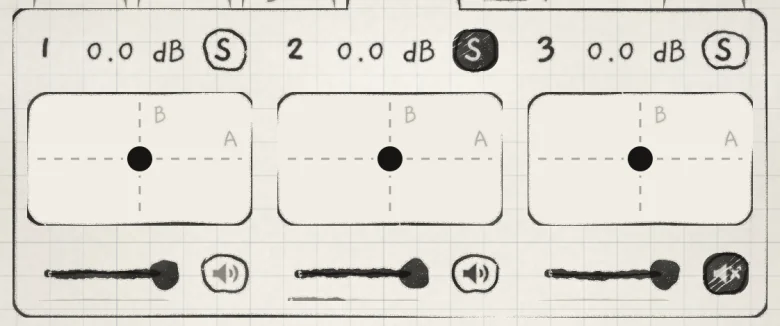 123
123- 1Solo on
- 2Silenced by another engine's solo
- 3Muted
Solo follows these rules:
- Solos add up. While any engine is soloed, only the soloed engines sound.
- Mute beats Solo: a soloed engine that is muted stays silent.
- An engine silenced by another's solo shows its speaker in pencil, not crossed out, since its own Mute is off. Its tails ring out as after a mute.
- A Library audition is never silenced by Solo (Sound library).
S sits in the open mixer and on the engine strip. With the card folded, open it or solo from the engine strip.
#Engine strip
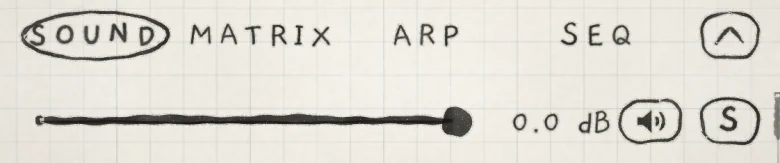 1234
1234- 1Level fader
- 2Level in dB
- 3Mute
- 4Solo
The engine strip is the first row of the Sound tab. It holds the mixer column's controls for the engine on screen: the level fader, the level in dB (where the row has room), Mute and S. The engine's meter is the card's level meter (Find your way).
#Keyboard bands
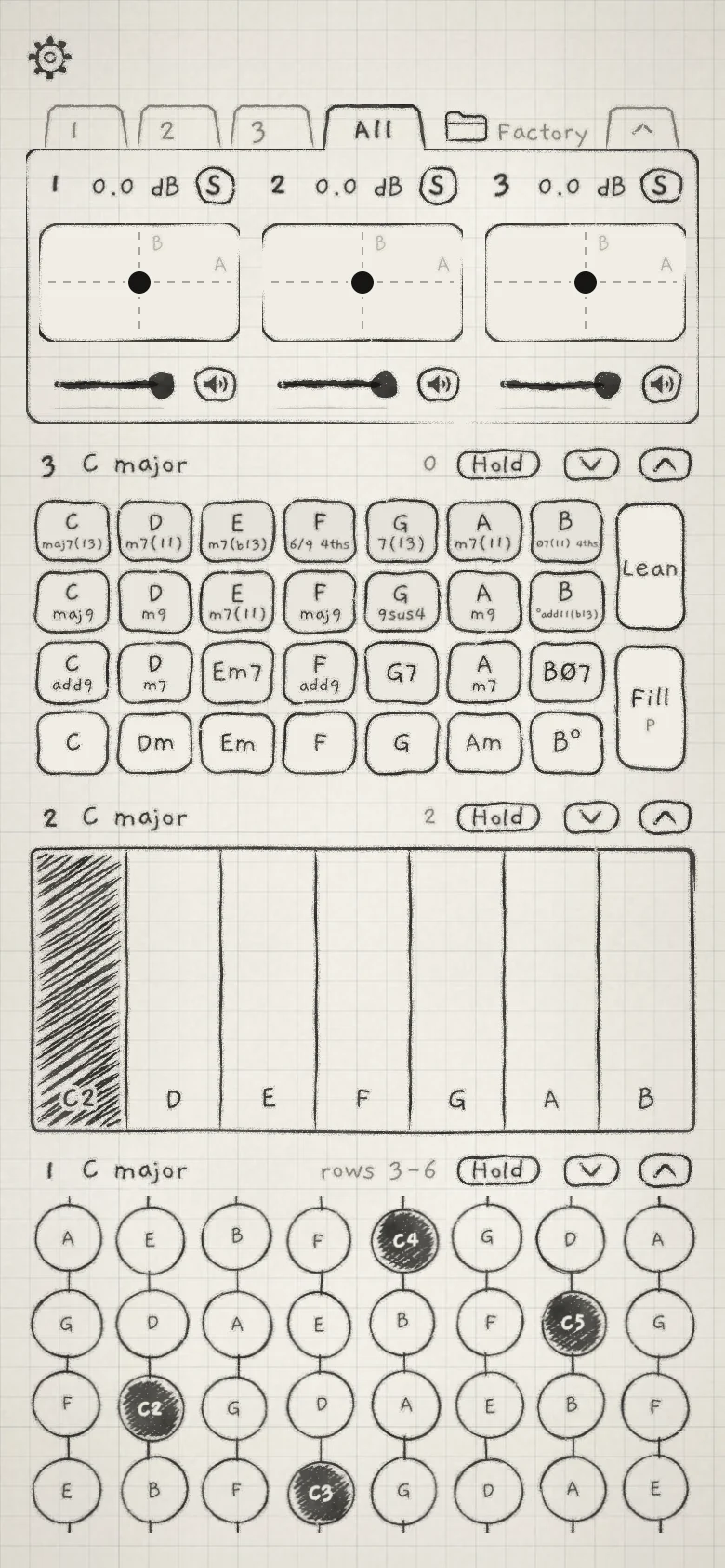 1234567
- 1Key
- 2Octave (Chords)
- 3Hold
- 4Rows down, Rows up
- 5Lean and Fill
- 6Octaves shown (Keys)
- 7Rows shown (Grid)
Upright, each engine's keyboard plays in a band under the mixer, the last engine on top. The band's head shows the engine number, its key and the range on screen, then the engine's Hold and a down and an up arrow. Hold is each engine's own, so one band can latch notes while the others play unlatched. Tap the key to open the engine sheet (Keyboard, key and scale).
The range and the arrows depend on the keyboard:
| Keyboard | Range in the head | Arrows |
|---|---|---|
| Grid | The rows shown, "rows 3-6" | Slide the band along the grid's 8 rows. Hidden when all 8 rows show; greyed at either end. |
| Keys | The octaves shown, "3" or "3–4" | Move the octaves shown. An arrow flickers while a note sounds out of view on its side. |
| Chords, Strings | The keyboard's octave, "0" | Move the keyboard's octave, −3 to +3, as the top row's arrows do (Octave). |
The bands share the height under the mixer; a Grid band shows 2 to 8 rows. A Chords band shows the tiles with Lean and Fill (Lean and Fill). The rails and Spice join them where the band is tall and wide enough, as in a side-by-side column; otherwise they stay on the engine's page (Chord colour).
#Folded card
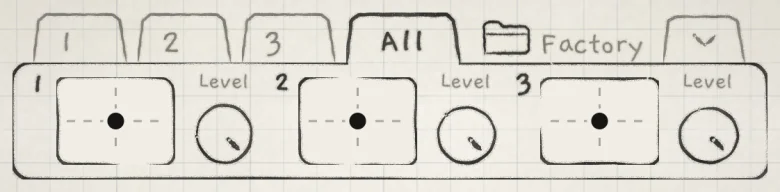 1234
1234- 1Engine number
- 2XY pad, no letters
- 3Level knob
- 4Fold handle
The fold handle at the right end of the engine tabs folds the mixer to one row, giving its height to the bands. Each engine keeps its number, a small XY pad without letters and a Level knob. A double-tap on the knob returns it to 0.0 dB. Mute and Solo stay on the open card and on the engine strip. This fold is separate from the card fold on the engine pages.
When the open mixer would leave the bands too little height to play, as on a small phone or in a small host window, the card folds itself and the fold handle is hidden.
#Side by side
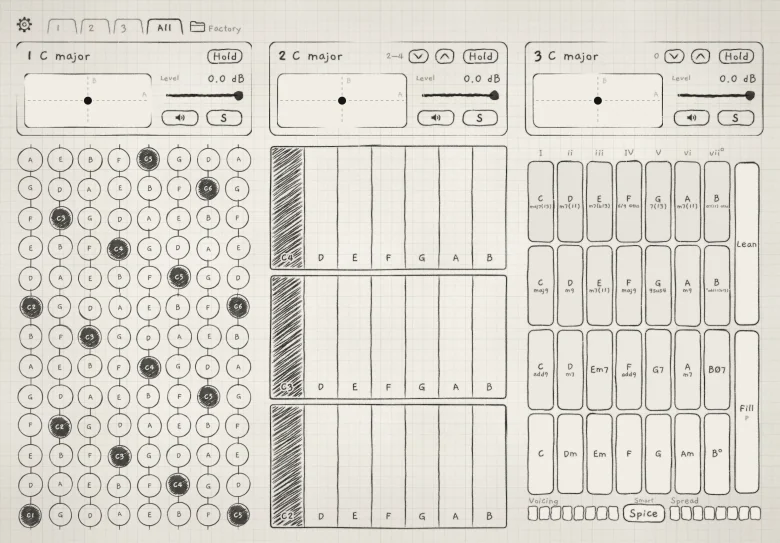 1234
1234- 1Mixer block
- 2Range, arrows and Hold
- 3Grid, 16 rows
- 4Rails and Spice
On a phone on its side or an iPad in landscape, each engine gets a column. Where the column is wide enough, a mixer block heads it: the number and key in large type, the XY pad, and beside it Level with the dB value, the fader and meter, Mute and S. A narrower column gets a two-line head with the same controls. The keyboard's range, arrows and Hold sit on the head's first line; tap the key to open the engine sheet. The card does not fold.
A Grid column shows 8 to 16 rows of round pads. Rows 9 and up continue each column up the scale; Hold, the arp and Seq treat them as any other pad.
In a host's narrow strip, the mixer sits under each keyboard: Macro A and Macro B as small knobs, the level as a bar, and Mute. A double-tap on a macro knob returns it to the value saved with the sound.
In INK MIDI, the engine's Out takes the place of the level, Mute and S (INK MIDI).
#OUTPUT

OUTPUT, at the bottom of the Sound and Arp tabs, sets the gain of INK's whole output: Main and every own bus (INK in a host). 0 to 100%; 100% is unity gain. Default: 50%. A safety limiter follows it on Main and on each own bus. INK MIDI makes no sound and has no OUTPUT.
OUTPUT is saved with the project and in a host session. It is never an undo step.
#Gain stages
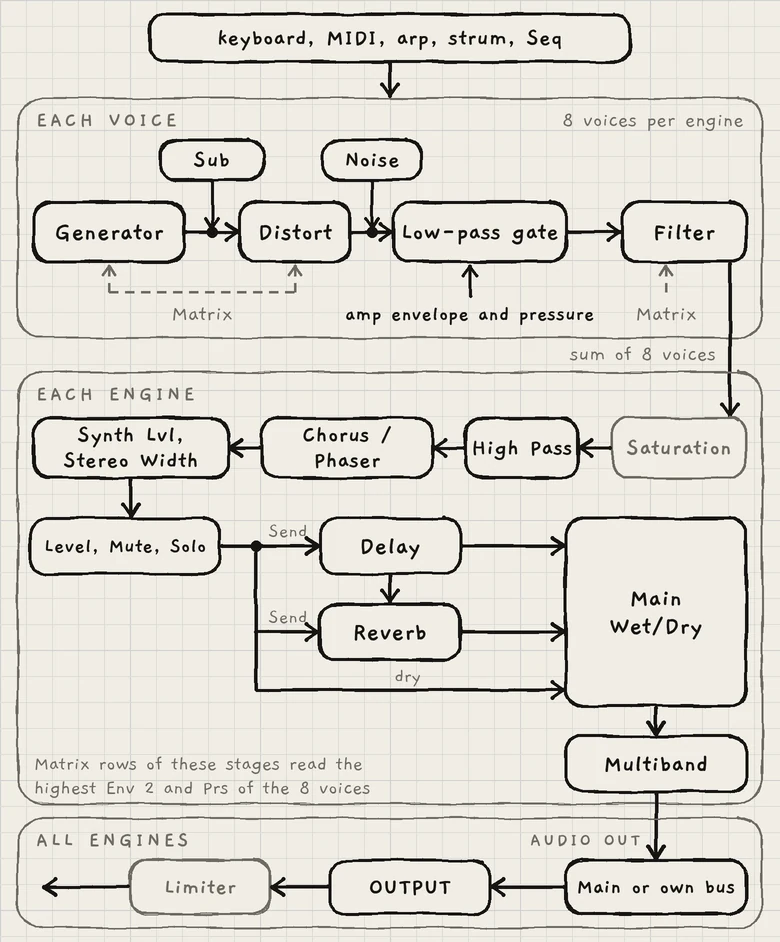
The stages that set level, in signal order:
| Stage | Where | Acts on | Saved with |
|---|---|---|---|
| Synth Lvl | Sound › MIX | The engine's signal after CHORUS / PHASER, into its peak compressor | Sound |
| Level, Mute, Solo | Mixer, engine strip | The compressor's output, before the delay and reverb sends | Project |
| Main Wet/Dry | Sound › MIX | Dry signal against the delay and reverb returns | Sound |
| Low, Mid, High | Sound › MULTIBAND | The engine's finished signal | Sound |
| Main or Multibus | Engine sheet › AUDIO OUT | Where the engine leaves INK | Project |
| OUTPUT | Sound and Arp tabs | Main and every own bus | Project |
Details: Reverb and mix, Multiband, INK in a host.