CHAPTER 44 OF 54 · MIDI AND HOSTS
MIDI in
Each engine listens to MIDI through its own MIDI In: one channel, every channel, an MPE zone, or Off. Set it to play an engine from a controller, a sequencer app or a DAW. It is Off on every engine until you set it, in every project, Factory included.
MIDI In is saved with the project. Changing it marks the project changed (*) and is an undo step. In a host, every engine also starts Off and the host session keeps the setting. Each engine's MIDI Out sits beside its In (MIDI out).
#The MIDI page
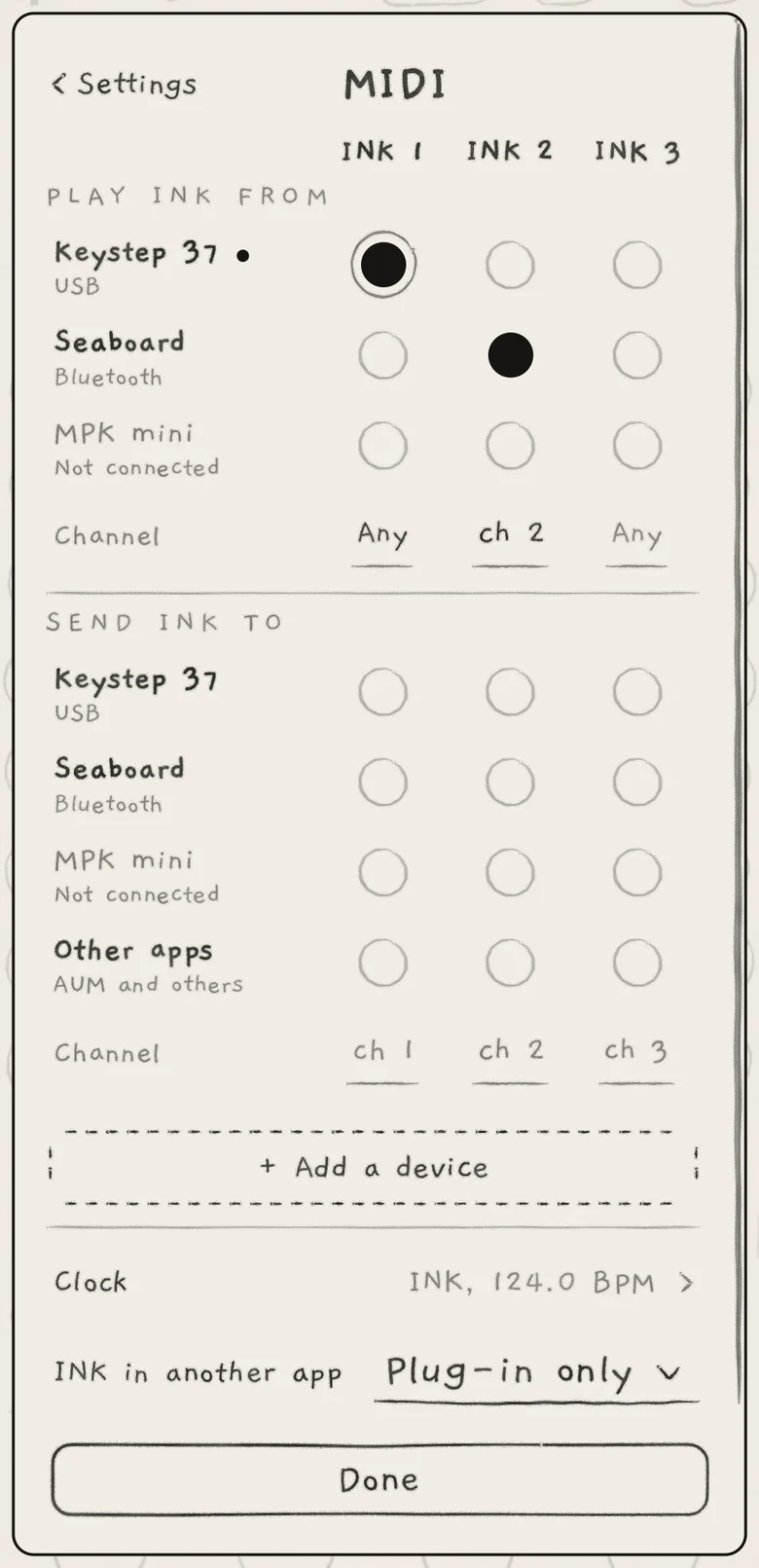
On iPhone and iPad, Settings › MIDI connects devices to engines on one page: each device is a row, each engine a column, and a dot where they cross lets the device play the engine. Its row on the first Settings page reads None connected or the number of devices connected ("2 connected").
 1234567
- 1Engine columns
- 2PLAY INK FROM
- 3Device and connection
- 4Lit dot
- 5Channel row
- 6SEND INK TO
- 7+ Add a device
The columns are headed INK 1, INK 2 and INK 3. Under PLAY INK FROM, every device INK can hear has a row, with its connection under the name: USB, Bluetooth, Wi-Fi or App. A filled mark beside the name shows while notes arrive from it.
A lit dot means the engine plays what the device sends; a ring shows around a lit dot while notes arrive. Tap a dot to switch it. Switching a dot off ends the notes that device held on the engine. A newly connected device is lit on every engine whose In is on.
The first dot you light in a column whose In is Off sets that engine's In to Any channel, with only that device playing it. Choosing a channel from the list for an engine whose In is Off leaves its dots off; light a dot to play it.
The Channel row under the devices shows each engine's In channel: Any, "ch 5", MPE (lower zone) or MPE up (upper zone). It is in pencil while no dot in the column is lit; an engine whose In is Off shows Any in pencil. While an engine listens on one channel and notes arrive on a channel no engine takes, "got n" appears under its channel. Tap a channel to open the engine's In list.
SEND INK TO is the output half of the page: the devices and Other apps INK can send to, with each engine's Out channel (MIDI out). When an engine both plays from and sends to one device, the device shows Loop and that engine's lit dots turn dashed.
Under the grid, + Add a device connects Bluetooth and Wi-Fi devices (Connect a device), Clock sets the clock INK follows and sends (Clock and sync), and INK in another app sets whether the hidden app plays while an INK plug-in runs (Background and other apps).
The device dots are app settings, kept across projects; the channels are the project's.
#In channels
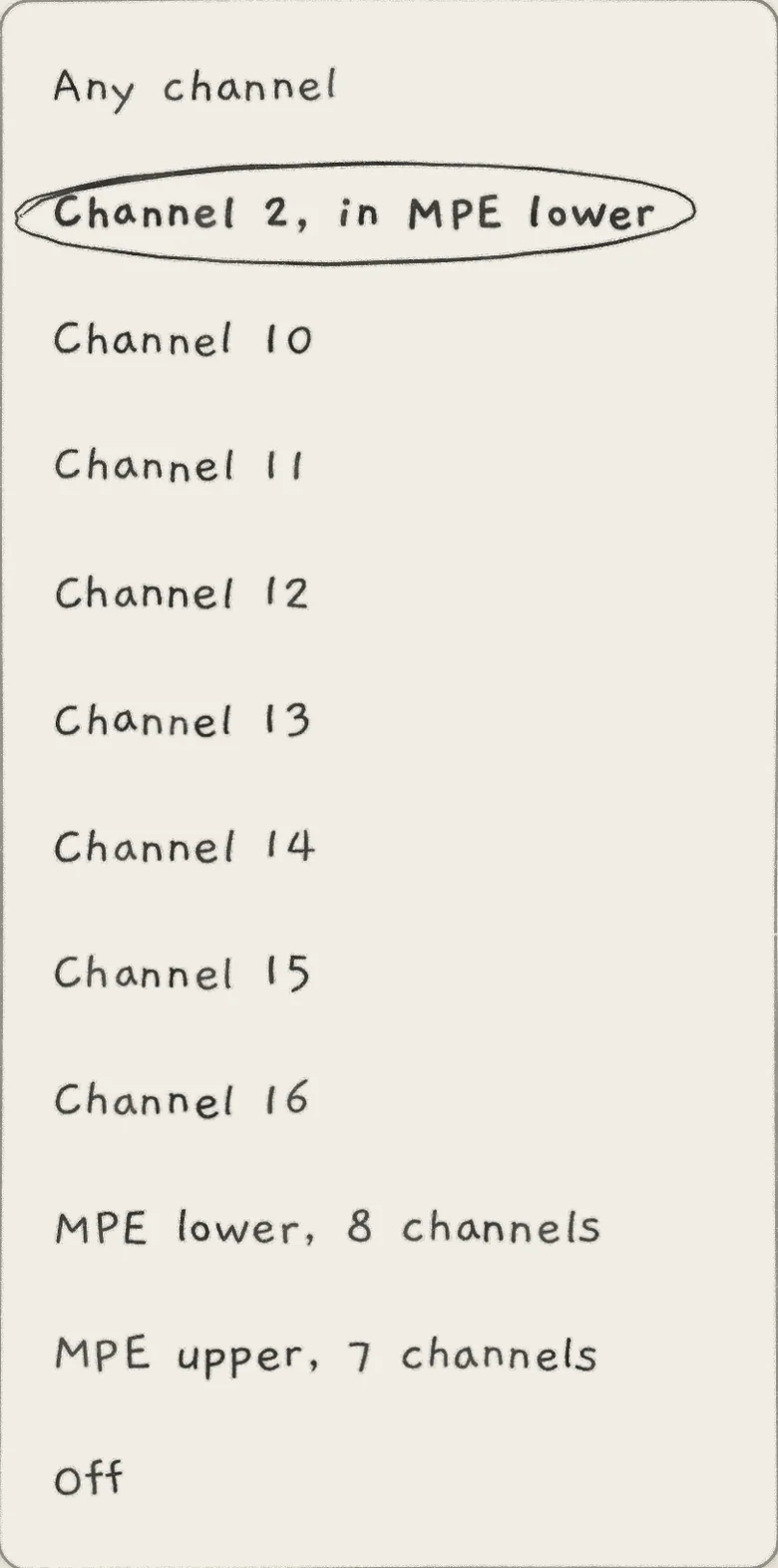
- Any channelEvery channel not taken by another engine's MPE zone. Shown as Any on the grid.
- MPE lower, n channelsLower MPE zone: manager channel 1, n member channels from 2 upwards.
- MPE upper, n channelsUpper MPE zone: manager channel 16, n member channels from 15 downwards.
- Channel 1toChannel 16One channel.
- OffNo MIDI in. Default in every project. On iPhone and iPad it is on the engine's In page.
Any channel suits a controller whose channel you do not know. Engines on the same channel, or on Any channel, all play every note on it.
An MPE zone is a manager channel plus its member channels. A channel another engine's zone takes is not offered. Two engines on the same zone layer: every finger plays both. The two zones together have at most 14 member channels.
On iPhone and iPad, tap an engine's channel on the MIDI page to open its In list: Any channel, MPE lower, MPE upper, then the channels. On a zone the list also sets Bend range (Auto, 2, 12, 24, 48) and offers Member channels...; on a Chords engine it offers Keys play... (Keys play). Those two open the engine's In page.
 1234
1234- 1Own channel inside the zone
- 2Plain channels
- 3MPE zones
- 4Off
A zone that grows over an engine's single channel takes it: notes on that channel go to the zone, and the engine's In reads "Channel 5, in MPE lower". The engine plays again when the zone shrinks or goes away. Changing an engine's In, or a zone's size, first ends the notes MIDI held on that engine.
#Automatic MPE setup
A controller that sends the MPE Configuration Message sets its zone up without the menu. When its setup messages end, INK gives the zone to the first of:
- the engine on the zone's manager channel (Channel 1 for lower, Channel 16 for upper);
- an engine that gave a zone back in the same setup (the controller moved zones);
- the first engine on a single channel.
An engine already on that zone keeps it. The zone takes the member channel count the controller announced. When the controller switches the zone off (0 member channels), an engine that got the zone this way goes back to its previous channel.
#The engine's In page
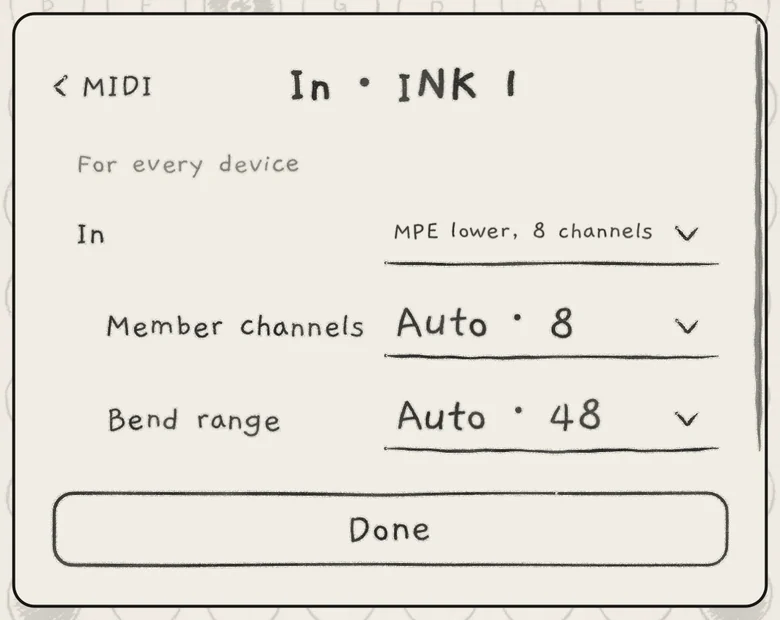
Each engine's In page holds the settings that apply to whatever plays the engine, whichever device it is. The page is titled In · INK 1 (2, 3) and marked For every device.
 1234
1234- 1Title
- 2In
- 3Member channels
- 4Bend range
- InThe engine's channel or zone. The full In list, Off included.
- Member channelsHow many member channels the engine's zone has. Auto · n (what the controller announced, else 8) or 1 to 15. Only on a zone.
- Bend rangePitch bend range in semitones. Auto · n or 2, 12, 24, 48. Not while In is Off.
- Keys playWhat a MIDI key plays: Chords, or Chords below C2, C3, C4 or C5. Default: Chords. Only on Chords engines.
A Member channels number overrides the controller's announcement and is shared by the engines on that zone. Its maximum keeps both zones within 14.
Bend range Auto follows the range the sender sets with RPN 0; without one it is 48 on member channels and 2 on a plain channel. On a zone, the setting sets the member channels' range; the manager channel keeps the sender's range (2 by default). Auto shows the range in use ("Auto · 48").
Bend range, Member channels and Keys play are app settings. An AUv3 instance keeps its own in the host session.
#MPE and velocity
A MIDI note starts at its velocity. When pressure arrives for it (channel pressure, the key's aftertouch, or Slide, CC 74, under an MPE zone), the note's pressure glides from the strike to that value, then follows it, below the strike too. When more than one arrives, the largest sets the pressure. A note that receives none keeps its velocity. Pressure is the Matrix source Prs (Modulation matrix).
Velocity 127 and pressure 127 equal INK's hardest tap at the default Touch settings.
Under an MPE zone:
- Each finger's pitch bend, pressure and Slide belong to its note.
- The manager channel's bend moves every finger; its pressure and CC 74 reach every finger.
- The sustain pedal (CC 64) and Hold (CC 69) act on the whole engine. Parameter CCs work on the manager channel only.
- CC 74 is Slide on every channel of the zone; on a plain channel it sets Cutoff (MIDI implementation).
- A released finger keeps its own bend and pressure through its release, also under the pedal.
MIDI notes play chromatically on the engine's 8 voices. The AUv3 tells its host that it supports MPE.
#Keys play
On a Chords engine, Keys play sets what a MIDI key plays.
- Chords: every key plays its scale degree's chord on row 2. The scale note at or below the key picks the column, so a key off the scale plays the chord of the scale note below it. The key's octave does not move the chord, nor do the Octave arrows; the sound's Octave does.
- Chords below C4 (also C2, C3, C5): keys below the split note play chords; that note and the keys above play single notes. A key held while you change the setting ends as what it started as.
A chord key is a finger on its tile (Play Chords): Spice, the rails, Lean and Fill, Strum, the arp and Follow act on it. The newest key's chord plays; releasing it while an older key is down plays the older key's chord again. Velocity sets the strike and pressure moves the level, as under MPE and velocity. On a zone, the newest finger's chord follows its pressure and bend.
The sustain pedal holds the chord. Hold (CC 69 or the on-screen Hold) latches it. On Grid and Keys engines Hold does not latch MIDI notes; sustain them with the pedal (CC 64).
MIDI out sends the chord's notes (MIDI out). Chords from MIDI keys play with INK's window closed too.
#Connect a device
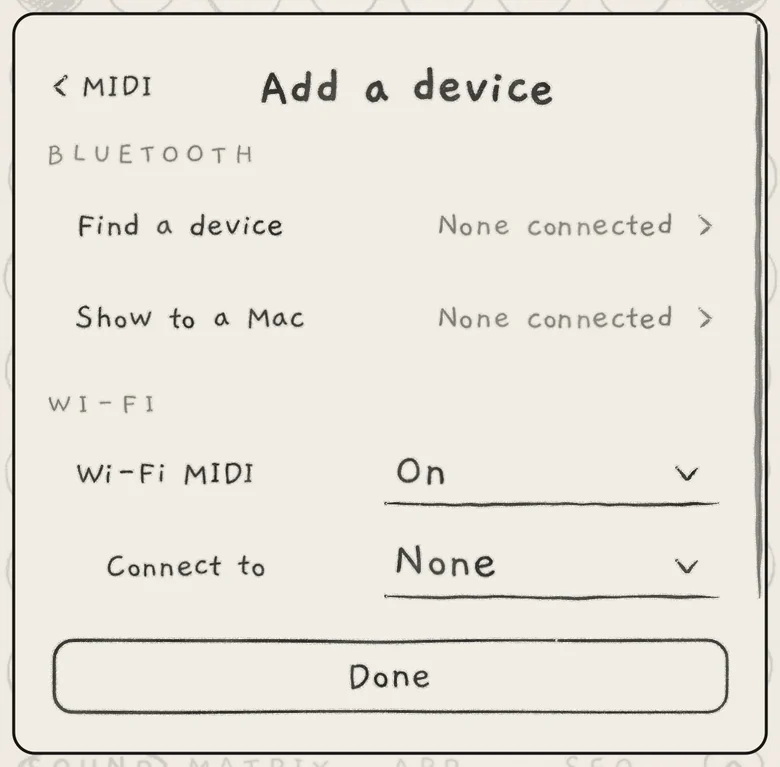
USB devices, interfaces and other apps' MIDI ports appear on the MIDI page as soon as they connect. Apps that send to a MIDI destination can send to INK's own input, named INK Synth. Bluetooth and Wi-Fi devices connect from + Add a device, in its BLUETOOTH and WI-FI sections.
 1234
1234- 1Find a device
- 2Show to a Mac
- 3Wi-Fi MIDI
- 4Connect to
- Find a deviceOpens the system sheet that finds and connects Bluetooth MIDI devices. Reads None connected or "n connected".
- Show to a MacOpens the system sheet that makes this iPhone or iPad visible to a Mac or iPad as a Bluetooth MIDI device. Shows the same count.
- Wi-Fi MIDIOff or On: the network MIDI session, open to anyone on the Wi-Fi. While On, the session is a row on the MIDI page, named Wi-Fi session or after the devices connected to it.
- Connect toNone, or a network MIDI device found on the Wi-Fi. Only while Wi-Fi MIDI is On.
A Mac connects over Bluetooth only while the iPhone or iPad shows itself with Show to a Mac. The first use asks for Bluetooth or local network permission.
#Devices that come and go
Two devices with the same name get a row each, and a second port of the same name is listed with " 2". A device that reconnects gets its row back.
When a device disconnects, INK releases every key, the pedal and Hold of that device, on every engine. Its notes end with the sound's release, and a chord its keys latched under its Hold ends. A chord latched with the on-screen Hold stays. Other devices, touch, the arp and patterns play on.
The device stays on the page as Not connected, in pencil, until the app quits; its PLAY INK FROM dots cannot be switched. When it returns it plays as before, with the MPE zones and bend ranges it announced. A disconnect never changes the engines' MIDI settings.
#Background and other apps
MIDI notes in keep the hidden app running for 30 s after the last note (Settings and background audio).
INK in another app, in the iPhone and iPad app, sets who plays when an INK plug-in runs in a host on the same device:
- Plug-in only (default): while an INK plug-in with an engine's In on is running, the hidden app leaves incoming notes to it. Note-offs still reach the hidden app, so its sounding notes end.
- Both play: the hidden app always plays what it receives.
The app in front always plays. The setting is the app's.
#On a Mac and in plug-ins
The Mac app and the plug-ins set MIDI on Settings › MIDI Settings, one block per engine, instead of the grid. Its row on the first Settings page names the engines with In or Out on: Off, "Engine 1" or "Engines 1, 2".
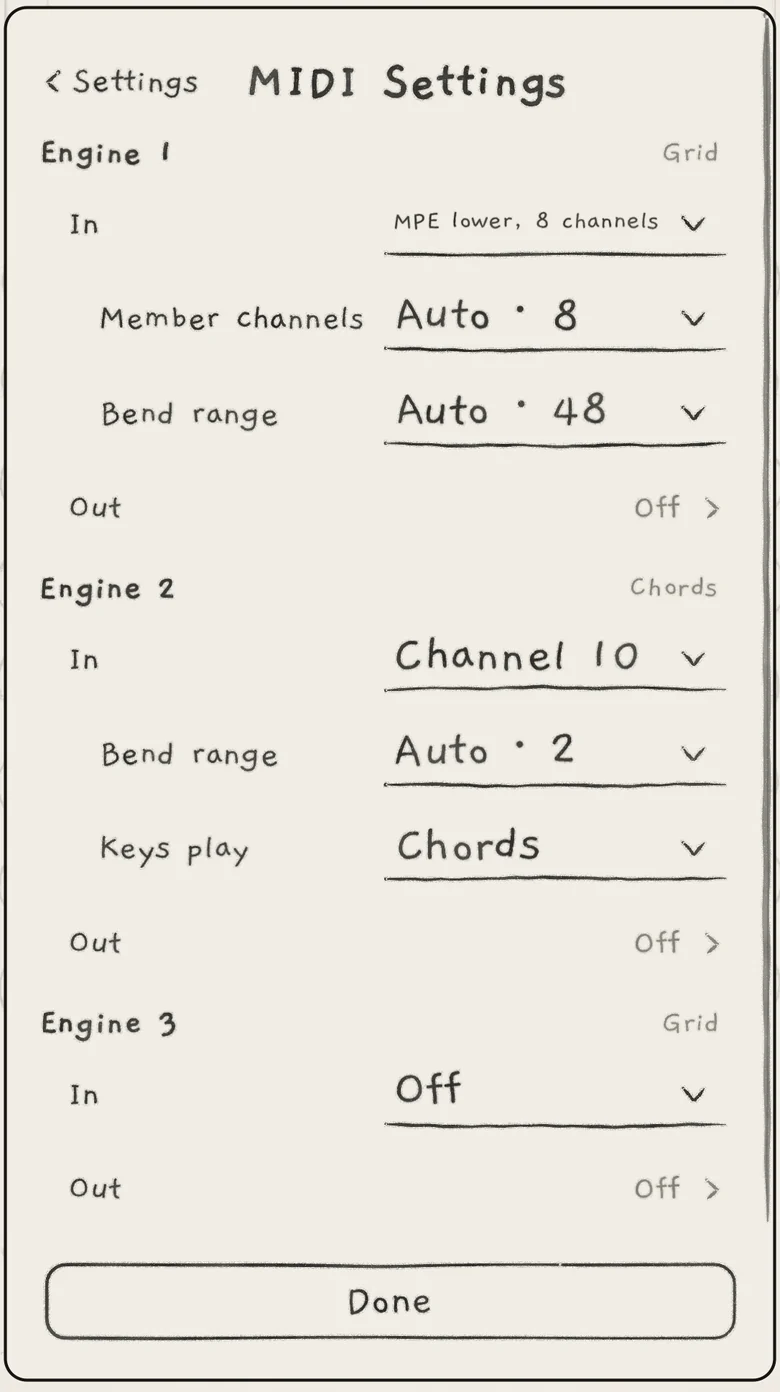 123456
- 1In
- 2Member channels
- 3Bend range
- 4Keys play
- 5Out
- 6In Off
Each block is headed Engine 1 (2, 3), with the engine's keyboard at the right. In opens the In list in the order Any channel, channels, MPE lower, MPE upper, Off; a dot at the row's end shows while notes arrive. Unless In is Off, the In page's rows follow under it. Out opens the engine's MIDI routes (MIDI out).
While notes arrive on a channel no engine listens to, a line under the engines reads "Notes on channel n reach no engine".
In a host, the host connects MIDI sources to INK. The Mac app opens no MIDI inputs, so its In settings receive no notes. To play INK from MIDI on a Mac, run it as a plug-in in a host (INK in a host).
#CCs and Program Change
Each CC INK reads has a fixed destination; every message and CC is listed in MIDI implementation. INK ignores Program Change: choose sounds and projects on screen.