CHAPTER 30 OF 54 · YOUR OWN SAMPLES
Granular sampler
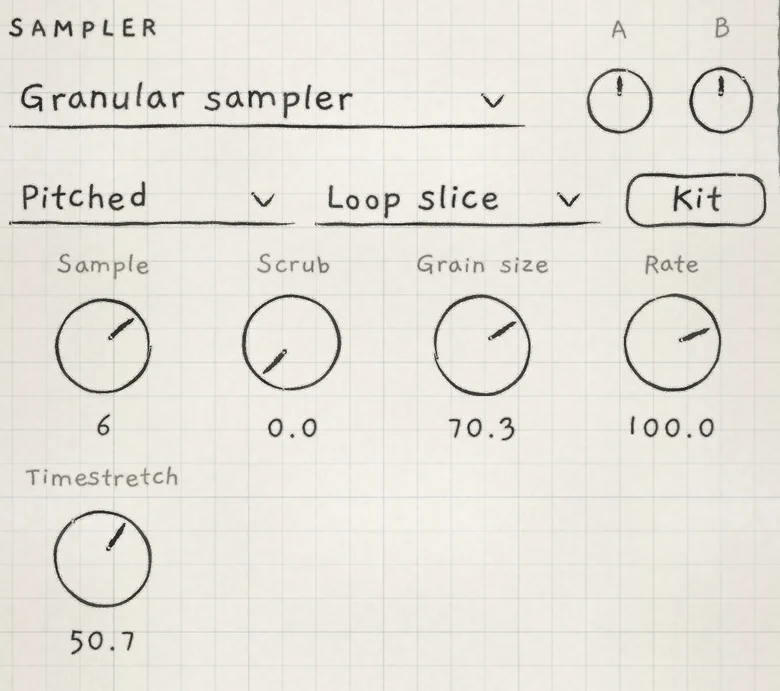
The Granular sampler is the generator that plays samples. Each voice reads the sample as a stream of short, overlapping grains, so pitch, playback speed and position in the sample can be set apart.
It comes from Plinky's sampler, as does its layout: a kit of eight samples, each cut into eight slices that match the Grid's eight columns. Choose Granular sampler in the generator drop-down, or load a Granular sampler sound: in the Library, set the Engine filter to Granular.
 123456789
- 1Generator drop-down
- 2Tape or Pitched
- 3Play style
- 4Kit
- 5Sample
- 6Scrub
- 7Grain size
- 8Rate
- 9Timestretch
On this generator the Sound tab starts with SAMPLER, headed by the generator drop-down, then SAMPLER JITTER. OSC follows with every control except the tone control and LPG Filter; the low-pass gate has no resonance here (Oscillators). Sample rate, slot count and maximum sample length are in The three engines.
Kit opens the kit view, where you import and record samples (Import and record) and trim, slice and tune them (Trim, slices and kits).
#Slots, slices and grains
 12345
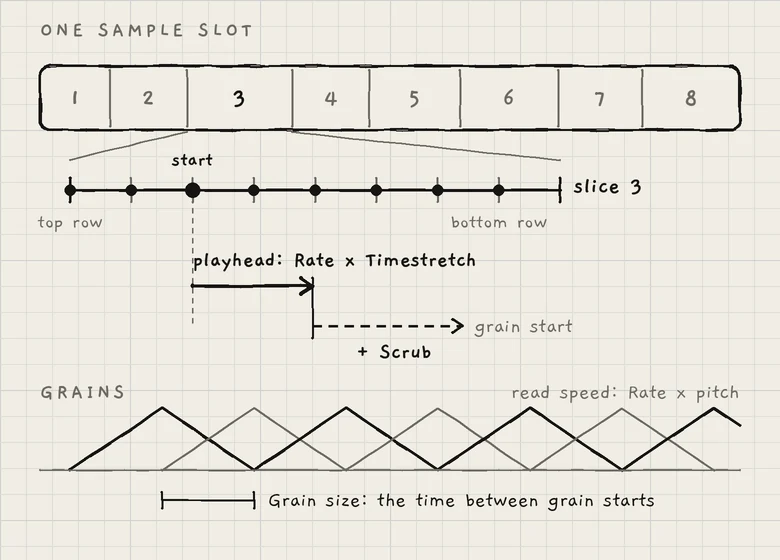
12345- 1Slice
- 2Eight start points
- 3Playhead
- 4Scrub offset
- 5Grain interval
A kit has eight slots; each is a sample slot. Sample chooses the slot the engine plays.
The slice lines in the kit view divide each slot's sample into eight regions; each is a slice with its own root note. A note starts at a point in one slice.
From there a playhead moves through the sample. Each grain starts at the playhead plus the Scrub offset. Grains overlap and crossfade, so the sound is continuous; a new grain starts every Grain size interval. Each stereo channel of a voice reads its own grains.
#Tape and Pitched
 1234
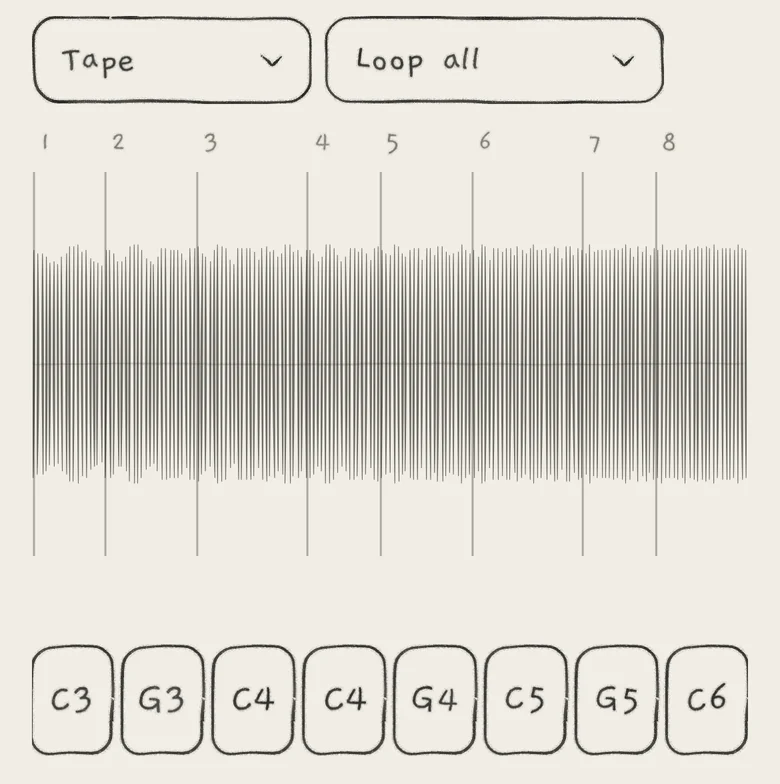
1234- 1Tape
- 2Play style
- 3Slice lines
- 4Slice pads
 1234
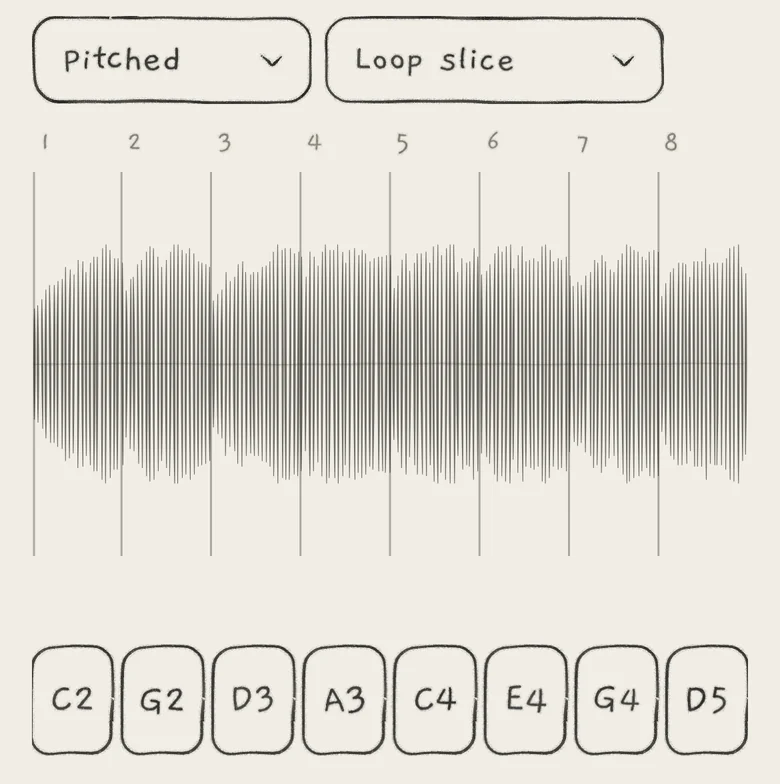
1234- 1Pitched
- 2Play style
- 3Slice lines
- 4Root notes
The Tape / Pitched drop-down sets how a note chooses its slice and pitch. These are Plinky's two sample modes: Tape lays the sample out on the pads, Pitched plays it chromatically like a multisample.
Tape: on the Grid, the column chooses the slice and the row chooses one of eight start points in it, in eighths of the slice. The top row starts at the slice start, the bottom row seven eighths in. With a negative Rate every row starts one eighth later. On Keys the keys form eight slice zones instead (Play Keys).
In Tape mode the note does not tune the sample: only Pitch does, −12.0 to +12.0 st. Pitch changes the grains' read speed, not the playhead's, so a slice keeps its length. Octave and Root leave a Tape sample at its recorded pitch, and Root never moves a slice.
Pitched: a note plays the slice whose root note is nearest to its pitch, transposed by the difference. When several slices are equally near, for example eight slices with the same root, the least recently played one is chosen, so repeated notes cycle through them. A note starts at the slice start, or at its end with a negative Rate.
A newly imported or recorded sample starts as Pitched with Play slice.
#Play style
The play style drop-down, beside Tape / Pitched, sets the area of the sample the playhead runs through and what happens at its end.
- Play sliceThe playhead runs through the note's slice once.
- Loop sliceThe playhead wraps inside the slice.
- Play allThe playhead runs from the start point to the end of the sample once.
- Loop allThe playhead wraps from the end of the sample to its start.
In Play slice and Play all a note falls silent when the playhead leaves its area, even while held; the amp envelope shapes the note up to then. Running backward, the area ends at its start. For a sustained note, choose Loop slice or Loop all, or stop the playhead with Timestretch at 0.0.
Tape or Pitched and the play style are set per slot and saved with the sound. The SAMPLER section shows them for the slot Sample selects; the kit view shows the same two drop-downs for the slot on screen. Neither has a Matrix row.
#SAMPLER
- SampleThe slot the engine plays. 1 to 8, stepped. Init: 1. CC 82.
- ScrubOffset of each new grain's start from the playhead, as a share of the whole sample's length. 0.0 to 100.0. Init: 0.0. CC 15.
- Grain sizeTime between grain starts, 2 ms to 524 ms. 0.0 to 100.0. Init: 50.0 (131 ms). CC 16.
- RateSpeed and direction of grains and playhead together; 100.0 is the recorded speed. Bipolar, −200.0 to +200.0. Init: 100.0. CC 17.
- TimestretchSpeed of the playhead only, as a factor on Rate. Bipolar, −200.0 to +200.0. Init: 100.0. CC 18.
Sample acts on the whole engine, so a modulated Sample switches the slot for every voice. Every other SAMPLER and SAMPLER JITTER control acts per voice (Modulation matrix).
#Rate and Timestretch
Rate scales grains and playhead together. Timestretch scales the playhead only. Both read as factors: 100.0 is 1×, 50.0 is 0.5×, −100.0 is 1× backward.
| Mode | Grain read speed | Playhead speed |
|---|---|---|
| Tape | Rate × Pitch | Rate × Timestretch |
| Pitched | Rate × transposition | Rate × Timestretch × transposition |
At Timestretch 100.0, Rate acts as tape speed: pitch and duration change together. Timestretch 50.0 doubles the duration at the same pitch; 0.0 stops the playhead, and the grains repeat one point. In Pitched mode a note above the root also moves the playhead faster, so higher notes run through the slice sooner.
The sign of Rate × Timestretch sets the direction of grains and playhead: a negative Rate with a negative Timestretch reads forward. At Timestretch 0.0 the grains read in Rate's direction.
#Scrub
Scrub moves the read point away from the playhead, later in the sample. The offset is a share of the whole sample's length: Scrub 25.0 on a 32.0 s sample is 8.0 s.
In Play slice and Loop slice a grain whose start falls outside the slice wraps back into it, so Scrub moves the read point around inside the slice. In Play all and Loop all grains read across slice borders and wrap at the end of the sample; in Pitched mode they wrap into the note's own slice.
On the Grid, dragging a held finger along its column also offsets the grain starts: four rows equal one slice length, later toward the bottom. In Pitched mode the drag also changes the pitch, as on every generator (Play the Grid).
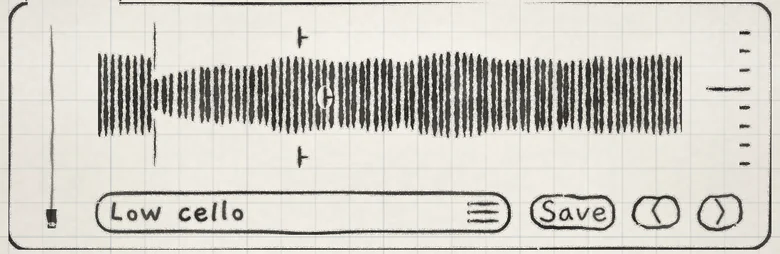 12
12- 1Grain marks
- 2Slice line
#Grain size
Grain size sets the interval between grain starts. Each grain sounds for two intervals, fading in over one and out over the next. The value reads 0.0 to 100.0, not time: 25.0 is 33 ms, 50.0 is 131 ms, 100.0 is 524 ms.
#SAMPLER JITTER
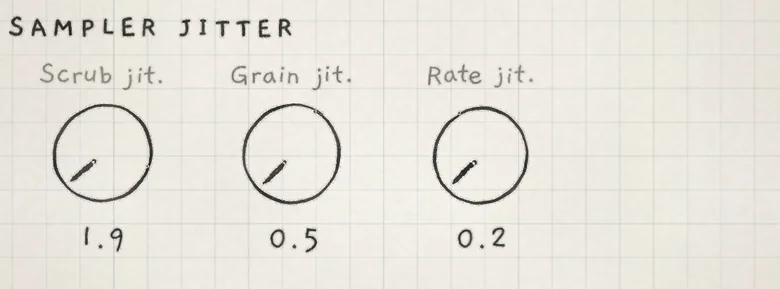 123
123- 1Scrub jit.
- 2Grain jit.
- 3Rate jit.
SAMPLER JITTER gives each new grain its own random offset when it starts, to blur a frozen point or break up a regular grain rhythm. Each offset goes one way only: later, longer, faster.
- Scrub jit.Moves each grain's start later by a random amount, up to one grain interval plus 262 ms at 100.0. 0.0 to 100.0. Init: 0.0. CC 116.
- Grain jit.Lengthens each grain's interval by a random factor, up to 2× at 100.0. 0.0 to 100.0. Init: 0.0. CC 117.
- Rate jit.Raises each grain's read speed by a random amount, up to one octave at 100.0 and about 4 st at 50.0. 0.0 to 100.0. Init: 0.0. CC 118.
Rate jit. counts toward the 4× read-speed limit.
#Matrix rows
The Matrix groups SAMPLER and SAMPLER JITTER hold every control of the two sections, with the same names as on the Sound tab.
A → Scrub, +50 lets Macro A move the read point; Prs → Grain size gives each note its own interval. The dice rolls every SAMPLER and SAMPLER JITTER row except Sample (Macros and dice). Every value in both sections is saved with the sound.
- On Engine 1, load Low cello. Tap Hold, then play one note.
- Set Timestretch to 0.0. The playhead stops and the grains repeat one point.
- Turn Scrub. The frozen point moves inside the slice, since Low cello plays Loop slice.
- Set Rate to −100.0. The grains read backward at the same point.
- Set Timestretch to −50.0. Rate × Timestretch is positive: grains and playhead move forward, the playhead at half speed.