CHAPTER 35 OF 54 · PERFORM AND RECORD
Strum
Strum plays notes started together once each, one after another, the way a guitar chord is strummed. Each note then rings with its own amp envelope until it is released. Mode sets the order and Division the time from one note to the next.
Choose Strum on the Free / Arp / Strum switch at the top of the Arp tab, or on engine sheet › PLAY, which sets the same switch (Arp).
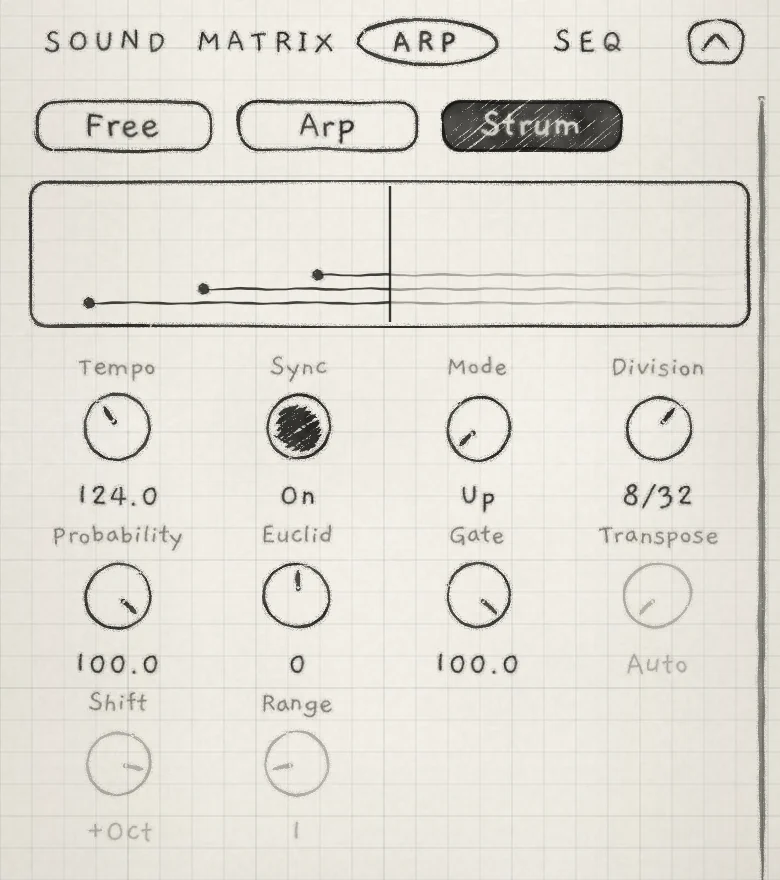 12345678
- 1Strum
- 2Trace
- 3Mode
- 4Division
- 5Probability
- 6Euclid
- 7Gate
- 8Transpose, Shift and Range, greyed
#Arp controls on Strum
Strum uses the Arp tab's parameters. Some act differently on Strum, and some are greyed.
| Control | On Strum |
|---|---|
| Tempo, Sync | Set the tempo of a synced Division (Arp rhythm and tempo). |
| Mode | The order the notes enter in, from the orders that strike each note once (Order and timing). |
| Division | The time between one note's turn and the next. |
| Probability | The share of hits in the Euclidean rhythm. With Euclid at −1, 0 or +1 it has no effect. |
| Euclid | The length of the Euclidean rhythm that spaces the notes. A negative value plays as the same positive length. |
| Gate | Not greyed, but it does not shorten strummed notes: each rings until released. |
| Transpose, Shift, Range | Greyed. A strum plays each held note once, at its own pitch. |
#What forms a strum
Notes started together form one strum. How they arrive decides which note sounds first.
- Notes that arrive at the same moment, as a pattern step's notes or a MIDI chord sent with one timestamp do, strum in Mode's order from the first turn.
- Notes that arrive one by one, as fingers on the Grid or Keys do: the first sounds at once, and the notes that follow it closely enter after it in Mode's order. With Up the strum can start on a note other than the lowest.
- A chord the Chords keyboard strikes waits until all its notes are there, then strums in Mode's order. Up starts on the lowest note, and no note sounds ahead of the strum.
- A single note sounds at once, as on Free. A single note that starts while a strum still has notes waiting joins it and takes its turn.
A waiting note is silent. It follows its own pressure while it waits and starts at the pressure it has at its turn. Envelope 2, Random, grain starts and LFO Freeze count each note's start from its turn (LFOs and Freeze).
The trace, the strip under the switch (Arp), draws each note as a dot at its turn and a line while it sounds. On Strum, each lane is a note's rank by pitch among the held notes, lowest at the bottom. The lines stack, since no turn ends an earlier note. Right of the vertical now line, a fading guess draws the waiting notes at the turns they will take. The Rnd orders draw no guess.
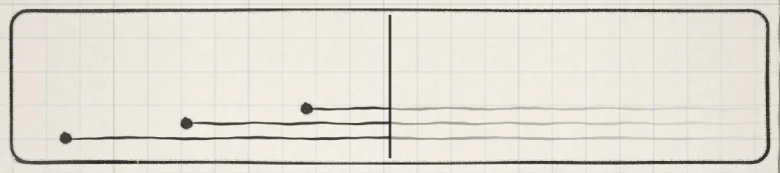 12345
12345- 1First note
- 2Second note, one Division later
- 3Third note
- 4Now
- 5The guess: the notes ring on
#Order and timing
On Strum, Mode offers only the orders that strike each note once. Turning the knob skips the others. A sound stored on another order, or a Matrix cell that moves Mode onto one, plays Up, and the knob reads Up.
- Up and Down: by pitch, lowest or highest first.
- Rnd: a random waiting note at each turn. 2xRnd: two at each turn.
- Up 8 Steps, Down 8 Steps, Rnd 8 Steps, 2xRnd 8 Steps: the same orders walked over the engine's eight voices, one voice per turn, as on the arp (Arp). A voice with no note of the strum is a rest. The first turn never rests.
Division sets the time between turns. A synced Division counts from the strum's first note at the engine's tempo, not from the next beat or bar. To land on the beat, start the strum on the beat or let a pattern play the chord. A free Division (0.0 to 100.0) runs independently of tempo, and higher values strum faster (Arp).
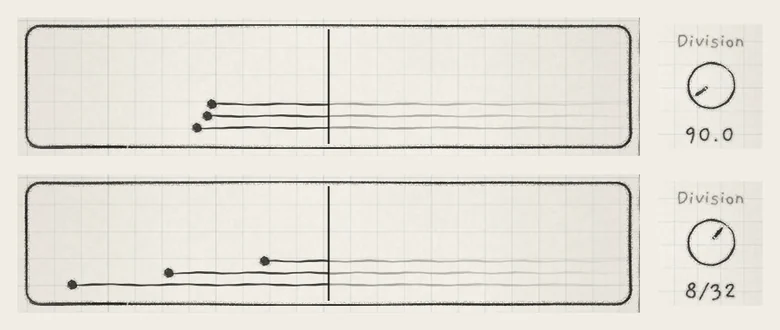 12
12- 1Free, 90.0
- 2Synced, 8/32
#Euclid and Probability
Euclid and Probability space the strum's notes with a Euclidean rhythm. Euclid sets the rhythm's length in steps; Probability sets the share of steps that are hits, spread as evenly as possible. Each step is one Division. A hit starts the next waiting note; a rest lengthens the gap before it. The first note always starts at once. The same settings always give the same rhythm.
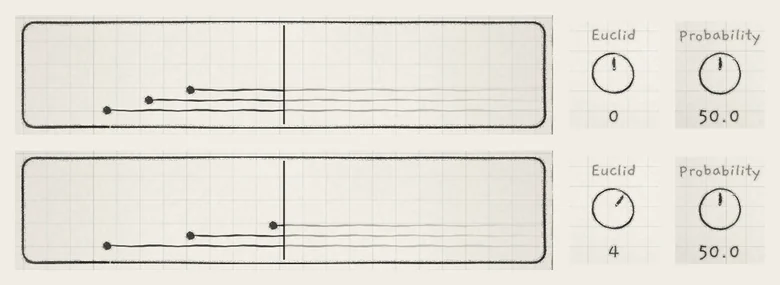 123
123- 1Step 1
- 2Step 3
- 3Step 5
With Euclid at −1, 0 or +1, Strum strikes on every step and ignores Probability. With a length of 2 or more, Probability at 100.0 also strikes on every step. At 0.0 only the first note sounds; the rest wait until they are released or a new strum starts.
The table reads left to right: ● starts the next note, · is a rest of one step. The rhythm repeats until every note has started; each note starts once.
| Probability | Euclid 3 | Euclid 4 | Euclid 5 | Euclid 7 |
|---|---|---|---|---|
| 25.0 | ||||
| 50.0 | ||||
| 75.0 | ||||
| 100.0 |
Short lengths have few distinct rhythms: Euclid 3 plays the same at 50.0 and 75.0. Euclid 5 at 25.0 and 50.0 ends on a hit, so the next repeat's first hit follows it with no rest.
#A new strum
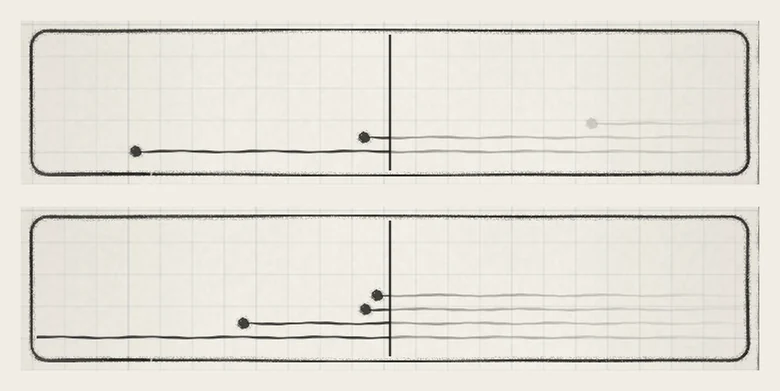
A new strum restarts the order and the rhythm. Notes of the old strum still waiting are dropped and never sound. Notes already struck ring on under the new strum, and a note that stays held is not struck again.
 123
123- 1Waiting note
- 2New strum
- 3Struck note rings on
A note released before its turn is skipped. A short tap on a chord plays only the notes whose turn came while it was down.
#Strum on the Chords keyboard
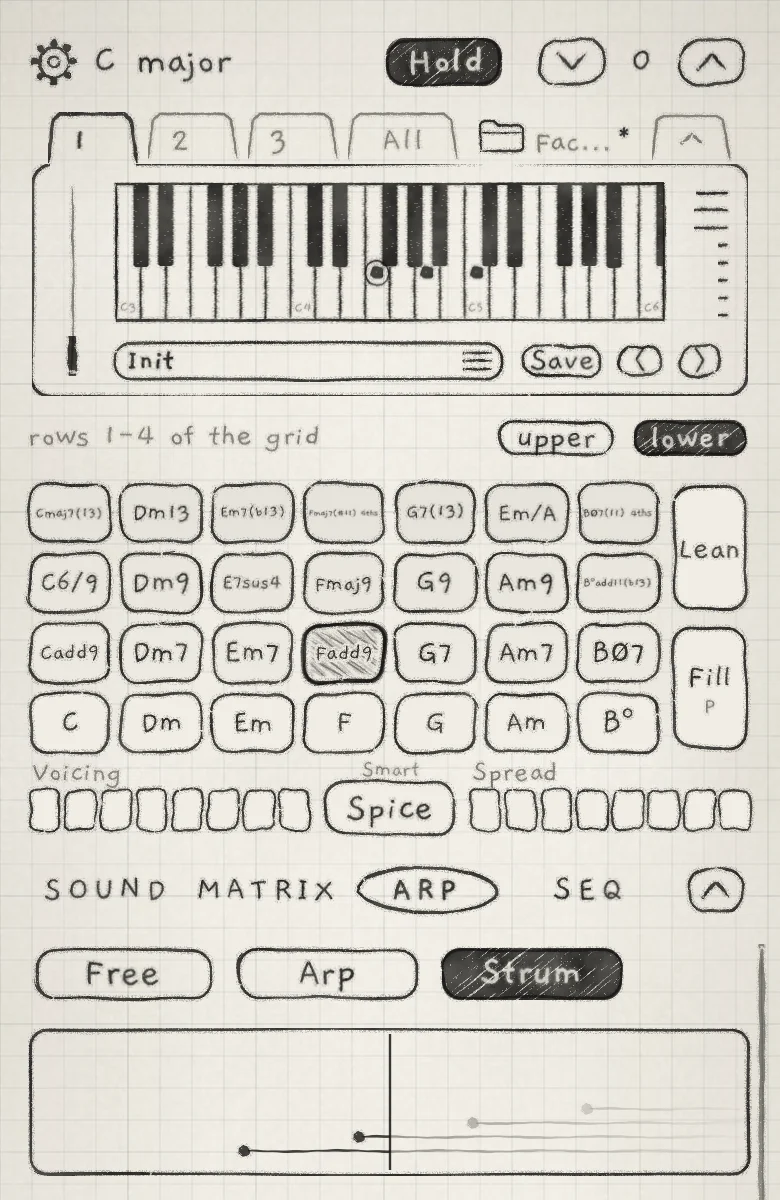
On the Chords keyboard every chord change strikes the whole new chord again as a strum. The old chord goes into its release as the strum starts. With Hold on, the new chord is struck and then held (Play Chords).
 1234
1234- 1Struck tile
- 2Chord piano
- 3Notes struck
- 4Notes waiting
The new chord takes free voices first. When all 8 voices of the engine are still ringing, it takes the quietest. With Lean on, each step of a voice moving to the new chord is struck again on its own, outside the strum, and notes new to the chord enter strummed (Lean and Fill).
#Follow
An engine on Strum that follows a Chords engine strums again on each chord its leader strikes, the same chord included. Its sounding notes are struck again in Mode's order at the new pitches. A follower with one note sounding moves with the leader and is not struck again. A follower that plays the Chords keyboard itself is not struck again. Follow is in Key lock and Follow.
#Patterns
A pattern step's notes arrive together, so they strum in Mode's order from the first turn. Gate does not shorten strummed notes, but a pattern's notes still end with their step: the note's length and the pattern's Gate end it, and with it any notes of the strum still waiting (Pattern playback).
#MIDI
Notes from MIDI in strum as touched notes do. Each note keeps its own pressure, set by its velocity and aftertouch; a Note Off before its turn skips the note (MIDI in). Each strummed note goes to MIDI out at its turn, with its pressure at that moment as the velocity (MIDI out).
CC 102 at 0 selects Free. At 127 an engine on Strum stays on Strum (MIDI implementation).
#Saved with the sound
Save stores Free, Arp or Strum with the sound. A sound saved on Strum plays Strum, with its own arp settings, whenever it is chosen (Arp rhythm and tempo).
- Load Init. Tap Hold and open the Arp tab. Choose Strum and set Mode to Up.
- Set Division to 4/32, Euclid to 5 and Probability to 50.0.
- Touch the bottom pads of columns 1, 3 and 5 together and lift. The notes enter on steps 1, 3 and 5.
- Set Euclid to 0. Touch the bottom pads of columns 2, 4 and 6 together. The new strum strikes on every step over the first three notes, which ring on.