CHAPTER 34 OF 54 · PERFORM AND RECORD
Arp rhythm and tempo
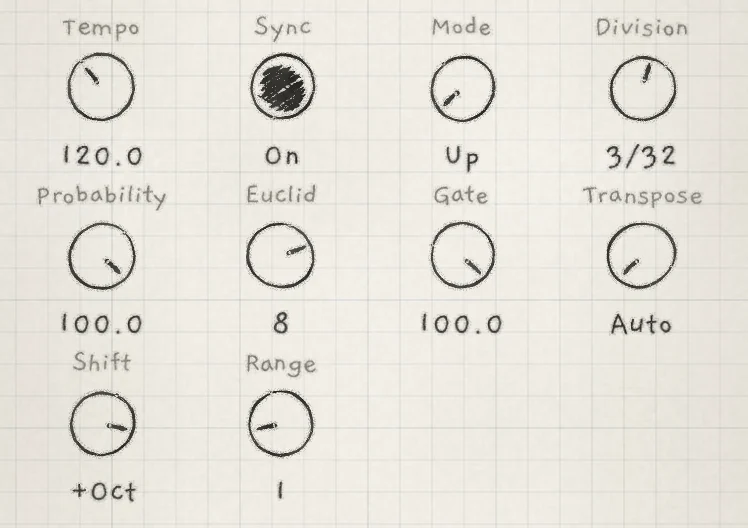
These controls set when the arp plays a note and how long the note sounds: the tempo and its clock, which steps play, and each note's length. They share the Arp tab with the controls that set what the arp plays, its note order, step length and transposed passes (Arp).
 12345
12345- 1Tempo
- 2Sync
- 3Probability
- 4Euclid
- 5Gate
- TempoThe current pattern's tempo. 20.0 to 300.0 BPM in 0.1 BPM steps. New pattern: 120.0; double-tap returns 120.0. No CC.
- SyncWhether the engine follows the master clock. On or Off. New pattern: On. No CC.
- ProbabilityWithout a Euclid length, the chance that a step plays; with one, the share of hits in the loop. 0.0 to 100.0. Init: 100.0. CC 105.
- EuclidLength of the Euclidean loop in steps; the sign sets what a gap does. −16 to +16; −1, 0 and +1 mean no loop. Init: 8. CC 106.
- GateShare of each step an arp note sounds. 0.0 to 100.0. New pattern: 100.0; double-tap returns 100.0. CC 11.
Tempo, Sync and Gate belong to the engine's current pattern. Probability and Euclid belong to the sound or to your own arp settings (Your arp settings and sounds with an arp).
#Tempo and Sync
Tempo and Sync are also the first two controls on the Seq tab. They are one control each, shown on both tabs. Changing either marks the pattern edited. Choosing another pattern brings its own Tempo and Sync (Pattern playback).
A synced Division follows the tempo the engine plays. A free Division ignores Tempo and Sync.
Sync selects the clock:
- On: the engine follows the master clock (Clock and sync). That is the host's tempo when INK runs in a host, else an incoming MIDI clock, else Engine 1's Tempo.
- Off: the engine runs its own clock at its pattern's Tempo.
Without a host or MIDI clock, Engine 1 is the master clock whatever its Sync.
A synced engine plays the master clock's tempo, not its own. Its Tempo is still stored with its pattern and plays once Sync is off. On Engine 2 or 3 with Sync on, and on any synced engine while a MIDI clock comes in, turning Tempo does not change the speed.
Clock sources, receiving MIDI clock and starts on the bar are in Clock and sync.
#In a host
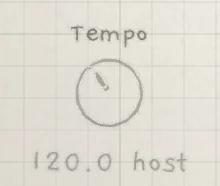
In a host that sends a tempo, a synced engine's Tempo shows the host's tempo followed by host, for example 120.0 host. The knob is greyed and does not respond; set the tempo in the host. The pattern keeps its own Tempo. With Sync off, the engine plays that Tempo and the knob responds.
#Probability
Probability works in one of two ways, chosen by Euclid.
- Euclid −1, 0 or +1: Probability is a per-step chance. Each step plays or misses at random.
- Euclid 2 to 16, either sign: Probability sets the number of hits in the Euclidean loop. Nothing is random.
At 0.0 no step plays, either way.
At Euclid 0 or +1, a missed step does not advance the arp. With Gate at 100.0 the previous note keeps sounding through the miss; under 100.0 the step is silent. At Euclid −1 a missed step is silent and the arp moves on to the next note.
The trace, the strip at the top of the Arp tab that draws the notes played and a guess at the next ones, draws no guess while Probability rolls dice (Arp).
#Euclid
Euclid turns the arp's steps into a Euclidean rhythm E(k,n): k hits spread as evenly as possible over a loop of n steps. The length n is the Euclid value without its sign, 2 to 16.
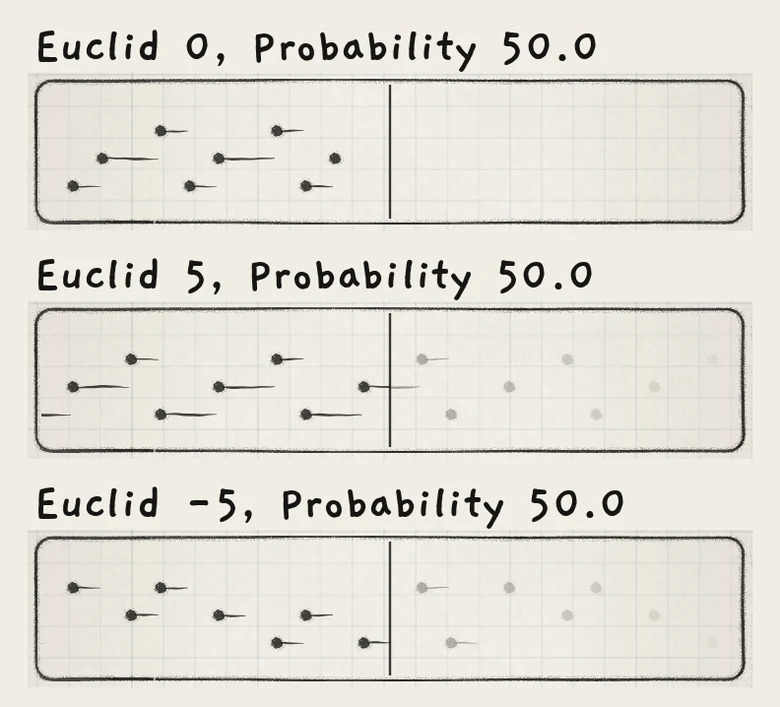
Probability sets the hits k. Higher values give more hits, step 1 of the loop is always a hit, and at 100.0 every step is. Euclid 5 at Probability 50.0 hits steps 1, 3 and 5 of every five. Euclid 8 at 50.0 hits steps 1, 3, 5 and 7.
 123
123- 1Euclid 0: no guess past now
- 2Euclid 5: the note rings through the gap
- 3Euclid −5: silent gaps, the arp walks on
The rhythm is fixed and repeats every loop. The loop starts again when the arp starts from no held notes and when the transport starts. Step offset on the Seq tab moves the pattern's steps, not the arp's loop.
The sign sets what a gap does:
- Positive: the arp advances only on hits. On a gap, the previous note keeps sounding with Gate at 100.0; under 100.0 the gap is silent.
- Negative: the arp advances on every step and the gaps are silent. The notes that fall on gaps are skipped, so the note order moves against the loop.
Init sets Euclid 8 at Probability 100.0, so every step plays until Probability is lowered.
Euclid is a stepped Matrix row: modulation jumps between whole lengths. On Strum, Probability acts only as Euclid's density; with no Euclid length every step strikes (Strum). The Seq tab has its own Probability and Euclid for the pattern's steps (Pattern playback).
#Gate
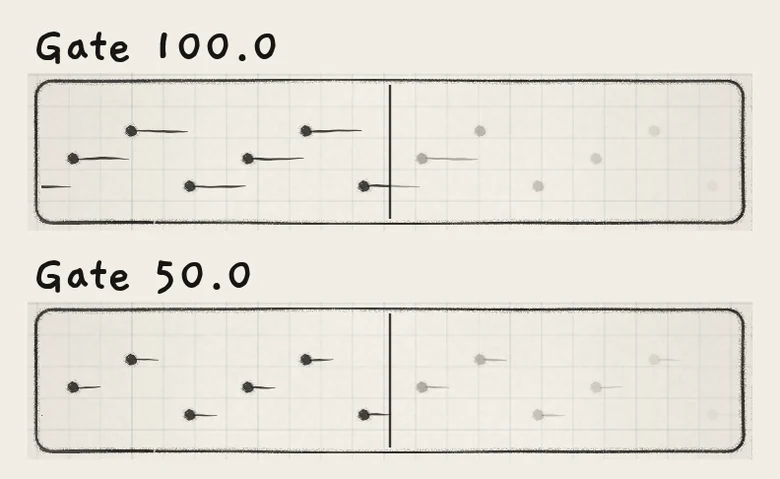
Gate sets the share of each arp step that a note sounds. Under 100.0 the note ends at that point and enters the amp envelope's Release, the first note of a run included. The step is one Division, synced or free. At 100.0 a note lasts until the next step.
 12
12- 1Gate 100.0: the line runs to the next step
- 2Gate 50.0: the line ends halfway
Gate belongs to the current pattern, like Tempo and Sync. It is the same control as Gate on the Seq tab, where it also shortens the pattern's steps (Pattern playback). Changing it marks the pattern edited. Matrix amounts on the Gate row belong to the sound and act per voice, so Prs → Gate sets each note's length from its own pressure.
Strum ignores Gate.
With Gate under 100.0 and a short Release, the voices fall silent between arp notes, so LFO Freeze takes a new value for each note (LFOs and Freeze).
#Your arp settings and sounds with an arp
Each engine keeps your own arp settings apart from the sound: the Free / Arp / Strum switch and every arp control except Tempo, Sync and Gate, with their Matrix amounts. Those three belong to the pattern, whatever sound plays.
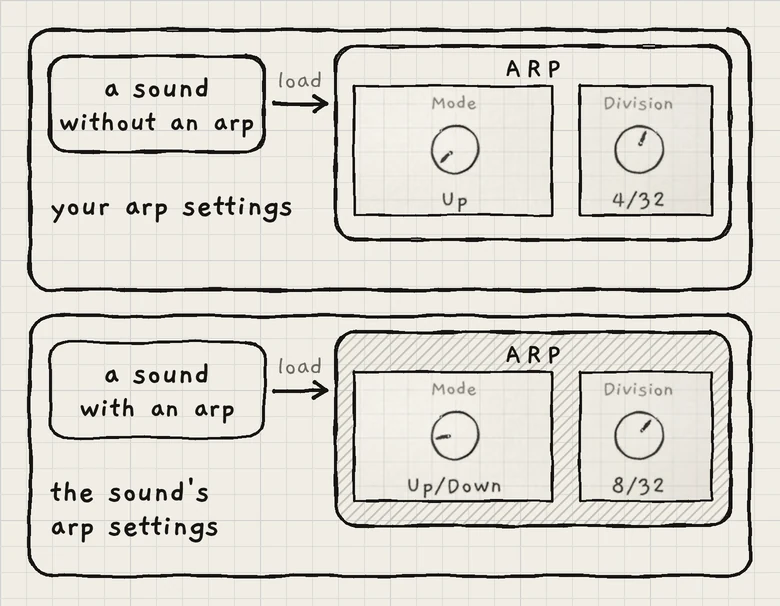 12
12- 1Sound without an arp: your arp settings
- 2Sound with an arp: its own settings
- A sound with an arp is one saved with the switch on Arp or Strum. It plays its own switch and arp controls. Editing those controls changes the sound and marks it edited (*).
- Any other sound plays your switch and your arp controls. Editing them changes your arp settings, not the sound, and does not mark it edited. They play again on the next sound without an arp.
Every change of the switch, on any sound, also sets your switch. Choosing Free, Arp or Strum never marks a sound edited. Your arp settings are saved with the project, one set per engine.
- Load Init. Tap Hold, latch three notes on the Grid and choose Arp on the Arp tab.
- Set Division to 2/32, Probability to 50.0 and Euclid to 5.
- Set Euclid to −5 and Gate to 50.0. Steps 1, 3 and 5 of every five play, the arp moves on through the silent steps, and each note ends halfway through its step.