CHAPTER 49 OF 54 · REFERENCE
Sound recipes
Each recipe is a patch sheet: the sound it starts from, the controls it changes, its Matrix cells and how to play it. Values are knob readings as the Sound tab shows them, and they are starting points. Where a factory sound is close, the recipe names it for comparison. Setups with several engines, the arp and patterns are in Performance recipes.
#Before you start
Load Init (Library › START FROM SCRATCH › Init). Set the key on the engine sheet (Keyboard, key and scale).
Each table lists only the controls the recipe changes; everything else keeps the value of the sound it starts from. Init's values:
| Section | Init |
|---|---|
| OSC | Supersaw, Detune 17.2 ct, Octave 0 |
| FILTER | Cutoff 21.0 kHz (fully open), Mode LP, Resonance 0% |
| ENVELOPE | Attack 12.5, Decay 25.0, Sustain 100.0, Release 12.5 |
| ENVELOPE 2 | Env Level 50.0; Attack, Decay, Sustain and Release as ENVELOPE |
| MOD A, MOD B, LFO X, LFO Y | Depth 0.0: no LFO moves |
| CHORUS / PHASER | Chorus, Mix 0% |
| DELAY | Classic, Send 0.0 |
| REVERB | Send 25.0 |
| Matrix | One cell: Prs → DCW, +50, which acts only on the Phase generator |
A Matrix cell is written source → destination, amount: Env → Cutoff, +40 is the Env cell of the Cutoff row in FILTER, set to +40. The columns are Env (Envelope 2), Prs (pressure), A (Macro A plus Mod A), B (Macro B plus Mod B), X (LFO X), Y (LFO Y) and Rnd (a random value per note). Env Level in ENVELOPE 2 scales every Env cell. A row name that repeats takes its group: Send (REVERB). How to set a cell is in Modulation matrix.
#Focused pulse bass
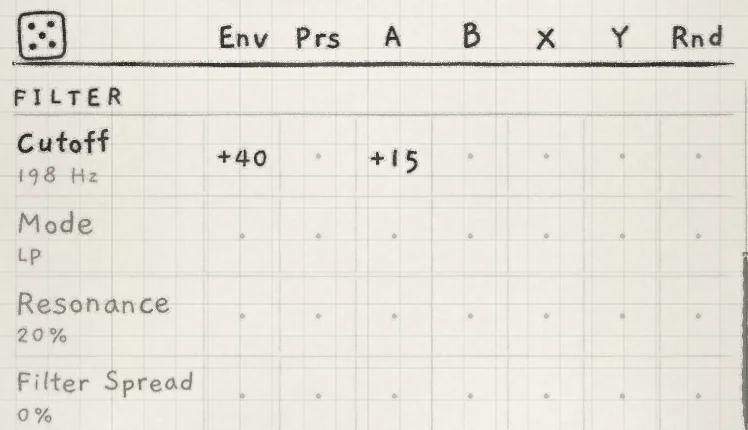
A square-wave bass with a filter envelope on every note. Start from: Init. Compare: Rubber root, Low lantern.
 123
123- 1Base value
- 2Env → Cutoff
- 3A → Cutoff
 12
12- 1Amp envelope
- 2Envelope 2
| Section | Control | Value |
|---|---|---|
| OSC | generator box | Pulse |
| OSC | Width | 50.0% |
| OSC | Octave | −1 |
| FILTER | Cutoff | about 200 Hz |
| FILTER | Resonance | 20% |
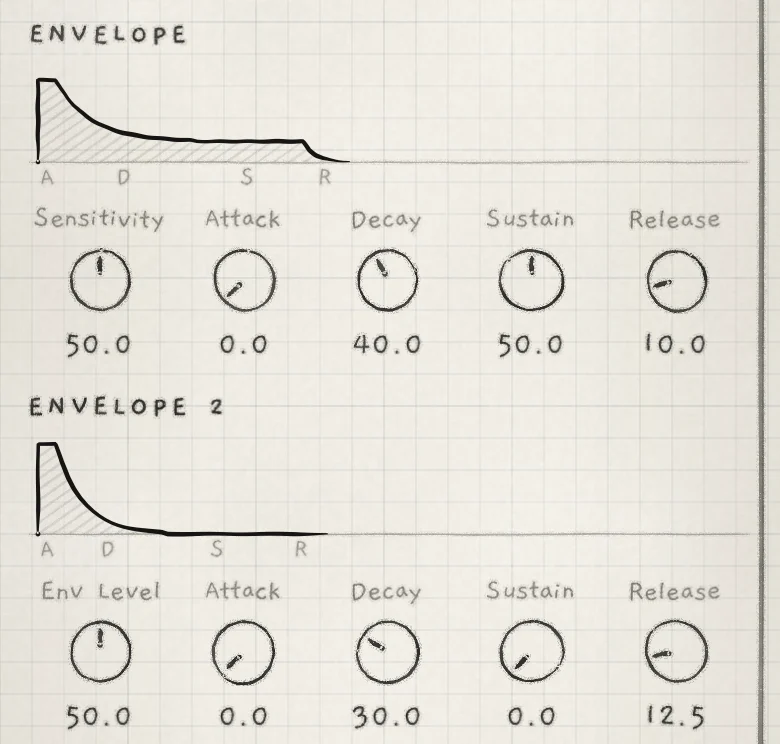
| ENVELOPE | Attack, Decay, Sustain, Release | 0.0, 40.0, 50.0, 10.0 |
| ENVELOPE 2 | Attack, Decay, Sustain | 0.0, 30.0, 0.0 |
| REVERB | Send | 0.0 |
| MIX | Stereo Width | 0.0 |
Matrix: Env → Cutoff, +40. A → Cutoff, +15.
Width 50.0% is a square wave. Env → Cutoff sets the height of the sweep above the 200 Hz base, Envelope 2's Decay its length. Stereo Width 0.0 makes the dry synth mono (Reverb and mix).
Play: single notes. Turn Macro A (A at the top right of OSC) clockwise from its centre to raise the cutoff under the sweep.
#Supersaw pad on pressure
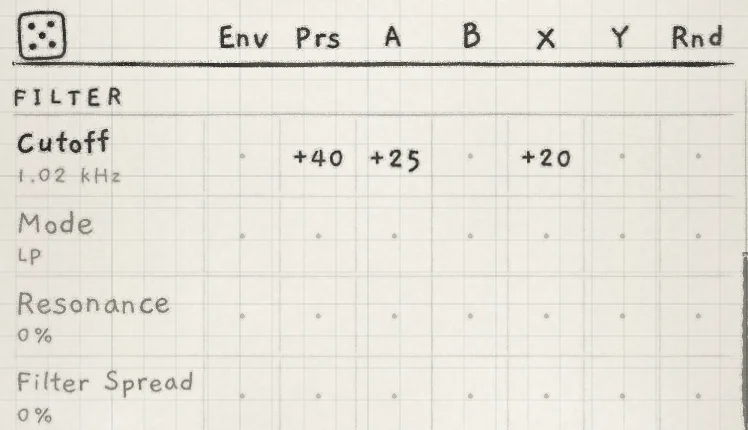
A slow pad whose filter follows pressure and an LFO. Start from: Init (Supersaw). Compare: Distant choir, Silver canopy.
 123
123- 1Prs → Cutoff
- 2A → Cutoff
- 3X → Cutoff
| Section | Control | Value |
|---|---|---|
| OSC | Detune | 12.5 ct |
| FILTER | Cutoff | about 1.0 kHz |
| ENVELOPE | Attack, Release | 50.0, 50.0 |
| LFO X | Depth, Rate | 30.0, −50.0 (3.3 s cycle) |
| CHORUS / PHASER | Mix, Rate | 40%, 0.09 Hz |
| REVERB | Send | 40.0 |
Matrix: Prs → Cutoff, +40. Prs → Detune, +10. X → Cutoff, +20. A → Cutoff, +25. B → Send (REVERB), +25.
Sustain stays at Init's 100.0. Prs → Detune widens the saw stack as pressure rises. A Release of 50.0 keeps voices busy after the keys are up: with 8 voices per engine, a new chord can take a ringing voice (Amp envelope).
Play: chords of three or four notes, held. Pressure opens the filter; A raises the cutoff, B the reverb send.
#Vocal wavetable lead
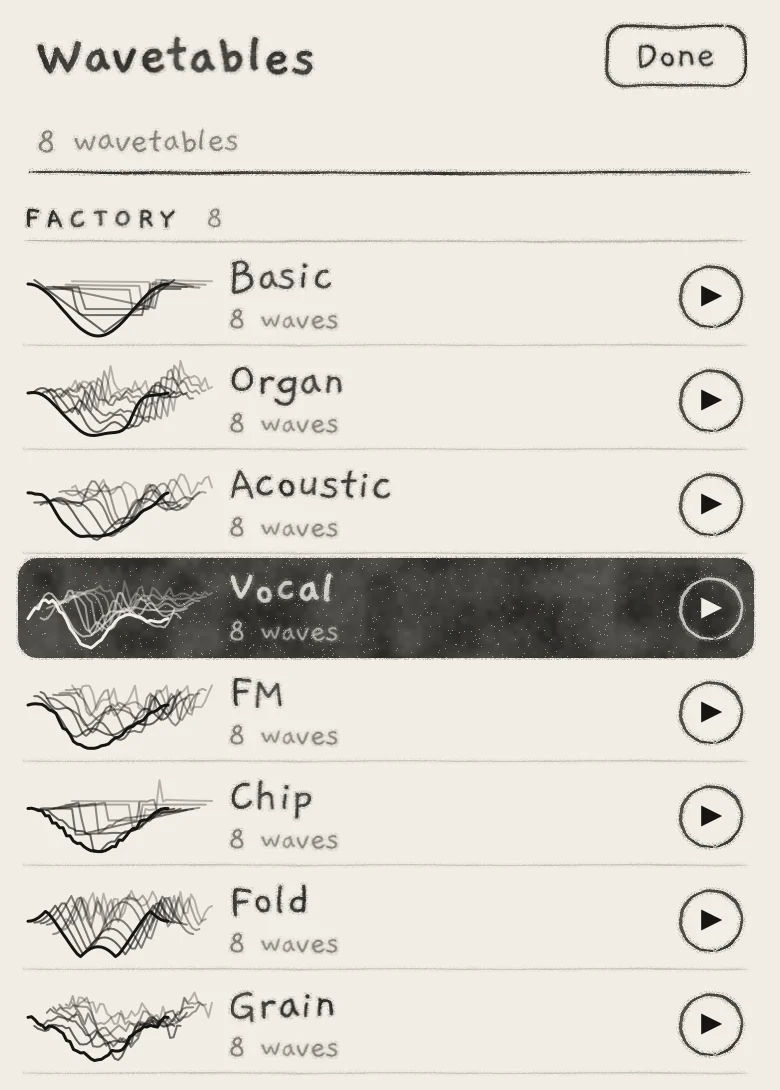
A monophonic line on Keys, scanning the Vocal bank. Start from: Init. Compare: Vowel line.
 1
1- 1Vocal, the table the sound plays
| Section | Control | Value |
|---|---|---|
| OSC | generator box | Wavetable |
| OSC | bank box, under the generator box | Vocal |
| OSC | Position | 4.0 |
| OSC | Glide | 15.0 |
| FILTER | Cutoff | about 2.0 kHz |
| ENVELOPE | Attack, Release | 5.0, 25.0 |
| DELAY | Send, Time | 20.0, 3 /32 sync (dotted 1/16) |
Matrix: A → Position, +15. Prs → Cutoff, +30.
Keyboard: engine sheet › KEYBOARD › Keys. Slide control stays on In tune, its default. It is an app setting for every engine on Keys, in Settings › PLAYING › Slide control (Play Keys).
Tap the bank box to open the Wavetables list (Wavetables). Position 4.0 is the bank's fourth wave. With A → Position, Macro A scans toward the brighter waves above it. On Keys, Glide acts only on jumps (a new note, a row change); a slide follows the finger.
Play: one note at a time, sliding between keys. Rock the finger sideways for vibrato.
#Glass keys
A struck FM bell whose timbre varies from note to note. Start from: Init. Compare: Glass celesta, Mellow tines, Bell piano.
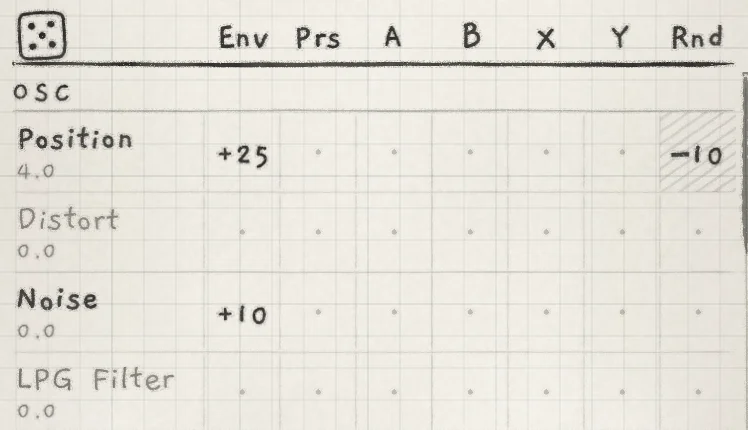 123
123- 1Env → Position
- 2Rnd → Position
- 3Env → Noise
| Section | Control | Value |
|---|---|---|
| OSC | generator box | Wavetable |
| OSC | bank box, under the generator box | FM |
| OSC | Position | 4.0 |
| ENVELOPE | Attack, Decay, Sustain, Release | 0.0, 45.0, 0.0, 30.0 |
| ENVELOPE 2 | Attack, Decay, Sustain | 0.0, 20.0, 0.0 |
| REVERB | Send | 30.0 |
Matrix: Env → Position, +25. Rnd → Position, −10. Env → Noise, +10.
- Env → Position starts each strike on brighter waves and returns to the base as Envelope 2 decays.
- Rnd → Position is negative because a negative Rnd amount spreads each note's value both ways around the base, not only upward (Modulation matrix).
- Env → Noise adds a noise burst at the strike that decays with Envelope 2. The Noise knob stays at 0.0, so no noise sustains.
Play: single notes and chords with short presses. Repeat one note to hear the Rnd spread.
#Frozen granular atmosphere
A sustained recording held at one read point, which moves to a new point with each phrase. Start from: Low cello (Library), or a Granular sampler sound playing your own sustained recording (Import and record). Compare: Prism cloud, Sleep current, Night shore.
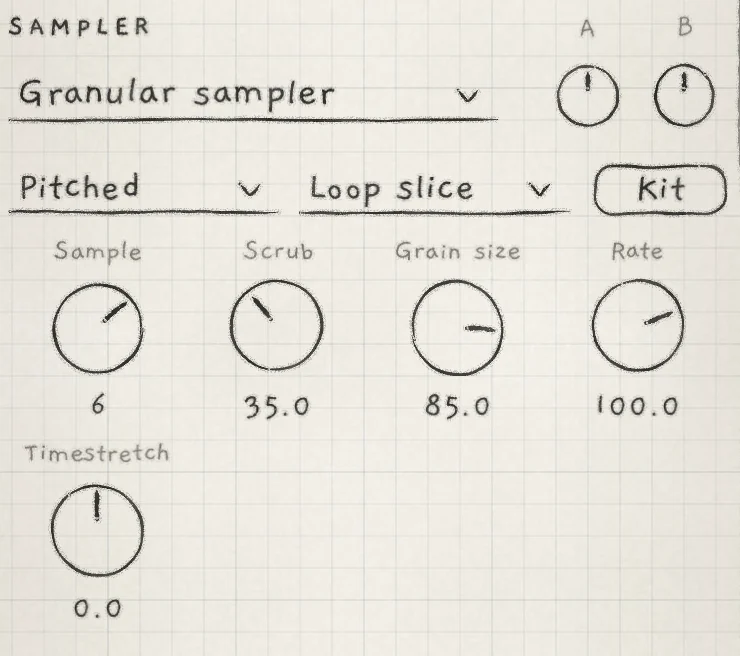 12345
12345- 1Tape or Pitched
- 2Play style
- 3Scrub
- 4Grain size
- 5Timestretch
| Section | Control | Value |
|---|---|---|
| SAMPLER | Tape or Pitched, the drop-down under the generator | Pitched |
| SAMPLER | Play style, the drop-down beside it | Loop slice |
| SAMPLER | Scrub | 35.0 |
| SAMPLER | Grain size | 85.0 (about 380 ms) |
| SAMPLER | Timestretch | 0.0, the knob's centre |
| SAMPLER JITTER | Scrub jit. | 20.0 |
| FILTER | Cutoff | about 2.7 kHz |
| ENVELOPE | Attack, Release | 50.0, 50.0 |
| LFO X | Freeze | on |
| LFO X | Depth, Rate | 30.0, −50.0 |
| LFO Y | Depth | 50.0 |
| REVERB | Send | 40.0 |
Matrix: X → Scrub, +10. Y → Cutoff, +15.
Low cello already plays Pitched and Loop slice; a new recording starts on Play slice. Timestretch is bipolar: at 0.0 the playhead stops and the grains repeat one point, set by Scrub (Granular sampler).
X → Scrub moves the read point. With Freeze on, LFO X's value is held from the first note until every voice of the engine is silent, so each phrase keeps one point and the next phrase starts at another (LFOs and Freeze). Y → Cutoff moves the filter continuously.
Play: single notes or chords, held. Let the release end before the next phrase to get a new read point.
#Phase bass with Sub
A CZ-style saw bass with a DCW envelope, a Sub an octave below (Shape 40.0, a flat-topped sine) and multiband compression. Start from: Init.
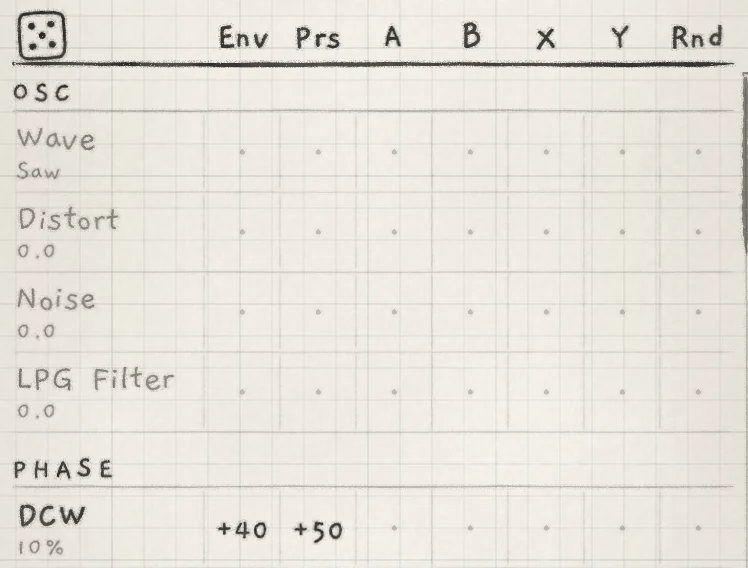 123
123- 1Wave, Saw
- 2Env → DCW
- 3Prs → DCW
| Section | Control | Value |
|---|---|---|
| OSC | generator box | Phase |
| OSC | Wave | Saw (fully anticlockwise) |
| PHASE | DCW | 10% |
| PHASE | Drift | 10% |
| SUB | Level | 40.0 |
| ENVELOPE | Attack, Decay, Sustain, Release | 0.0, 40.0, 60.0, 10.0 |
| ENVELOPE 2 | Attack, Decay, Sustain | 0.0, 30.0, 0.0 |
| REVERB | Send | 0.0 |
| MULTIBAND | Low, Mid | 40%, 20% |
Matrix: Env → DCW, +40. Keep Init's Prs → DCW, +50.
Switching from Supersaw leaves the first OSC knob where Detune was, so Wave reads Saw-pulse; turn it fully anticlockwise for Saw (Phase). DCW sets the brightness: Env → DCW gives each note a DCW sweep, Prs → DCW a brighter note at higher pressure.
The Sub plays one octave under the lowest held note (SUB Octave −1, Init). At Init's Shape 40.0 its odd harmonics keep it audible on small speakers. It weakens on notes below B1 (Sub oscillator). Low at 40% and Mid at 20% make the low and mid bands denser and louder (Multiband).
Play: single notes and short phrases in the lower half of the Grid. Press harder for a brighter note.