CHAPTER 26 OF 54 · MAKE IT MOVE
Modulation matrix
The modulation matrix decides what moves in a sound. Each engine has one on its Matrix tab: the modulation sources are the columns, and every control that can be modulated is a row. A cell holds how far its source moves that control from the base value its knob sets (The three engines). The amounts are saved with the sound.
The layout comes from Plinky, where each parameter carries its own amount for every modulation source. INK shows those amounts for all parameters at once, as one grid per engine.
#Columns, rows and cells
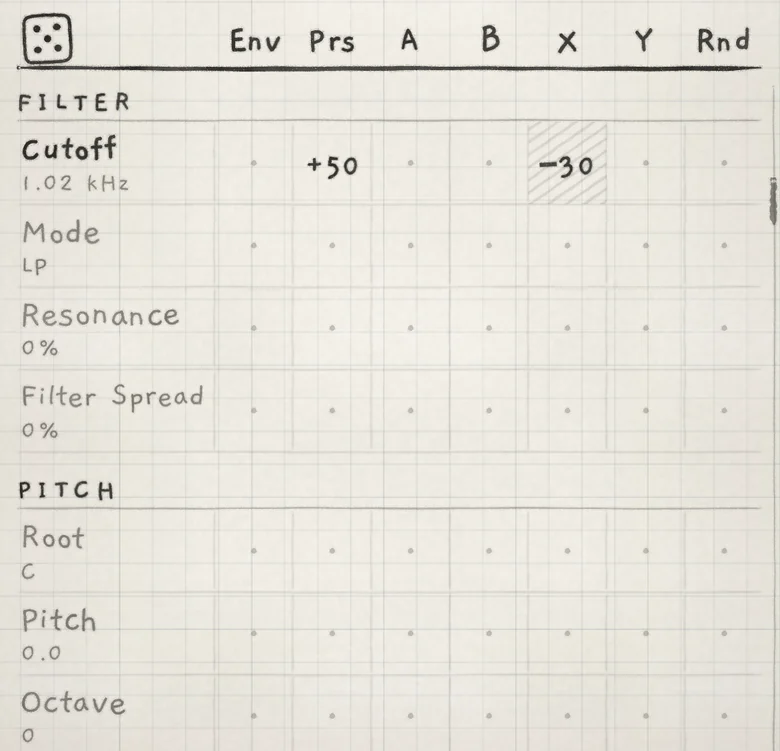 12345
12345- 1Dice
- 2Column heads (sources)
- 3Group title
- 4Row name and base value
- 5Cell
In the Matrix, each column head names a source. Each row is a destination, a control listed under the title of its group. Where a column meets a row is a cell.
Under each row name is the row's base value, as its knob shows it. A row with at least one non-zero cell has its name in bold.
The title of the current group stays pinned at the top of the list. Tap a group title to open the list of groups and jump to one. The dice in the top-left corner writes a random set of cells (Macros and dice).
#Sources
- EnvEnvelope 2. Unipolar; Env Level sets its peak (Envelope 2 and Random).
- PrsPressure, from touch or MIDI. Unipolar: 0 at no pressure.
- AMacro A plus the Mod A LFO. Bipolar; the macro's centre is 0 (Macros and dice).
- BMacro B plus the Mod B LFO. Bipolar.
- XLFO X, including its Offset. Bipolar (LFOs and Freeze).
- YLFO Y, including its Offset. Bipolar.
- RndA random value drawn at each new note. The sign of the amount sets how it spreads (see Amounts below).
A unipolar source moves its destination in one direction from the base value. A bipolar source swings both ways around it.
Prs comes from touch on every keyboard. A MIDI note's Prs starts at its velocity, then follows the highest of its aftertouch, channel pressure and MPE Slide (CC 74) once one of them arrives (MIDI in).
The A and B columns move while the macro is at rest when the Mod A or Mod B Depth is above 0.
#Amounts
 12345
12345- 1Bold name: the row is modulated
- 2Base value
- 3Positive amount
- 4Zero
- 5Negative amount, hatched
A cell's amount runs from −100 to +100, in whole numbers. Zero is drawn as a dot; negative amounts are hatched.
At full source level, +100 moves the destination across its whole scale: from minimum to maximum on a unipolar destination such as Cutoff, from the centre to one end on a bipolar one such as Distort. +50 moves it half as far. A negative amount inverts the source.
Rnd works differently. A positive amount gives each note a value spread evenly from 0 to the amount. A negative amount spreads it both ways, from −amount to +amount, more often near 0.
#Set an amount
- Drag a cell up or down; up is more. A faster drag covers more range. For fine changes, rest the finger on the cell before you drag.
- Double-tap a cell to clear it to 0. On a knob, a double-tap returns to the reference value instead.
- A quick swipe scrolls the list, also when it starts on a cell.
On a Mac: drag a cell, double-click to clear, scroll to move the list. The scroll wheel never edits.
#Summing and headroom
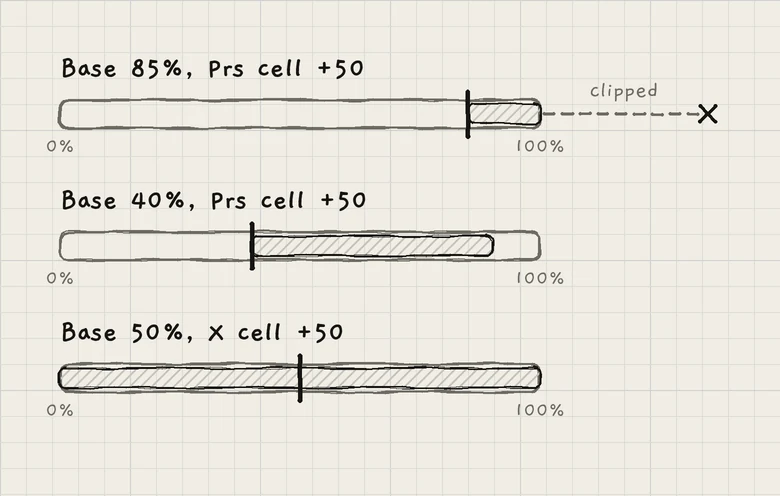
The base value and every source's contribution add up. The sum is held to the destination's range; modulation beyond either end is lost.
A unipolar source with a positive amount needs room above the base value. With Cutoff at its maximum, a positive Prs amount has no effect; lower the base value, or use a negative amount. A bipolar source needs room on both sides.
#Per voice and per engine
Rows inside the voice are read for each voice, with that note's own Env, Prs and Rnd. Rows outside the voice are read once per engine.
| Read | Groups | Env and Prs |
|---|---|---|
| Per voice | OSC, PHASE, FILTER, PITCH, AMP ENV, ENV 2, SAMPLER (except Sample), SAMPLER JITTER | The voice's own |
| Lowest note | SUB | The voice the Sub plays under |
| Per engine | Sample, MOD A, MOD B, LFO X, LFO Y, ARP, CHORUS / PHASER, DELAY, REVERB, MULTIBAND, MIX | The highest Env and the highest Prs of the engine's voices |
Per-engine rows take one Rnd value, drawn again at each new note in the engine. The ARP group's Gate is read per voice.
#Destination groups
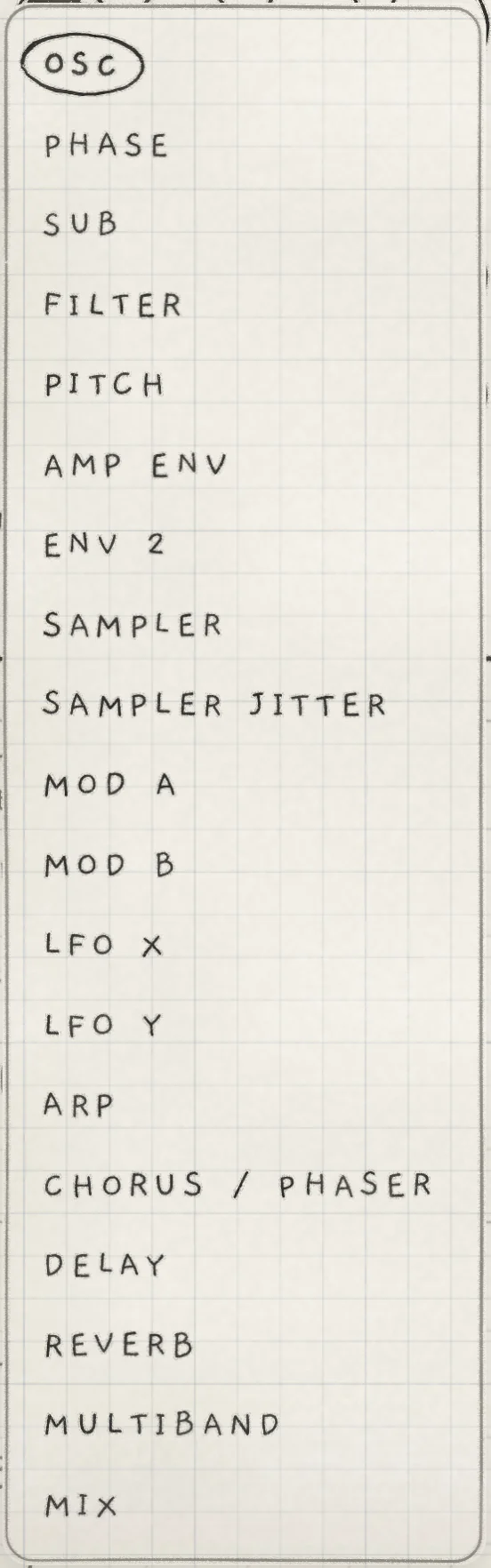
Each group holds the controls of one section of the Sound or Arp tab. The table lists them in the Matrix's order, with the chapter that explains each control:
| Group | Rows | Chapter |
|---|---|---|
| OSC | tone control (Detune, Width, Position, Wave or Shape), Distort, Noise, LPG Filter | Oscillators |
| PHASE | DCW, Detune, Osc B, B Pitch, Ring, Drift | Phase |
| SUB | Level, Shape, Octave | Sub oscillator |
| FILTER | Cutoff, Mode, Resonance, Filter Spread | Filter |
| PITCH | Root, Pitch, Octave, Interval, Glide, Microtone, Degree, Scale, Stride | Oscillators, Play the Grid, Keyboard, key and scale |
| AMP ENV | Sensitivity, Attack, Decay, Sustain, Release | Amp envelope |
| ENV 2 | Level, Attack, Decay, Sustain, Release | Envelope 2 and Random |
| SAMPLER, SAMPLER JITTER | Sample, Scrub, Grain size, Rate, Timestretch; Scrub jit., Grain jit., Rate jit. | Granular sampler |
| MOD A, MOD B, LFO X, LFO Y | LFO depth, LFO rate, LFO shape, LFO warp; Offset on X and Y | LFOs and Freeze |
| ARP | Mode, Division, Probability, Euclid, Gate, Shift, Range | Arp |
| CHORUS / PHASER | Mix, Center, Depth, Rate, Feedback, Tone, Stereo | Chorus and phaser |
| DELAY | Send, Time, 2nd tap, Wobble, Feedback | Delay |
| REVERB | Send, Time, Shimmer, Wobble | Reverb and mix |
| MULTIBAND | Low, Mid, High | Multiband |
| MIX | Synth level, Wet / dry, High pass, Stereo width | Reverb and mix |
Every group is listed for every generator. PHASE rows act only on a Phase sound; SAMPLER and SAMPLER JITTER only on a Granular sampler sound.
PITCH holds Root and Scale, the engine's key, whose controls are on the engine sheet, as well as Pitch, the sound's tuning. Stepped rows, such as Octave, Scale and the LFO shapes, move in whole steps; the full list is in Macros and dice.
#Row names that differ from the knobs
| Group | Matrix row | Knob |
|---|---|---|
| OSC | first row: Detune, Width, Position or Wave | the same; on a Granular sampler sound the row reads Shape, and it and LPG Filter have no knob |
| ENV 2 | Level | Env Level |
| MOD A, MOD B, LFO X, LFO Y | LFO depth, LFO rate, LFO shape, LFO warp | Depth, Rate, Shape, Warp |
| DELAY | 2nd tap | 2nd Tap |
| MIX | Synth level, Wet / dry, High pass, Stereo width | Synth Lvl, Main Wet/Dry, High Pass, Stereo Width |
With the Phaser selected, the Center row of CHORUS / PHASER reads Sweep, as its knob does.
#ARP
The ARP rows carry the Arp tab's names; Transpose has no row. A cell on an ARP row plays what the knob plays at the resulting value.
- Division stays within the half its knob is on: free values or synced divisions.
- With a Euclid length of 2 or more, Probability sets the pattern's density. Without one, the arp skips steps at random and Strum plays every note.
- Gate is the sound's Gate, so a cell on it also shortens played and pattern notes.
#Rows on Chords and Strings
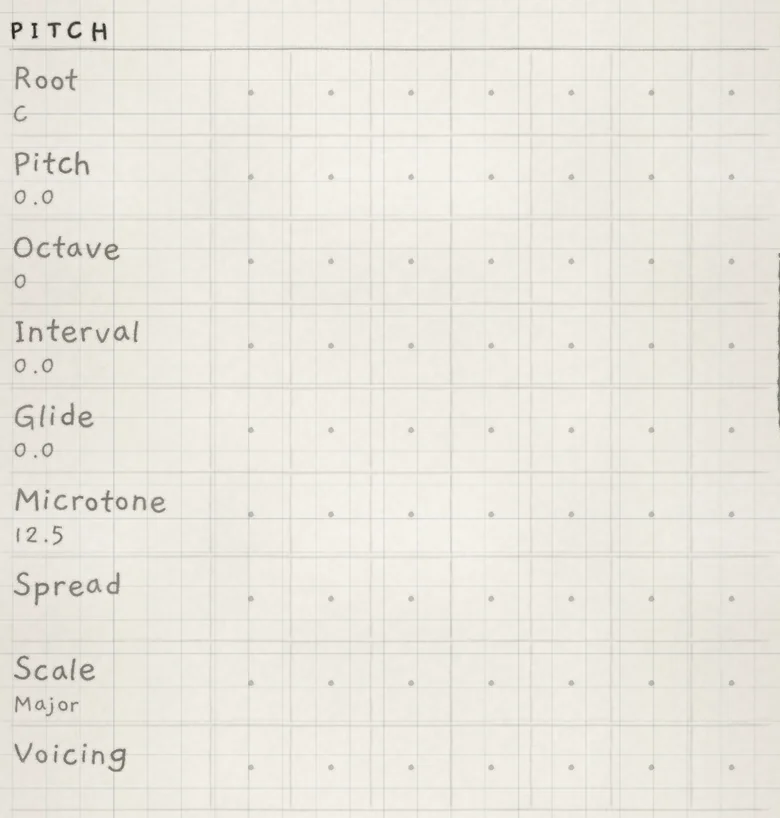 12
12- 1Spread (Degree's row)
- 2Voicing (Stride's row)
On a Chords engine, the Stride row becomes Voicing and the Degree row becomes Spread. They modulate the two rails (Chord colour). Their value is read when a chord is struck, changed under a held finger or slid to; a sounding chord is never re-voiced. Env cells on these rows have no effect, since Envelope 2 is at 0 at the strike. The Stride and Degree knobs are greyed.
On a Strings engine, the Stride and Degree knobs are greyed, but the rows keep their names and move the strings as they move the Grid's columns (Play Strings).
In INK MIDI, the Matrix holds PITCH (Root, Octave, Degree, Scale and Stride), ARP, ENV 2, MOD A, MOD B, LFO X and LFO Y, plus a PARAM row for each PARAM knob (INK MIDI).
- Load Init. On the Sound tab, lower Cutoff to about 500 Hz.
- On the Matrix tab, in FILTER, drag the Prs cell of Cutoff to +50.
- Drag the A cell of Cutoff to +30.
- Hold a note on the keyboard and vary the pressure.
- On the Sound tab, turn Macro A, the A knob at the right of the OSC section, or drag the XY pad on the All page. A moves the cutoff's starting point above or below 500 Hz; pressure opens the filter from there.