CHAPTER 21 OF 54 · SHAPE THE SOUND
Filter
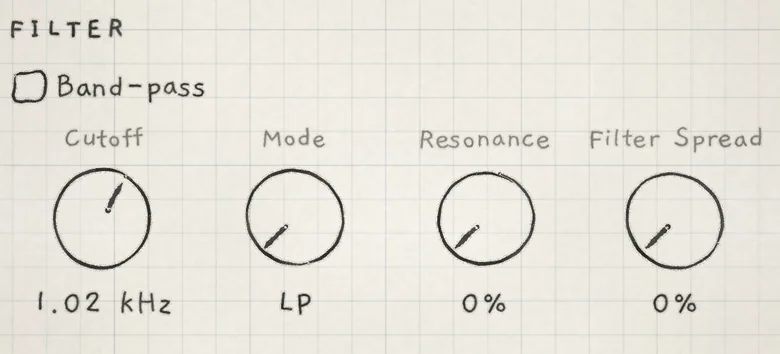
Each voice has its own multimode filter, modelled on the Oberheim SEM. On the SEM one knob sweeps the filter continuously from low-pass through notch to high-pass; INK keeps that knob as Mode, and adds a band-pass switch and a stereo spread. The filter is the FILTER section of the Sound tab, the same on every generator, the Granular sampler included.
 12345
12345- 1Band-pass
- 2Cutoff
- 3Mode
- 4Resonance
- 5Filter Spread
#The filter
The SEM-style Filter is a 2-pole (12 dB/oct) state-variable filter. Each voice has its own, so modulation acts on every note separately: with pressure on Cutoff (Prs → Cutoff), each note opens as far as it is pressed.
The filter sits after the voice's low-pass gate and before the voice joins the engine's mix and effects. It filters everything the voice plays: oscillators or grains, Sub and noise. The low-pass gate has its own resonance, LPG Filter, independent of this section (Oscillators). The full path is in Signal flow.
Cutoff is the same for every note, wherever it is played. For a filter envelope, route Envelope 2 to Cutoff in the Matrix: Env → Cutoff (Filter envelope).
- Band-passSwitches the output from the Mode sweep to the band-pass response. Off or on. Init: off.
- CutoffCutoff frequency. 20 Hz to 21.0 kHz. Init: 21.0 kHz. CC 74.
- ModeSweeps the response from low-pass through notch to high-pass. LP to HP. Init: LP.
- ResonanceBoost around the cutoff. 0 to 100%; does not self-oscillate. Init: 0%.
- Filter SpreadWidens the sound by detuning each voice's left and right filters. 0 to 100%. Init: 0%.
Cutoff, Mode, Resonance and Filter Spread are the FILTER rows of the Matrix, under the same names. Band-pass has no Matrix row and no CC, so no modulation or MIDI message changes it. Cutoff is the only control with a CC. To play Mode, Resonance or Filter Spread from a controller, give it a cell in the A or B column of the Matrix and send CC 1 or CC 30 (MIDI implementation). All five are saved with the sound.
#Cutoff
Cutoff sets the cutoff frequency, from 20 Hz to 21.0 kHz. The readout shows Hz below 1 kHz and kHz above.
The filter is always in the signal path: 21.0 kHz is not a bypass. With Mode at HP, that setting removes nearly all of the sound.
CC 74 sets Cutoff. On the note channels of an MPE zone, CC 74 is Slide instead (MIDI in).
#Resonance
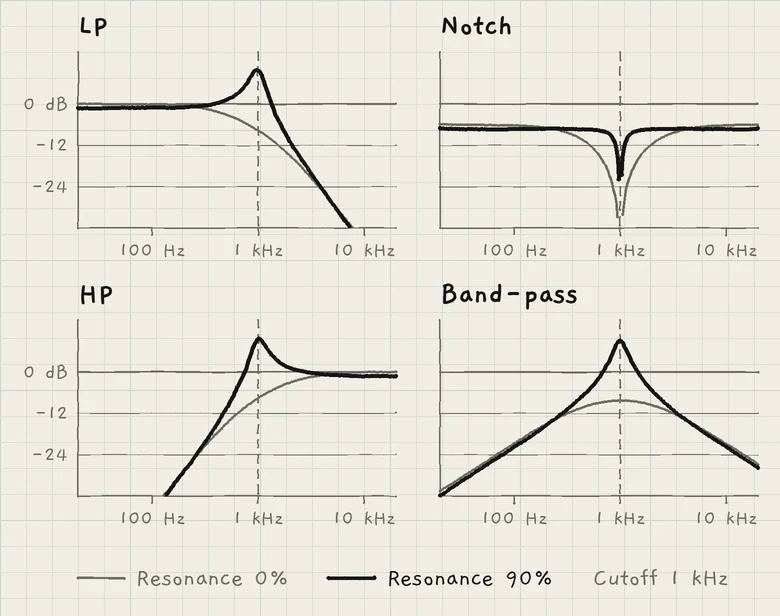
Resonance boosts the frequencies around the cutoff. It does not self-oscillate. Most of the boost comes in the top third of the range.
At 0% the response is broad: it starts to fall below the cutoff frequency, so the sound is darker than the Cutoff readout suggests.
#Mode
Mode sweeps the response continuously from low-pass to high-pass, through a notch at the centre. The readout shows LP at the left end, HP at the right end and Notch at the exact centre. Between them it reads LP / Notch or Notch / HP.
Between the ends, Mode mixes the filter's low-pass and high-pass outputs. At the centre the two cancel at the cutoff frequency, which makes the notch; higher Resonance narrows it. As on the SEM, the sound at Notch is about 6 dB quieter than at LP or HP.
#Band-pass
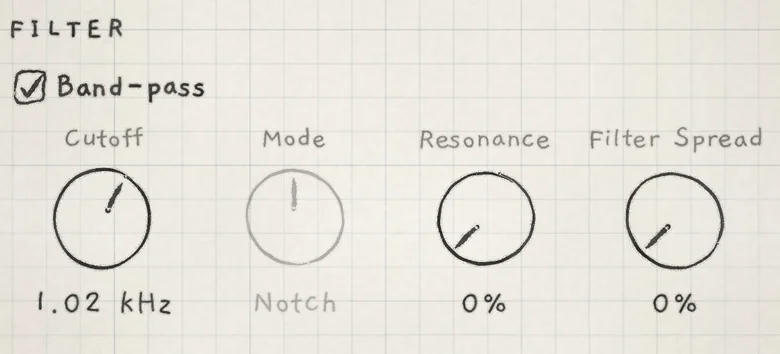
Band-pass switches the output to the filter's band-pass response. While it is on, Mode is greyed and keeps its value for when you switch back.
 12
12- 1Band-pass on
- 2Mode greyed
The band-pass peak follows Resonance: at 50% it sits at full level, quieter below and louder above.
#Filter Spread
Filter Spread widens the sound by detuning each voice's left and right filters. One side's cutoff moves up and the other's down, by up to 15% of the cutoff frequency at 100%. At 0% both sides share one cutoff.
Each voice moves by a different amount, and alternate voices swap which side goes up, so the notes of a chord fall to different sides. The effect is strongest with Resonance raised, where the left and right peaks sit at different frequencies.
- Load Init. In FILTER, set Cutoff to about 1 kHz and Resonance to about 70%.
- Set Filter Spread to 100%.
- Play and hold a chord of three or four notes. Each note's resonant peak sits higher on one side and lower on the other, and alternate voices swap sides, so the chord spreads across the stereo image.