CHAPTER 14 OF 54 · PLAY
Play Strings
Strings turns the keyboard into a strumplate: eight strings that play the notes of one chord. It comes from the Omnichord, where one hand picks a chord and the other strums a touch plate that plays only that chord's notes, over several octaves. On INK the chord is the engine's root chord, or the chord another engine plays on Chords.
How fast the finger crosses a string, not pressure, sets each pluck's level, brightness and ring. Each pluck takes one of the engine's 8 voices and plays through the sound, Matrix and effects like any other note.
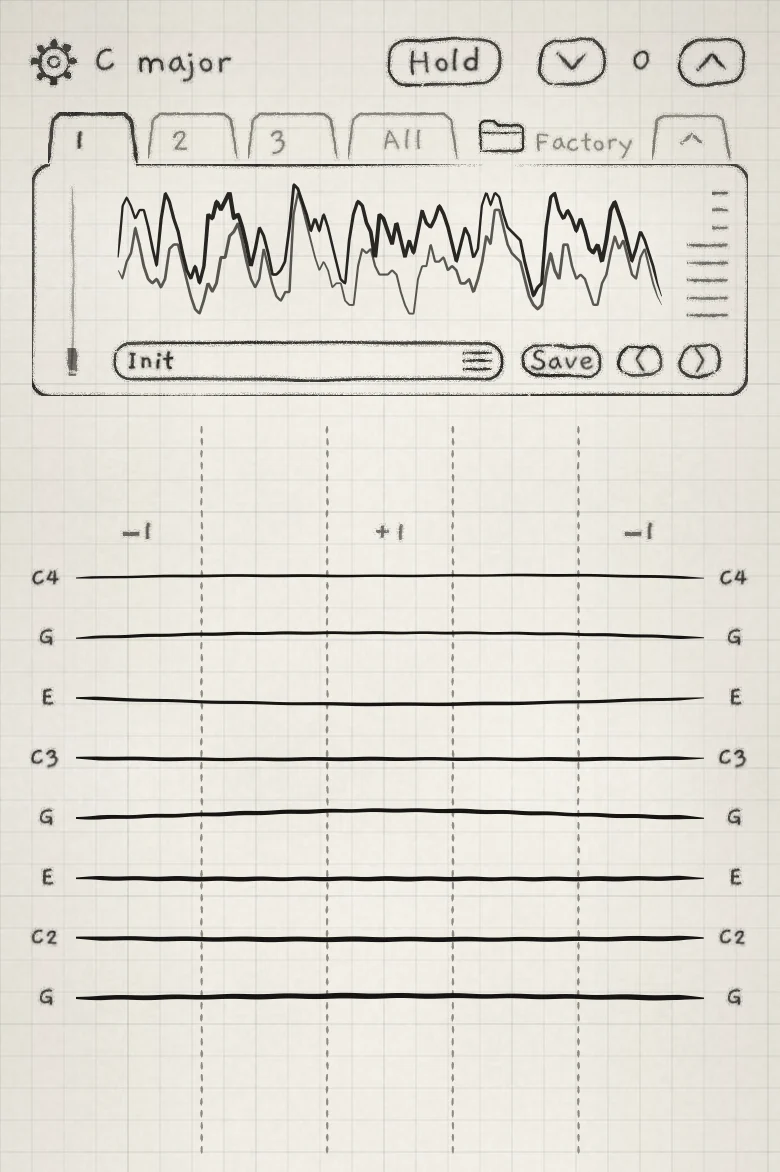 12345
12345- 1Zone marks
- 2Note names
- 3Zone edge
- 4Hold
- 5Octave arrows
#Choose Strings
Tap the key in the top row to open the engine sheet, then tap Strings under KEYBOARD. The keyboard is an app setting, one per engine; loading a sound or a project does not change it (Keyboard, key and scale).
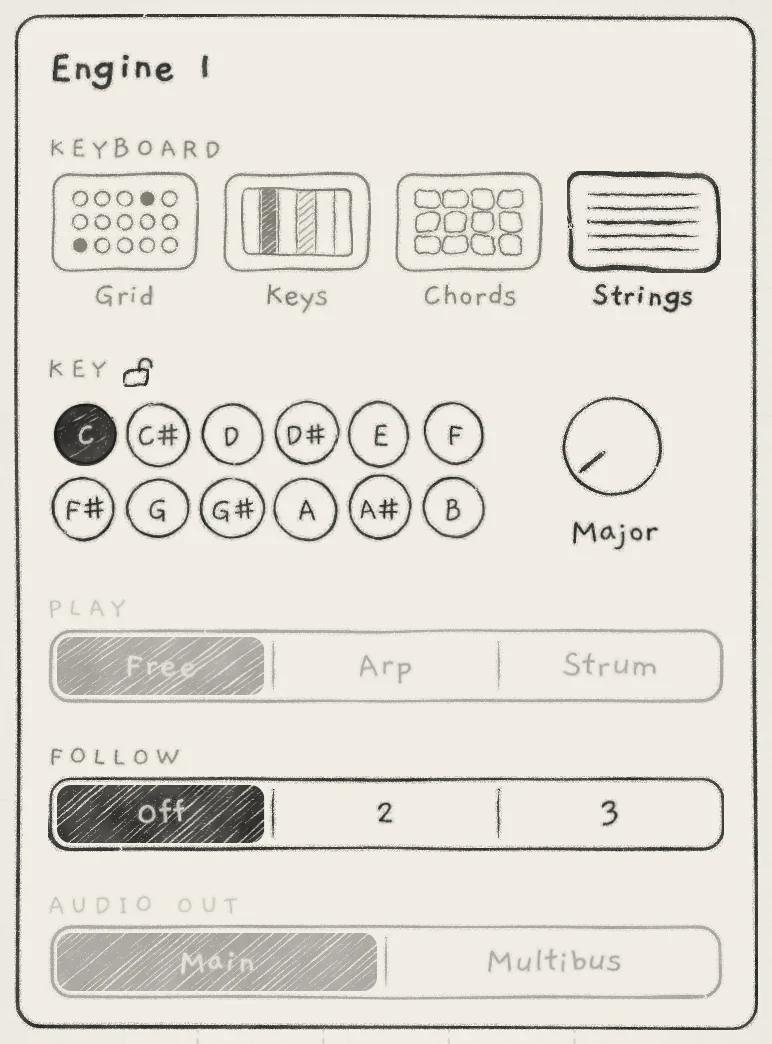 123
123- 1Strings
- 2PLAY greyed
- 3FOLLOW
#Layout
The strings run across the full width, lowest at the bottom. There is room above the top string and below the bottom one, so a strum can start off the strings.
Without Follow, the strings play the engine's root chord in the engine's key: the chord on column I, row 1 of the Chords keyboard (Play Chords). The chord's notes run upward from the bottom string, starting near the root:
| Key | Strings, bottom to top |
|---|---|
| C major | G C E G C E G C |
| F major | A C F A C F A C |
| G major | G B D G B D G B |
Every chord is laid out in the same register, so on a chord change each string moves by a few semitones at most and a strum stays smooth.
Each string's note name is printed at both ends, in the side zones' octave (Zones). The root carries its octave number (C2, C3, C4 in the figure). A name is pencil while its string is silent and bold while it sounds. A sounding string is drawn vibrating, as wide as its voice's level.
#Zones
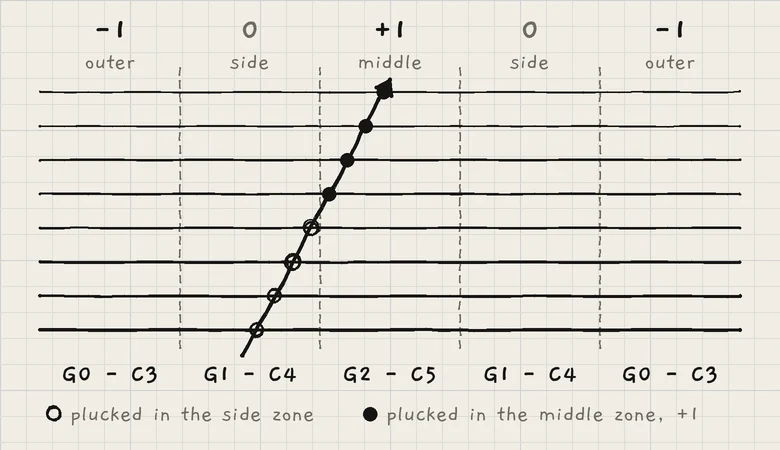 1234
1234- 1Outer zone, −1
- 2Side zone, 0
- 3Middle zone, +1
- 4Zone edge
The width is split into five equal zones that play the same strings in different octaves. The side zones play the strings as named. The middle zone plays them one octave higher, the outer zones one octave lower. The marks +1 and −1 above the strings label the middle and outer zones; dashed lines mark the edges.
The zone is read each time the finger crosses a string, not at touch-down. A strum that drifts sideways across an edge plays the strings after the edge in the new zone's octave. A finger must move a short way past an edge before its zone changes, so a strum along an edge does not flip between octaves.
The Octave arrows (˅ ˄) in the top row move the strings' octave, −3 to +3, and every zone with it. The next plucks move; ringing strings keep their notes (Keyboard, key and scale).
#Pluck and strum
A string sounds the moment a finger crosses it. A finger that lands on or next to a string plucks it at touch-down, at a medium level. Each crossing plucks a string once; move a short way off a string and back to pluck it again, so tremolo on one string works.
A pluck starts at its note: Glide does not apply.
#Strike
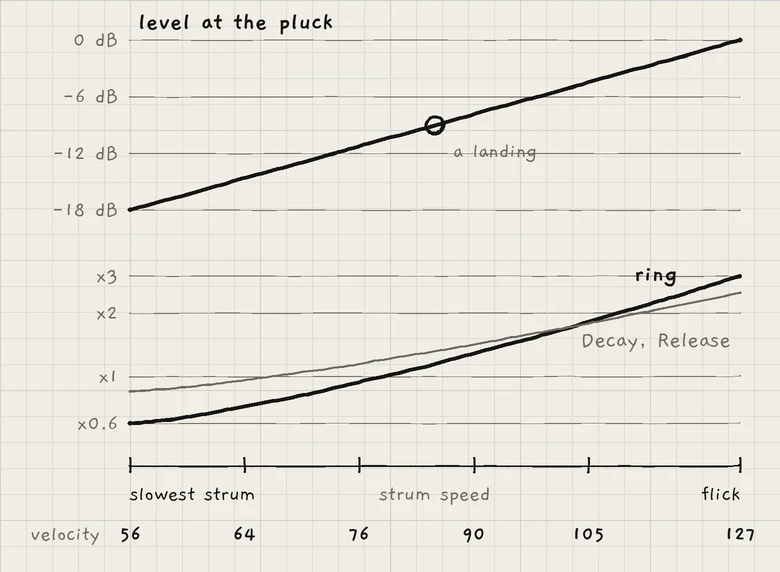 123
123- 1Slowest strum
- 2Flick
- 3MIDI velocity
How fast the finger moves across the strings sets each pluck's strike. The scale runs from the slowest strum, about a second and a half across all eight strings, to a flick. It is the same on every screen size.
The strike sets:
- Level. A flick is about 18 dB louder than the slowest strum. A finger that lands on a string plucks about 9 dB below a flick.
- Brightness. A faster strum opens the voice's low-pass gate further, scaled by the amp envelope's Sensitivity.
- Pitch. A hard pluck starts up to 12 ct sharp and settles quickly. The slowest strum starts in tune.
- Pressure. The strike is the voice's pressure, and it falls as the string rings. Prs routings in the Matrix follow the fade.
Where the string is plucked sets its tone: near a zone edge brighter and thinner, in the middle of a zone rounder.
#Ring
A plucked string rings on after the finger has passed, with its own fade: a quick drop right after the pluck, then a long tail. When the tail has faded, the string lets go and the sound's Release ends it.
- Strike. A soft pluck drops further at first and is short and plucky; a hard one sustains. A flick's tail lasts about five times as long as the slowest strum's.
- Register. Low strings ring longer; the tail halves every two octaves up.
- Envelope. The amp envelope's Attack, Decay and Release still shape the string. The strike stretches Decay and Release, from 0.85 times on the slowest strum to 2.5 times on a flick (Amp envelope).
- Sustain. Sustain does not hold a string: the string's own fade ends every pluck. For a longer ring, strum harder or play lower strings.
A string rings until its fade ends, a finger damps it, or a new pluck takes its voice.
A ringing string plucked again carries on from its current level, with no gap. On a Granular sampler sound a re-pluck restarts the sample.
#Damp and mute
A finger that stops on the strings damps or mutes them. A moving finger never mutes, and a finger never damps a string it strummed itself.
| Contact | Effect |
|---|---|
| Fingertip resting still | Damps the strings under it: they fade out quickly. |
| Flat finger or the side of the hand, still for a moment | Mutes the strings under it and their neighbours at once. A hand across all eight mutes them all. |
A tap that lifts lets its string ring; a tap held still damps it. A flat finger that lands plucks nothing and mutes, and its lift plucks nothing. Damping acts on a string whichever zone it was plucked in.
On a Mac: click a string to pluck it, drag across the strings to strum. A click held still damps the string. A click cannot mute.
#Voices
A pluck takes the voice already playing its note, else a free voice, else one that has gone silent, else the voice plucked longest ago. Voices playing a pattern are never taken.
#Follow a Chords engine
Under FOLLOW on the engine sheet, choose an engine that plays the Chords keyboard. The strings then play the leader's chord itself: every note it sounds, its colour and Spice tones included. Its Voicing, Spread and doublings do not carry over (Chord colour). The strings lay the chord out as in Layout above.
A chord note outside the Strings engine's scale plays as the nearest scale note the chord does not already have; a tie goes up. Every string stays a scale step.
A chord change affects only the plucks after it; ringing strings keep their notes. The strings keep the leader's last chord until its next one. When the leader leaves Chords, the strings return to their own root chord. A leader on another keyboard leaves them on their root chord. Follow in general is in Key lock and Follow.
#PLAY, Hold, Stride and Degree
- PLAY. The row is greyed on the engine sheet: an engine on Strings plays neither Arp nor Strum.
- Hold. The button stays in the top row and switches on and off, but the strings do not latch. A double-tap on it stops every ringing string.
- Stride and Degree. Both knobs are greyed. Their Matrix rows still act: strings 1 to 8 move as Grid columns 1 to 8 do (Play the Grid).
Ringing strings also stop on Escape on a hardware keyboard, when the engine leaves Strings, when another sound loads and, in a host, when INK's window closes.
#MIDI out
Each pluck goes out at once, its velocity set by its strike: about 56 for the slowest strum, 127 for a flick. Its brightness goes out as CC 74 immediately before the Note On; on an MPE zone it is the note's Slide. Velocity and brightness are fixed at the pluck, so the receiver's own envelope shapes the decay. The note ends where INK's string is heard to end. Details in MIDI out.
- On Engine 1, open the engine sheet and tap Chords under KEYBOARD.
- In C major, tap the tile in column IV, row 1. Engine 1 plays F major.
- Tap the 2 tab. Open the engine sheet, tap Strings under KEYBOARD and 1 under FOLLOW.
- Strum. The strings play Engine 1's last chord, A C F A C F A C from the bottom.