CHAPTER 48 OF 54 · REFERENCE
Settings and background audio
Settings holds the choices that apply across sounds: the colour theme, how touch becomes pressure, how Keys follows a slide, MIDI devices and clock, and what the Library auditions with. This chapter maps each page to the chapter that explains it, gives the scope and Init of every setting, and covers What's new, background audio and first launch.
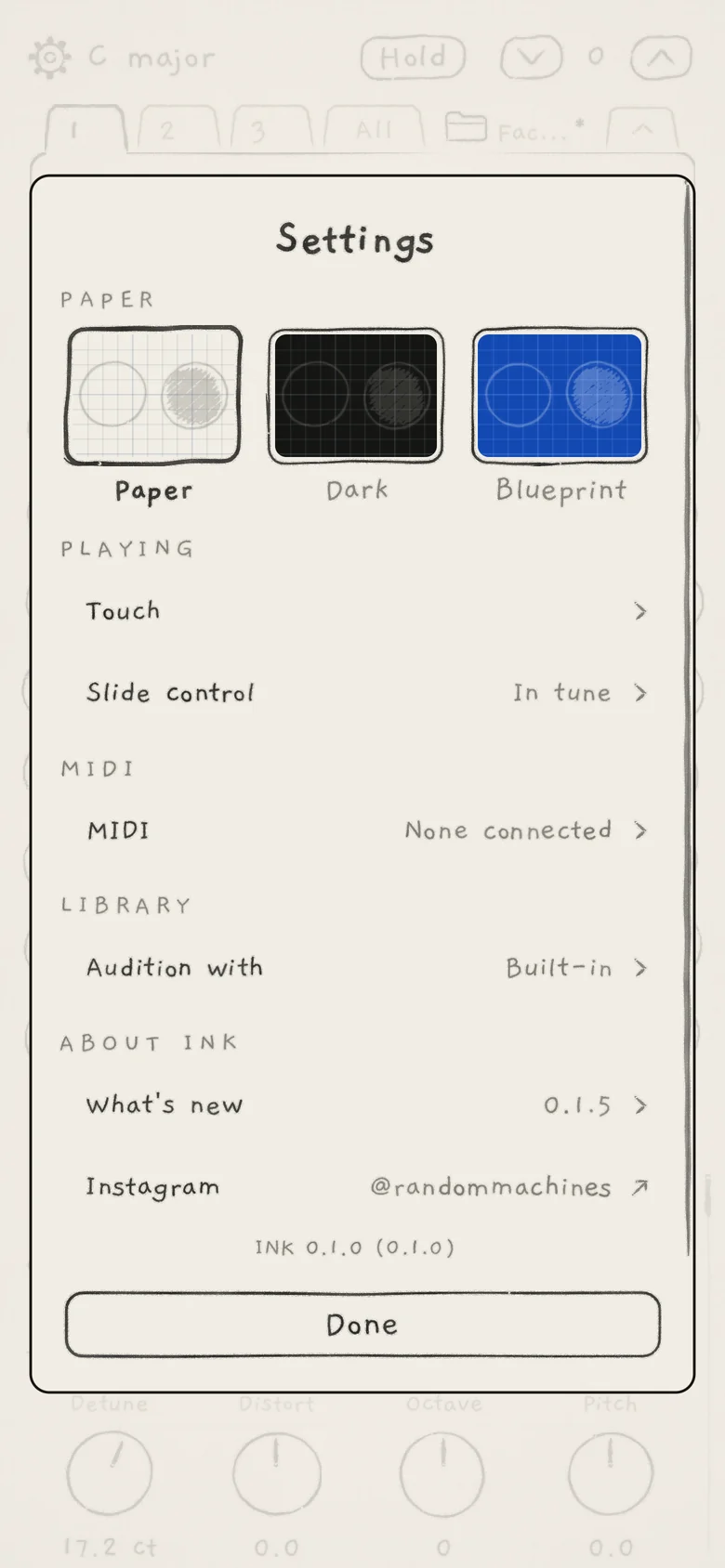
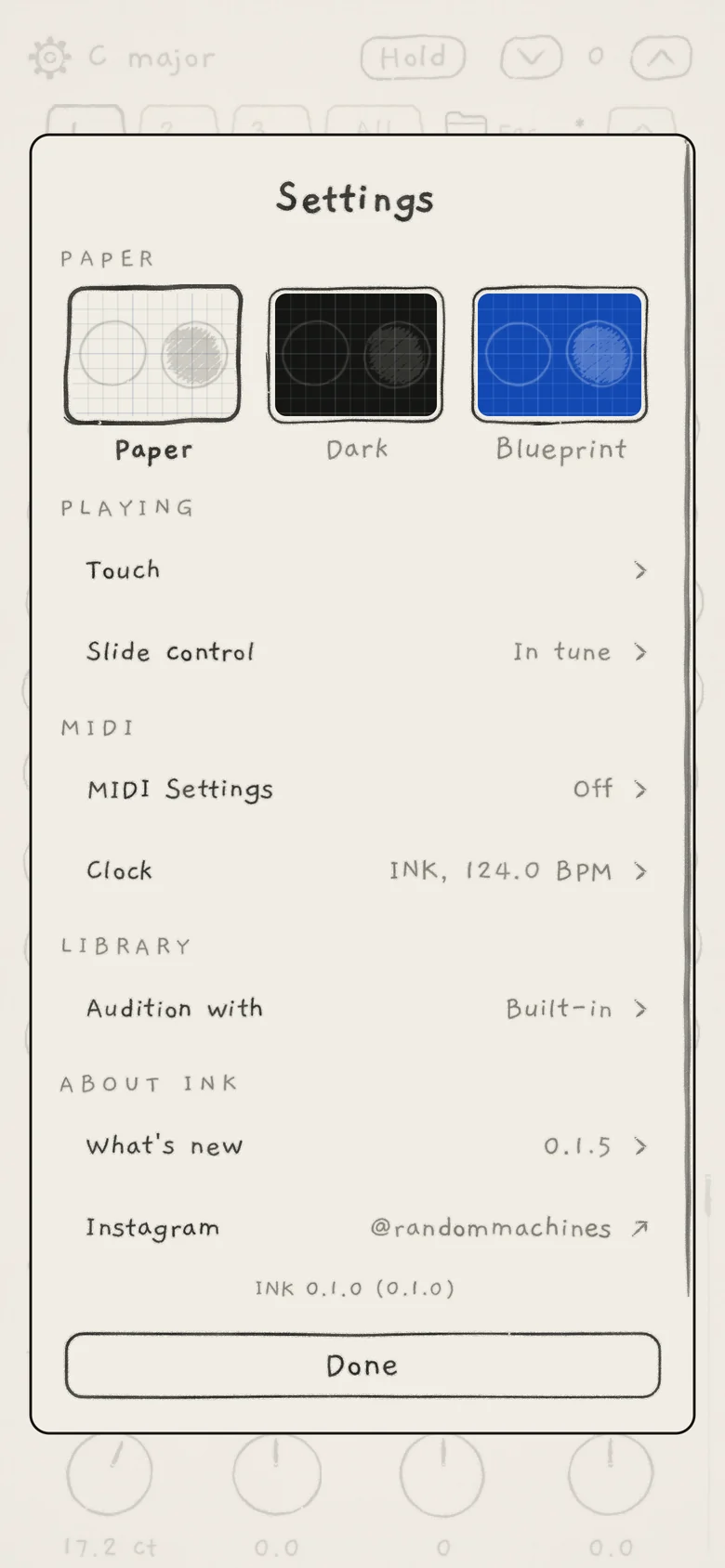
Settings opens from Settings (cog icon), left of the key in the top row. Its first page lists the sections; each row opens a page of its own. A choice applies at once and the sheet stays open.
 12345
12345- 1PAPER
- 2PLAYING
- 3MIDI
- 4LIBRARY
- 5ABOUT INK
 12345
12345- 1PAPER
- 2PLAYING
- 3MIDI
- 4LIBRARY
- 5ABOUT INK
#Navigation
- Tap a row to open its page. The value in pencil at the right of a row is its current setting. A chevron (›) opens a page; an arrow (↗) leaves the app.
- ‹ Settings at the top left of a page returns to the first page. A page opened from another page names that page instead: ‹ MIDI, ‹ Routes.
- Done, Escape on a hardware keyboard, or a tap beside the card goes back one page. On the first page it closes Settings.
#The first page
| Section | Row | Value shown | What it sets, and its home |
|---|---|---|---|
| PAPER | Paper, Dark, Blueprint | The chosen one in bold | The colour theme, chosen on the first page: Paper below |
| PLAYING | Touch | How a touch, or a click with a mouse, becomes pressure: Set up your playing | |
| PLAYING | Slide control | Piano, In tune or Free | How pitch follows a slide on Keys, with a box to play in: Set up your playing |
| MIDI (iPhone, iPad) | MIDI | "None connected" or "n connected" | One page for all of MIDI: which devices play each engine and which it sends to, its In and Out channels, the clock, and what the hidden app does while an INK plug-in runs: MIDI in, MIDI out |
| MIDI (Mac app, plug-ins) | MIDI Settings | Off, "Engine 1", "Engines 1, 2" | Each engine's In and Out: MIDI in, MIDI out |
| MIDI (Mac app, plug-ins) | Clock | The clock INK runs on and its tempo, "INK, 120.0 BPM" | Which MIDI clock INK follows, how early or late its steps play against it, and the clock INK sends: Clock and sync |
| LIBRARY | Audition with | Built-in or the pattern's name | What the Library's play button plays: Sound library |
| ABOUT INK | What's new | The newest version, "0.1.5" | Opens the What's new sheet: What's new below |
| ABOUT INK | "@randommachines" | Opens INK's Instagram page |
Under ABOUT INK, a pencil line gives the version, then the build in brackets.
On iPhone and iPad the standalone app has the single MIDI row, and Clock is a row on the MIDI page. INK MIDI plays no sounds and takes its clock from the host, so its Settings has no LIBRARY section and no Clock row (INK MIDI).
#Paper
Paper is the colour theme: Paper (ink on cream), Dark (light ink on black) or Blueprint (white ink on blue). Tap a theme's small sheet to switch; the chosen one has a heavy outline and its name in bold. Init: Paper.
The theme is an app setting. The app and the INK plug-ins share it, and it is not saved with sounds or projects.
#Settings and their scope
App values are kept when you change them and apply in every project. Project values are saved by the project's Save and in a host session (Projects). An AUv3 instance keeps the values marked "own in the AUv3" in the host's session, starting from the app's.
#On the Settings pages
| Setting | Page | Range or choices | Init | Scope |
|---|---|---|---|---|
| Theme | First page | Paper, Dark, Blueprint | Paper | App, shared with the AUv3 |
| Sensitivity, Smoothness, Curve: how hard a touch must be, how smoothly a held press moves, how strength builds | Touch (iPhone, iPad) | Less to More; Curve Heavy to Light; no number shown | The middle | App, shared with the AUv3 |
| Mouse expression: the pressure a click or drag plays | Touch (Mac) | 0 to 100% | 65% | Not kept: 65% each time INK's window opens |
| Slide control: how pitch follows a slide on Keys | Slide control | Piano, In tune, Free | In tune | App, shared with the AUv3 |
| Settle: how fast a stopped finger lands on the key's note | Slide control, under In tune | Quick (20 ms) to Slow (1000 ms) | 45 ms | App, shared with the AUv3 |
| In: the channel an engine listens to | MIDI page Channel; MIDI Settings › In | Off, any channel, channel 1 to 16, an MPE zone | Off | Project |
| Out: the channel an engine sends on | MIDI page Channel; MIDI Settings › Out | Off, channel 1 to 16 or an MPE zone, per route | Off | Project |
| Which engines a device plays (dots under PLAY INK FROM) | MIDI page | Per device and engine | A new device plays every engine whose In is on | App |
| Which devices an engine sends to (dots under SEND INK TO): the engine's MIDI routes | MIDI page | Per device and engine | Off | Project |
| Bend range (in): the bend range of incoming notes | The engine's In page | Auto, 2, 12, 24, 48 st | Auto | App; own in the AUv3 |
| Member channels: how many member channels an MPE zone has | The engine's In page, on an MPE zone | Auto, 1 to 15 | Auto | App; own in the AUv3 |
| Keys play: what a MIDI key plays on a Chords engine | The engine's In page, on Chords | Chords, Chords below C2, C3, C4 or C5 | Chords | App; own in the AUv3 |
| Receive: the MIDI clock INK follows | Clock | Off, Any, one port (iPhone and iPad app) | Any | App |
| Offset: how early or late steps play against that clock | Clock, while Receive is not Off | −50 to +50 ms | 0 ms | App |
| Send: the clock INK sends | Clock (standalone app only) | Off, Clock, Clock and transport | Off | App |
| INK in another app: whether the hidden app still plays MIDI notes while an INK plug-in runs | MIDI page; MIDI Settings on a Mac (standalone app only) | Plug-in only, Both play | Plug-in only | App |
| Audition with: what the Library's play button plays | Audition with sheet | Built-in, or a copy of one of your patterns | Built-in | App |
On a Mac, Slide control and Settle return to In tune and 45 ms when INK quits.
#Outside Settings
| Setting | Where | Init | Scope |
|---|---|---|---|
| Keyboard (Grid, Keys, Chords, Strings) | Engine sheet › KEYBOARD (Keyboard, key and scale) | Grid | App, per engine; own in the AUv3 |
| Root, Scale, Lock | Engine sheet › KEY (Keyboard, key and scale, Key lock and Follow) | Lock off | Project |
| FOLLOW: the engine whose chords this engine's notes move with | Engine sheet › FOLLOW (Key lock and Follow) | Off | Project |
| PLAY: notes as played, the arp or Strum (Free, Arp, Strum) | Engine sheet › PLAY, Arp tab (Arp) | Free | Saved with a sound by its Save |
| AUDIO OUT: the Main bus or the engine's own bus in a host (Main, Multibus) | Engine sheet › AUDIO OUT; greyed in the standalone app (INK in a host) | Main | Project |
| Level, Mute, Solo | Engine strip at the top of the Sound tab; All page mixer (Mixer and All page) | 0 dB, off, off | Project |
| OUTPUT: the gain of INK's whole output | Bottom of the Sound and Arp tabs (Mixer and All page) | 50% | Project; never an undo step |
| Quantize: how far live takes move toward the step grid | Seq tab (Record patterns) | 0% | Project; never an undo step |
| Fill style | Sideways swipe on Fill (Lean and Fill) | P | App; not saved, P again after INK quits |
#Where the other controls live
| Control | Home |
|---|---|
| Engine sheet: each engine's keyboard, key, play mode, Follow and audio out | Tap the key in the top row (Find your way) |
| Octave arrows | Top row (Keyboard, key and scale) |
| Hold | Top row (Play the Grid) |
| Tempo, Sync | Arp and Seq tabs (Arp rhythm and tempo) |
| Patterns, Record | Seq tab (Record patterns) |
| Recording and importing samples | Kit view (Import and record) |
| Projects | Folder and project name after All in the engine tabs (Projects) |
| Undo, redo | Edge swipe or three-finger swipe (Undo and redo) |
#What's new
 12345
12345- 1What's new
- 2Coming next
- 3Version tabs
- 4Instagram
- 5Done
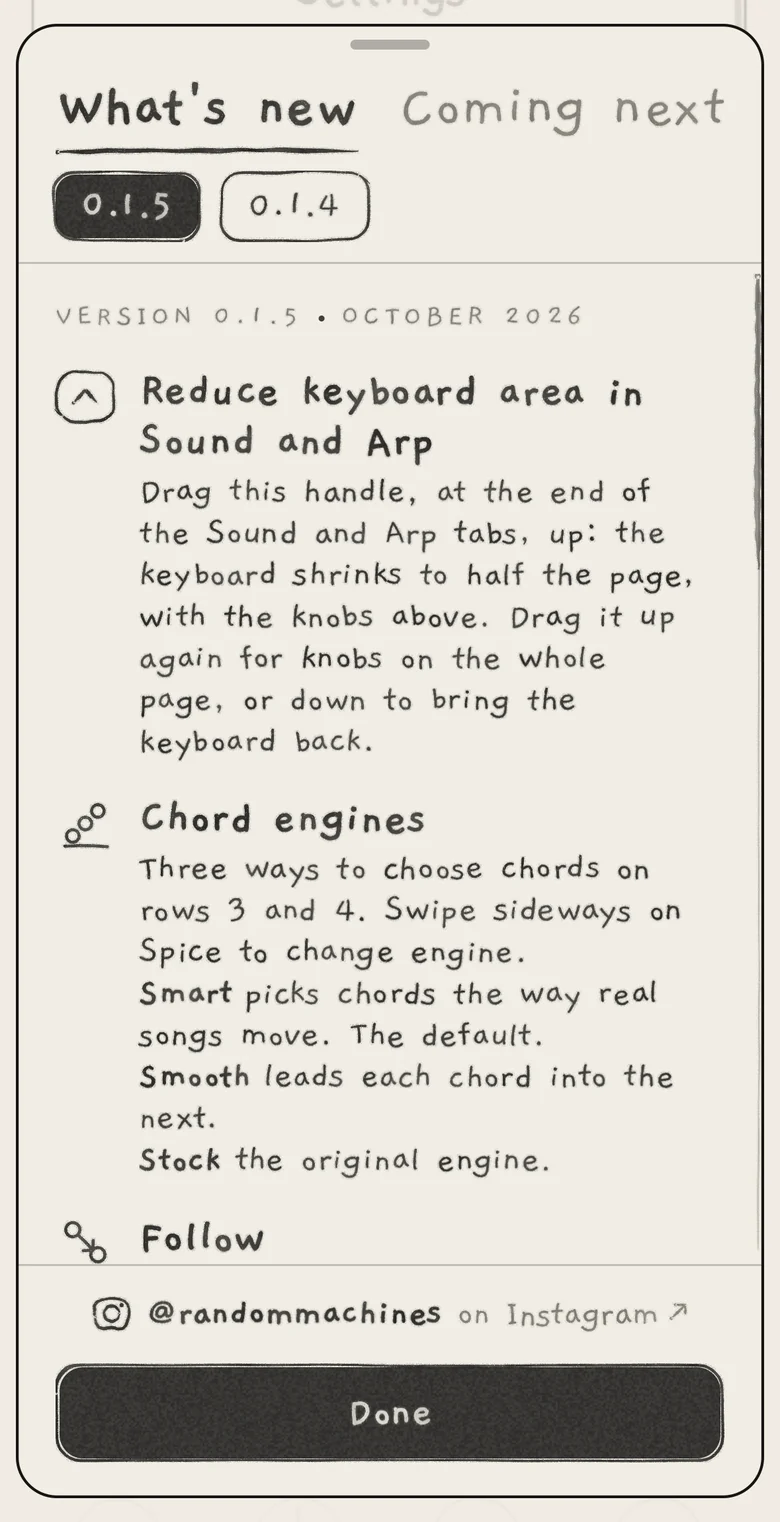
What's new lists what each version of INK added. It opens from Settings › ABOUT INK › What's new. It also opens once by itself, in the standalone app only:
- on the first launch after an update that added a new entry, a moment after the app comes to the front;
- if another sheet is already open by then, at the next launch instead;
- never on a first install, and never in the AUv3.
Two headings at the top switch the list: What's new for what each version added, Coming next for what is planned. The one shown is bold and underlined. Under What's new, a tab per version, newest first, selects the version. Each entry is an icon, a name and one line; small changes follow under ALSO.
The foot of the sheet holds @randommachines on Instagram and the main button: Continue when the sheet opened by itself, Done when opened from Settings. The button, Escape, a drag down on the top of the sheet or a tap beside it closes the sheet.
#Background audio
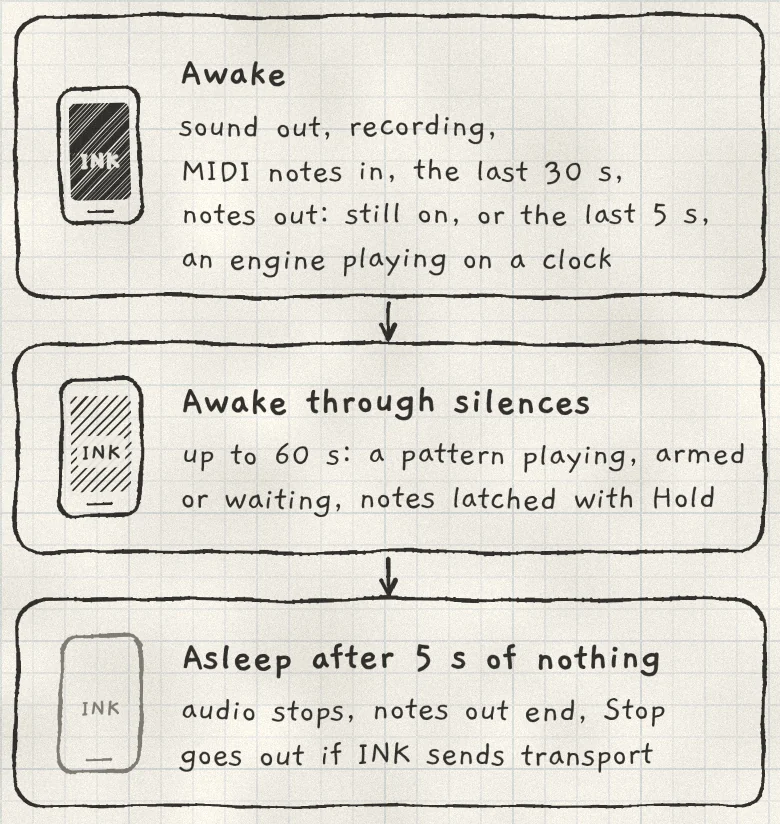
On iPhone and iPad, the standalone app plays on when you leave it, mixed with other apps' audio. This is background audio. When nothing needs it, the hidden app stops its audio so iOS can suspend it. In a host, the host owns the audio session and none of this applies.
 123
123- 1Awake
- 2Awake through silences
- 3Asleep
The hidden app stays awake while any of these holds:
- SoundAudio coming out, reverb and delay tails included. Sound at the device's volume 0 does not count.
- RecordingA take armed, recording or finishing, on any source, Other apps included (Import and record).
- MIDI notes in30 s after the last note-on from MIDI. Clock, controllers and a connected port alone do not count.
- Notes outA note still on at INK's MIDI out, or one sent in the last 5 s (MIDI out).
- ClockAn engine playing while INK sends clock or transport, or while it follows an incoming clock (Clock and sync).
A pattern playing, armed or waiting for a clock, or notes latched with Hold (the arp included), keep the app awake through silences of up to 60 s. A pattern that makes no sound, or one waiting for a clock that never comes, lets the app stop after 60 s.
With none of these, the app stops its audio after 5 s. Before it stops, every note at MIDI out ends, and a Stop goes out if INK's own transport was playing with Send on Clock and transport. The audio starts again when the app returns to the front.
While an INK plug-in runs in a host and INK in another app is Plug-in only, the hidden app leaves incoming notes to the plug-in; those notes do not keep it awake (MIDI in). With Both play, the hidden app plays them too.
iOS can start an app hidden, ahead of a launch it expects. Until INK has been in front once in that launch, it makes no sound and ignores MIDI in. Audio starts the first time INK comes to the front.
#First launch
A fresh install opens on:
- the Factory project (Projects), with the 24 factory patterns in bank A;
- the factory sounds, Piano Room included (Sound library), and the factory kits;
- MIDI In and Out Off on every engine;
- every setting at its Init value from the tables above.
iOS asks for microphone permission the first time the record screen opens on Mic (Import and record).