CHAPTER 51 OF 54 · REFERENCE
Troubleshooting
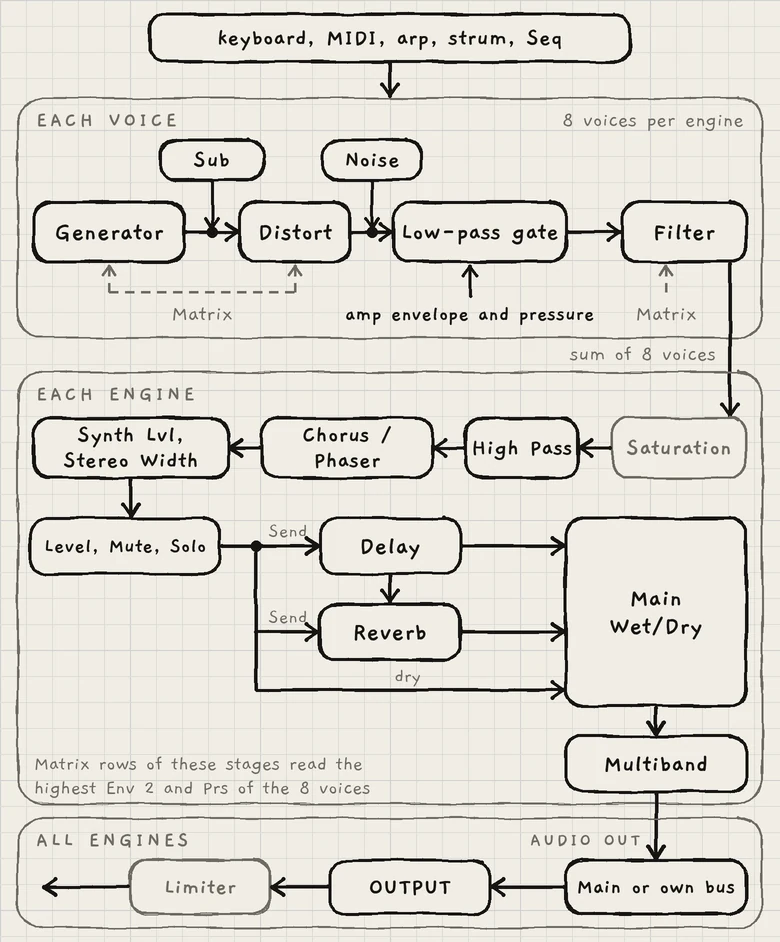
Symptoms are grouped below. Within each group, the checks follow the signal path, from what plays the note to the output. Each check names the control and links to its home.
#Find your symptom
| Symptom | Section |
|---|---|
| An engine makes no sound | No sound |
| Notes play, a pattern does not | Notes sound but the pattern is silent |
| A note does not stop | A note keeps sounding |
| Wrong notes, tuning or key | The pitch is wrong |
| Missing chord notes, or Fill plays nothing | Only some chord notes sound |
| A Matrix amount has no effect | Modulation does nothing |
| Harsh or distorted sound | Harsh or distorted |
| A synth or a Mac receives nothing | MIDI out and devices |
| A preview unlike the sound | A preview sounds different |
| Another sound changed | A change touched another sound |
| A control greyed or absent | A control is missing |
| Undo does nothing | Undo does nothing |
| Not saved, Not opened, Project deleted | Project and save notices |
#No sound
- The engine. Touch plays the engine whose tab is open, or the engine whose keyboard band is touched on the All page.
- MIDI In. In a new project every engine's MIDI In is Off. On iPhone and iPad, open Settings › MIDI: the dot where the device's row crosses the engine's column must be lit, and the engine's Channel must match the controller's. In plug-ins, set Settings › MIDI Settings › In. The Mac app opens no MIDI inputs; on a Mac, use INK as a plug-in in a host (MIDI in, INK in a host).
- Notes on the wrong channel. "got n" under an engine's channel, or the line "Notes on channel n reach no engine", means notes arrive on a channel no engine listens to.
- The sample. On a Granular sampler sound, open Kit: a slot reading Empty or Missing plays nothing (Trim, slices and kits).
- Distort. Distort at −100.0 (base value plus modulation) silences the generator and the Sub (Oscillators).
- Amp envelope and filter. A very long Attack, Sustain at 0 with a short Decay, a closed Cutoff, or a high High Pass in MIX (Amp envelope, Filter).
- Wet only. Main Wet/Dry at +100.0 plays only the delay and reverb returns. If both Send amounts are also at 0.0, the engine is silent (Reverb and mix).
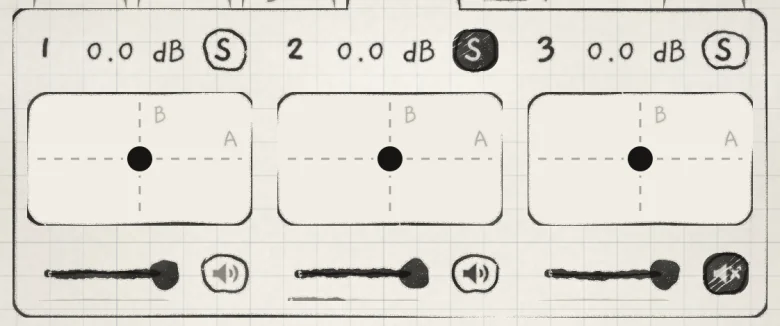
- Level, Mute and Solo. They head the Sound tab (the engine strip) and sit in the All page mixer. A soloed engine silences every engine that is not soloed; their speakers show in pencil (Mixer and All page).
- A Library audition. While the Library's play button plays, engines 1 to 3 fade to silence and keep running unheard (Sound library).
- OUTPUT. The OUTPUT slider at the bottom of the Sound and Arp tabs sets the gain of everything INK plays.
The card's level meter shows the open engine's own level after Level, Mute and Solo. It is crossed out while that engine is muted or OUTPUT is at 0.
 123
123- 1Solo on
- 2Silenced by another engine's solo
- 3Muted
In a host. Check the host's monitoring, track and output. If an engine's AUDIO OUT (engine sheet) is Multibus, enable and route that bus in the host. An enabled bus that the host connects to nothing silences its engine (INK in a host).
#Notes sound but the pattern is silent
- Play. The Seq tab's Play starts the engine's pattern. A dashed ring on the engine's tab means it is armed: it starts on the first beat of the next bar (Clock and sync).
- The clock. The Clock page names the clock INK runs on, INK, Host or MIDI in, with its tempo and whether it plays. It is at Settings › MIDI › Clock on iPhone and iPad, Settings › Clock on a Mac and in plug-ins. In a host, the label beside Play reads DAW plays or DAW stopped.
- The outside transport. A Stop from the host or a MIDI clock stops every engine; its Start or Continue starts them all. Receive at Off ignores incoming MIDI clock, Start, Stop and Continue.
- Sync. With Sync on, the engine follows the master clock's tempo and bar. With Sync off it runs at its own Tempo, and an outside Start begins it from its first step.
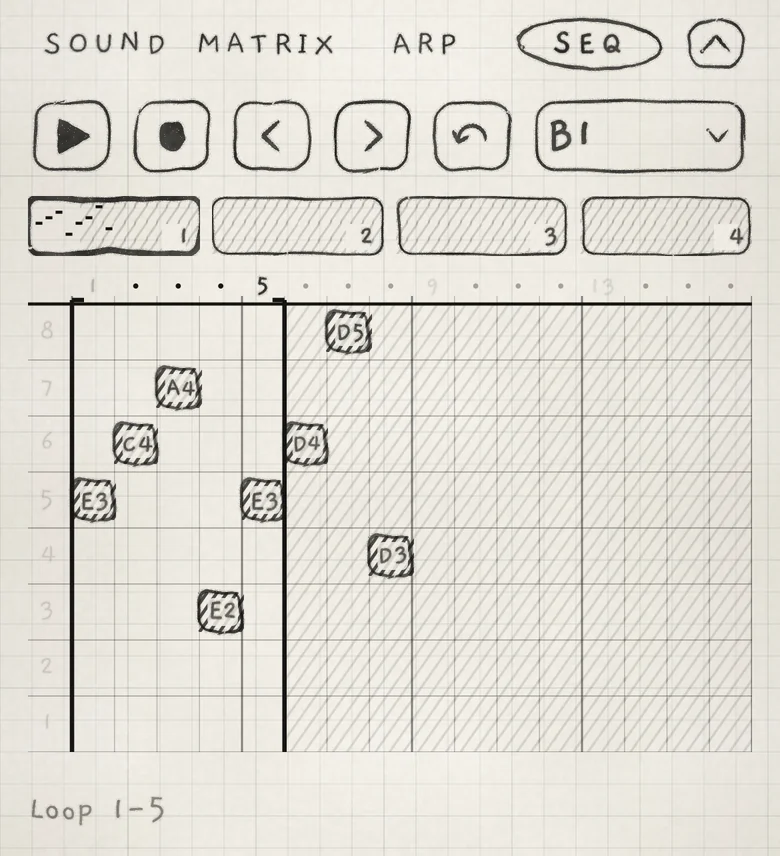
- The loop. Steps outside the loop are hatched and never play (Pattern playback).
- Direction. On Pause the playhead stays on one step. If that step is empty, nothing plays.
- Probability and Euclid. A low Probability skips steps. With Euclid at 2 to 16 (either sign), Probability sets how many steps of the Euclidean rhythm are hits; at 0.0 there are none (Pattern playback).
- The pattern. An empty pattern plays nothing.
 123
123- 1Loop end
- 2Outside the loop
- 3Loop 1-5
#A note keeps sounding
- Hold. Hold latches notes. Double-tap it to release every latched note.
- A running source. A pattern or the arp plays on. Stop the pattern, or set PLAY to Free on the engine sheet or the Arp tab.
- A tail. A long Release and delay and reverb tails continue after the note ends. Near 100.0, Classic's Feedback holds the repeats at a level instead of letting them decay (Delay).
- Strings. A plucked string rings on its own. Ringing strings stop on a double-tap on Hold, on Escape, when the engine leaves Strings and when a new sound loads. A flat finger or the side of the hand held still on the strings mutes them (Play Strings).
- Pedal and Hold. The sustain pedal is CC 64, Hold is CC 69; a value of 64 and above is down or on. A pedal of the opposite polarity holds every note while it is up. Set its polarity on the controller.
- Clearing notes from MIDI. CC 123 (All Notes Off) lifts the engine's MIDI keys; the pedal still holds them. CC 120 (All Sound Off) stops the engine's voices at once.
- A controller that leaves. When a device disconnects, INK releases its keys, its pedal and its Hold on every engine (MIDI in).
On a hardware keyboard, Escape releases every finger and every latched note and silences every engine at once. While a sheet is open, Escape acts on the sheet instead: it closes it, or in Settings goes back one page.
#The pitch is wrong
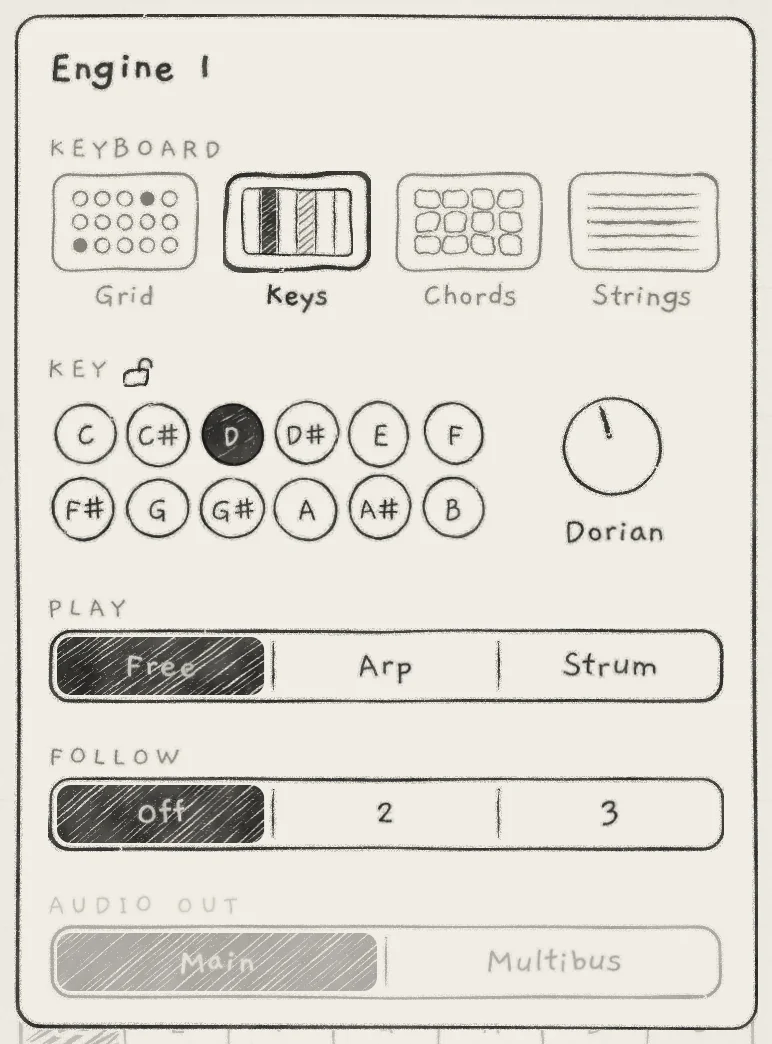
- The key. Root and Scale are on the engine sheet under KEY. The padlock beside KEY shows the engine's lock.
- A pattern changed the key. A saved pattern carries a key. Choosing it sets the engine's Root and Scale; with no engine locked, every engine takes them. Lock an engine to keep its key (Key lock and Follow).
- Octave. Two controls: Octave in OSC transposes the sound, −3 to +3, and is saved with it. The Octave arrows in the top row move only the keyboard: the next notes struck, never MIDI or patterns. On Keys, they move the octaves shown.
- Pitch. Pitch in OSC is the sound's tuning, −12.0 to +12.0 st. The note names on the keyboards do not change (Oscillators).
- The Grid layout. Stride sets the interval from one column to the next, in semitones kept in key; Degree shifts the layout in scale steps (Play the Grid).
- Pitch offsets. Interval transposes one stereo channel of each voice. Microtone sets how far a note bends off its pad's centre. Any amount in the Matrix's PITCH group moves the pitch, an LFO included.
- Glide. A high Glide makes each note reach its pitch late.
- The arp. Range sets how many passes the arp plays, Shift the interval between passes in the engine's key, and Transpose the order of the passes (Arp).
- Follow. A follower moves by its leader's scale degree. In a different scale, the same degree is a different interval (Key lock and Follow).
- Keys. With Slide control set to Free, the pitch stays where the finger stops (Settings › PLAYING › Slide control, Play Keys).
- MIDI. Pitch bend on the engine's channel bends its notes. Bend range on the engine's In page must match the controller's.
- Granular sampler. In Pitched mode, a wrong root note on a slice detunes every note played from it. In both modes, a Rate other than 100.0 changes the pitch of every grain (Granular sampler).
 123
123- 1Lock
- 2Root
- 3Scale
#Only some chord notes sound
- Voices. Each engine plays 8 voices, shared by fingers, latched notes, the arp, a pattern and MIDI. With all 8 held, a new MIDI note is dropped and a new note on Keys replaces the oldest latched note (Voices and polyphony).
- Samples. On the Granular sampler, a note that lands on a slot reading Empty or Missing plays nothing.
- Strum. A note released before its turn is skipped. A pattern step that ends early cuts the notes whose turn has not come (Strum).
- Fill. Fill plays only over a sounding chord: a finger on a tile, or a chord latched with Hold. A bar may rest; at most two bars in a row stay silent (Lean and Fill).
- Touches. iOS tracks a limited number of fingers at once. To build a larger chord on the Grid or Keys, latch notes in turns with Hold (Play the Grid).
#Modulation does nothing
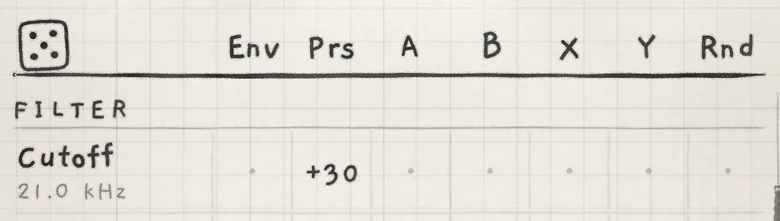
- The cell. A cell drawn as a dot has an amount of 0.
- The column. The amount must sit in the intended source's column: Env, Prs, A, B, X, Y or Rnd (Modulation matrix).
- The source. Env needs Env Level above 0.0. X and Y need a Depth other than 0.0. A and B move with Macro A and Macro B. Prs moves with pressure.
- Headroom. A destination at the end of its range cannot move further that way. Move its base value away from the limit.
- Freeze. A frozen LFO holds one value until every note is silent (LFOs and Freeze).
- The engine. The Matrix belongs to the engine whose tab is open.
- The generator. On the Granular sampler, the OSC group's Shape and LPG Filter rows have no effect.
- A or B moves on its own. A Mod A Depth other than 0.0 adds Mod A's LFO to Macro A; Mod B's does the same for Macro B (Macros and dice).
- The XY pad. The All page's XY pad moves Macro A and Macro B, so it drives the A and B columns. The X and Y columns are LFO X and LFO Y.
 12
12- 1Prs → Cutoff, +30
- 2Zero cell
#Harsh or distorted
These controls add level or distortion. Lower the one that is up, or lower the engine's Level on its engine strip to make room before the limiter (Mixer and All page).
- Synth Lvl (MIX) drives the engine's peak compressor, up to +8 dB at 100.0 (Reverb and mix).
- Distort (OSC) above 0.0 raises the voice level into the engine's saturation (Oscillators).
- Resonance (FILTER) and LPG Filter (OSC) boost the cutoff region (Filter).
- Feedback (DELAY) near 100.0 keeps the repeats at a saturated level (Delay).
- Low, Mid, High (MULTIBAND) above 0% add up to about 8 dB of make-up gain. A loud sound then reaches the safety limiter after OUTPUT (Multiband).
#MIDI out and devices
- Out. Every engine's Out is Off in a new project. On iPhone and iPad, light the engine's dot under SEND INK TO and check its Channel. On a Mac and in plug-ins, set Settings › MIDI Settings › Out and its route (MIDI out).
- The receiving synth. It must listen on the channel INK sends on.
- Mute. Mute silences the engine's sound only. Its notes, its pattern and its MIDI out keep running.
- Controller notes. INK sends what it makes from incoming notes: a Chords engine's chords and the arp's and Strum's notes. The incoming notes themselves do not go out; to play the synth from the controller as well, connect the controller to it directly.
- A Mac over Bluetooth. A Mac connects only while the iPhone or iPad shows itself with Show to a Mac (Settings › MIDI › + Add a device, MIDI in).
- INK MIDI. INK MIDI sends MIDI only and makes no sound. Connect its outputs INK 1 to INK 3 to a synth in the host (INK MIDI).
#A preview sounds different
- The Library's play button plays what Settings › LIBRARY › Audition with sets, a built-in phrase or a chosen pattern, not your gesture (Sound library).
- A press on the waveform in the kit view plays the slice dry, without the sound's envelopes, filter or effects.
- The play mark in the sample list plays the sample dry.
- The slice pads in the kit view play through the sound.
#A change touched another sound
- A shared kit. A kit is heard by every sound on it, factory sounds included. A sample's trim, Normalised and channel belong to the sample wherever it is used. Duplicate the kit or the sample first (Trim, slices and kits).
- A shared pattern. A pattern slot is the same for every engine that plays it. Use Save as new for a separate copy (Edit and save patterns).
- A deleted wavetable. A sound whose imported table was deleted plays the factory bank saved in it (Wavetables).
#A control is missing
The generator decides the Sound tab.
- The first control in OSC is Detune on Supersaw, Width on Pulse, Position on Wavetable and Wave on Phase. On the Granular sampler, OSC starts at Distort and shows no LPG Filter.
- SAMPLER and SAMPLER JITTER lead the Sound tab on the Granular sampler only; PHASE shows on Phase only.
- Center reads Sweep when CHORUS / PHASER is set to Phaser.
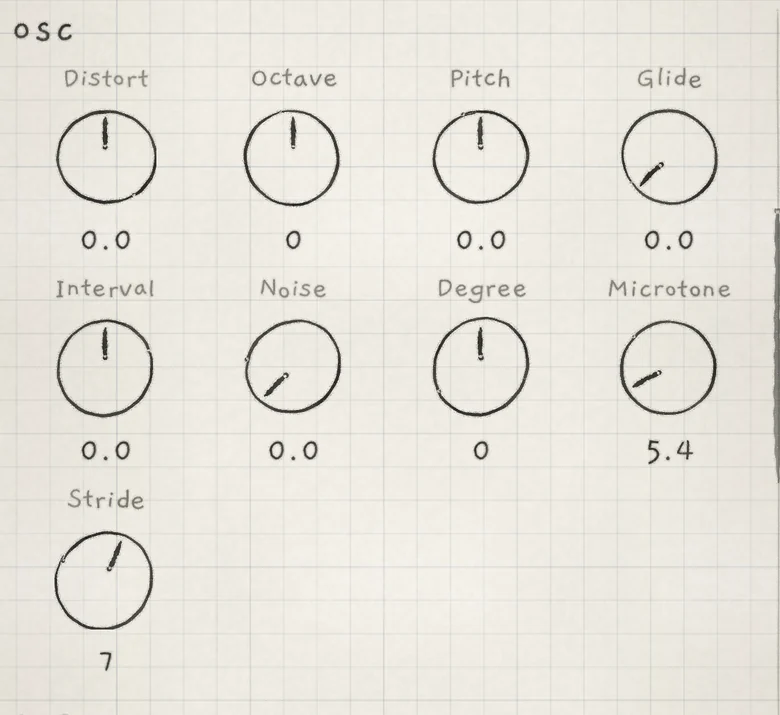
Greyed controls keep their value and do nothing in the current state:
| Greyed | When |
|---|---|
| Mode (FILTER) | Band-pass is on |
| Stride, Degree | The engine plays Chords or Strings |
| Transpose, Shift, Range (Arp tab) | PLAY is Strum |
| Wobble (DELAY) | The delay type is Reverse, Octave or Ping-Pong |
| 2nd Tap (DELAY) | The delay type is Reverse |
| PLAY (engine sheet) | The engine plays Strings |
| A FOLLOW number (engine sheet) | That engine already follows this one, directly or through the third engine |
| AUDIO OUT (engine sheet) | The standalone app: every engine plays through Main |
App and plug-in. Record samples and import audio in the standalone app on iPhone and iPad; the kit view shows Import and Record only there, and kits made there play in the plug-in. The iPhone MIDI page, INK in another app and the Clock page's Send also belong to the standalone app (INK in a host). INK MIDI shows no sound sections (INK MIDI).
#Undo does nothing
In a host such as AUM, the host takes the screen edges. Use the three-finger swipe: left to undo, right to redo (Undo and redo).
The three-finger swipe is inactive under a sheet or menu. Opening or creating a project starts a new history, and closing the app clears it.
#Project and save notices
| Notice | Meaning |
|---|---|
| Not saved | The sound, pattern or project could not be written. It still plays as it is. |
| Not opened | The project could not be opened. What was playing still plays. |
| Project deleted | The open project was deleted elsewhere: in the app, the plug-in or another session. It plays on; Save makes it again under its name, Save as new... under a new name. |
Details in Projects.